
On this page
How We Renamed 42 AWS ECS Services with Terraform
Overview
A simple Terraform change turned into a production risk.
We needed to rename 42 AWS ECS services across four environments to follow a consistent naming convention. The problem was that ECS does not support renaming a service in place. Terraform would destroy the existing service and create a new one, potentially causing 2–4 minutes of 503 errors while the new tasks started and passed their health checks.
A normal Terraform replacement was acceptable in non-production environments, but production needed a safer approach. We used AWS Application Load Balancer (ALB) listener-rule priorities to run the renamed service alongside the existing one, verify it before sending traffic, and switch traffic when it was ready.
In this article, we'll explain how we handled the ECS service rename, why the original approach was risky, and what we learned from the production migration.
Why a rename is a replace
Our cluster names already include the environment, so app-dev-api-service in app-dev-cluster repeats it. The new naming standard is app-<service>.
The ECS service name cannot be changed in place, so Terraform plans to destroy the existing service and create a new one. On a live service, the ALB has no healthy targets until the new tasks pass their health checks. This can cause 2–4 minutes of 503 errors.
Rename only the service
ECS service names only need to be unique within a cluster, so app-api can exist in dev, sandbox, and prod. Task-definition families, target groups, and log groups are scoped to an account and region, while IAM role names are scoped to an account. These names would therefore collide if we removed the environment from resources shared across environments in the same account and region.
Our dev and sandbox environments share an account and region, so we kept the environment in those resource names and renamed only the ECS service.
Pin the task-definition family
The upstream terraform-aws-modules ECS service module sets family = coalesce(var.family, var.name). Without an explicit family, the task-definition family follows the new service name, which causes two problems:
- CI finds the latest task definition by family. Dev and sandbox would share the same family, so a dev deployment could pick up sandbox's settings.
- Our migration IAM policy allows
ecs:RunTaskby family name, so migrations would fail withAccessDenied.
We set family explicitly to keep the task-definition family unchanged when renaming the ECS service.
Grant the new names first
Our prod deploy role allows ecs:UpdateService only on a list of exact service ARNs. We added the new ARNs next to the old ones before anything else, so no later step could fail with AccessDenied.
The shortcut we rejected
There was a faster option: use terraform state rm to remove the old service from Terraform state, let the renamed service join the same target group, and then delete the old service manually. We rejected this approach for three reasons:
- The renamed service would receive live traffic as soon as its first task became healthy, exposing customers to any issues before we could validate it.
- The running production service would remain outside Terraform management until we deleted it manually.
- We had not tested whether two ECS services could safely share the same target group.
We wanted to validate the renamed service before sending it any traffic.
The switch: listener-rule priority
An ALB evaluates listener rules in ascending priority order, and the first matching rule handles the request. Two rules can match the same host at different priorities, but the rule with the lower priority number is evaluated first.
For each production service, we ran:
- The original service and its live rule at priority P.
- The renamed service, its own target group, and a second rule for the same host.
While we validated the renamed service, its rule stayed at P + 900, a higher number that is evaluated later. The live rule matched first, so the renamed service received no traffic.
To switch traffic, we changed the renamed rule's priority to P − 1, which is evaluated before the original rule. New requests then went to the renamed service, while in-progress requests on the original service could finish normally.
To roll back, we changed the priority back. In our sandbox test, the switch took 1 second and the rollback took 2.1 seconds.
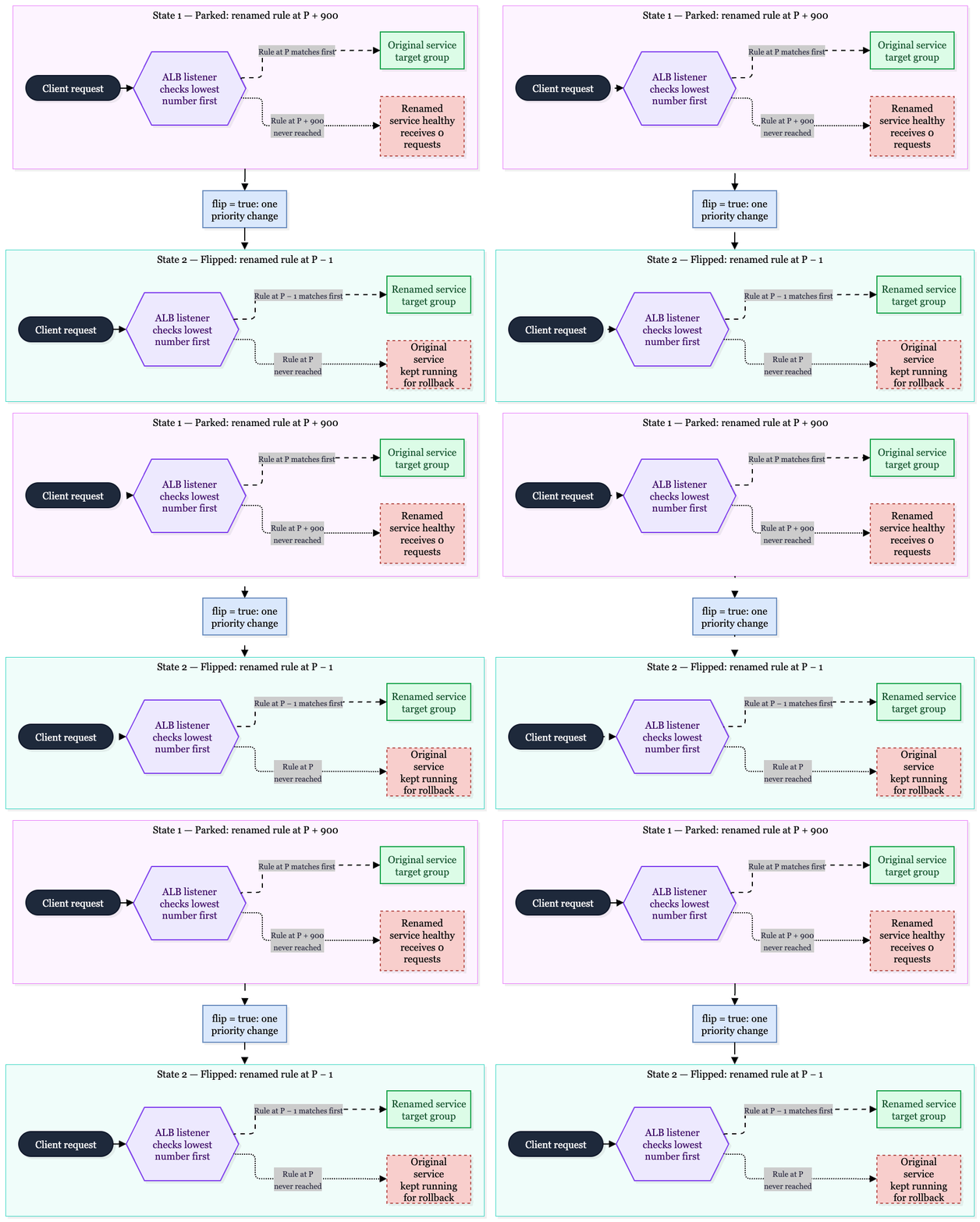
The renamed service runs and passes health checks while parked, without receiving traffic. The cutover requires changing the priority of one listener rule.
A single flag controls the rule's priority:
locals {
  parked_priority  = var.listener_rule_priority + 900 # Higher number: evaluated later
  flipped_priority = var.listener_rule_priority - 1   # Lower number: evaluated first
}

resource "aws_lb_listener_rule" "renamed" {
  listener_arn = var.alb_listener_arn
  priority     = var.flip ? local.flipped_priority : local.parked_priority

  action {
    type             = "forward"
    target_group_arn = aws_lb_target_group.renamed.arn
  }

  condition {
    host_header {
      values = var.host_names # Same hosts as the live rule
    }
  }

  lifecycle {
    precondition {
      condition     = var.flip || local.parked_priority <= 50000
      error_message = "Parked priority would exceed the ALB maximum of 50000. Use a smaller offset."
    }

    precondition {
      condition     = !var.flip || local.flipped_priority >= 1
      error_message = "No free priority below the live rule: ALB priorities start at 1. Renumber the rules first, or use a plain replace."
    }
  }
}
The ordering works by design: P + 900 is evaluated after the live rule, while P − 1 is evaluated before it. Avoid making these offsets configurable without adding validation. An incorrect priority can cause problems without an obvious error. If the parked rule has too low a priority number, it can send live traffic to the renamed service too early. If the flipped rule has too high a number, the apply may succeed while traffic continues going to the original service.
The two preconditions check the ALB priority limits. They cause the plan to fail if P + 900 exceeds 50000 or P − 1 is below 1. They do not check whether those priorities are already in use.
Before relying on this approach, check two things:
- Copy every condition. Our live rules matched on host name only. If your live rule also matches on path, headers, or query strings, copy those conditions to the renamed rule. Otherwise, the renamed rule may match more or fewer requests than intended.
- Make sure both priorities are available. Priorities must be unique per listener, so P + 900 and P − 1 must both be unused. Otherwise, the apply fails with
PriorityInUse. ALB priorities start at 1, so a rule already at priority 1 has no lower priority available. One of our frontends was in this position. Both frontends had very little traffic at the time, so we used a standard replacement instead.
The cutover
Non-prod took the plain replace, because a 2–4 minute gap there costs nothing. Prod started after dev and sandbox were renamed and a real CI deploy had passed.
The change sat behind a flag that was off by default. Without it, any unrelated apply would have recreated the service.
For each prod service:
- Create the renamed service, parked. Apply one unit. This creates the renamed service, its target group, and its rule at P + 900.
- Freeze prod deploys for this service. With two copies, a deploy can go to the copy that is not serving. CI shows green, but prod still runs the old code.
- Point CI at the renamed service. Merge the CI change now, not after the switch. If you merge it later, a deploy in between lands on the service you are about to delete.
- Restart the renamed service. Run
aws ecs update-service --force-new-deployment. ECS resolves an image tag like-latestto a digest when a deployment starts, and tasks launched later reuse that digest. A service last deployed yesterday still runs yesterday's image. - Compare the two task definitions. Check the image digest, environment variables and secrets. A health check only proves the container started.
- Switch. Set
flip = trueand apply. Watch target health and the 5xx rate against the same hour's baseline. - Scale the original to 0. Do this only after the renamed service is healthy and serving. Record the desired count first, and keep the service
ACTIVEfor rollback. If the service uses Application Auto Scaling, set its minimum capacity to 0 as well, or it may scale the original back up. - Clean up later. Delete the originals, move each new rule to the original priority, and remove the flags.
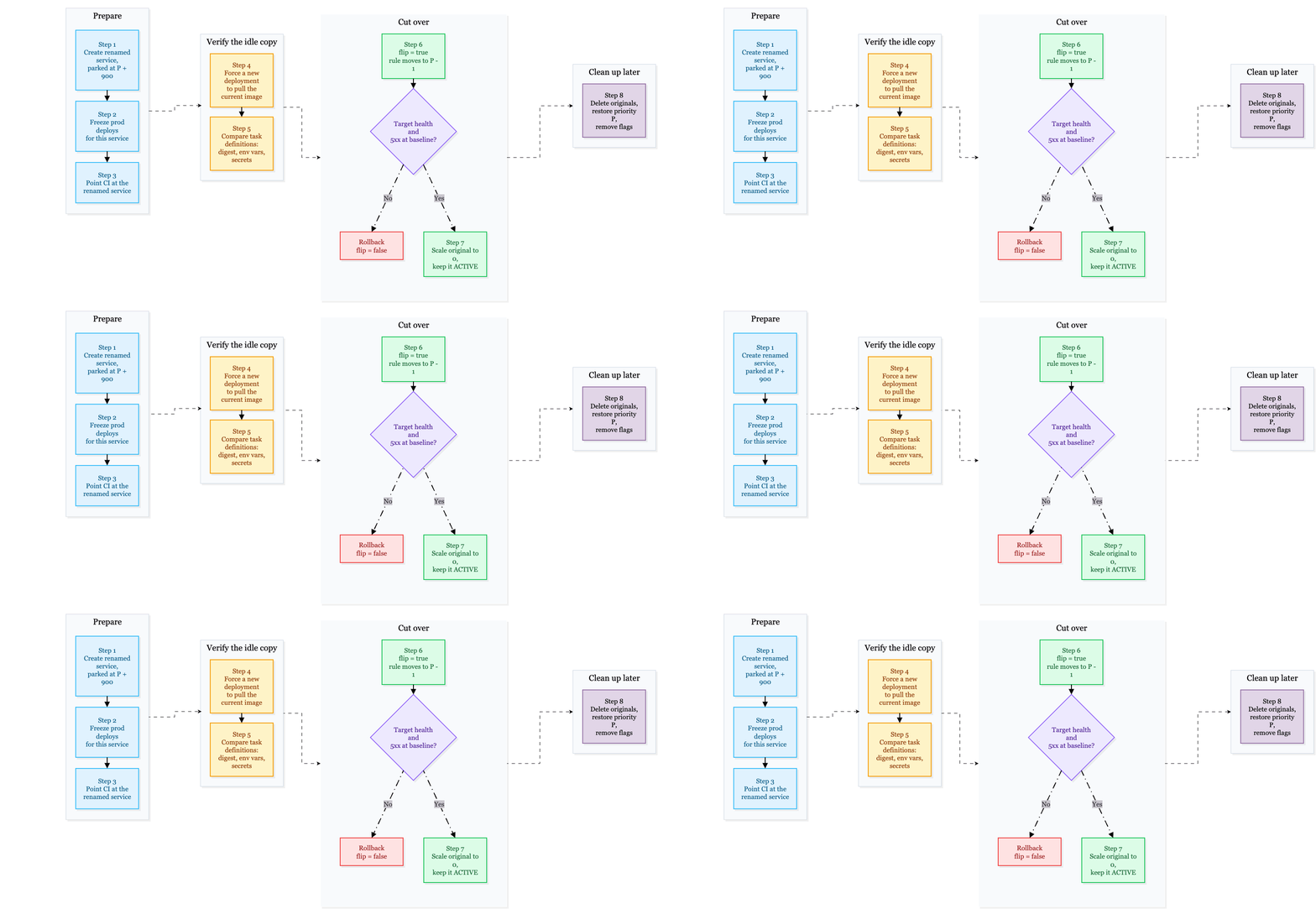
We applied one unit at a time and never used run --all. An early run --all plan picked up unapplied changes from three other units. A batch apply would have deployed those changes as well.
We started with the safest production service: internal-only, small, and without a public hostname. We also tested the rollback procedure on it: switch, check, switch back, check, and switch again.
Why the first prod apply failed
Our first design did not include a parked listener rule. The renamed service had a target group with no listener rule associated with it.
We tested with the flag turned off, and the plans matched a saved baseline in both dev and prod. When we turned the flag on in prod, ECS returned this error:
InvalidParameterException: The target group with targetGroupArn arn:aws:elasticloadbalancing:... does not have an associated load balancer.ECS could not attach the service to a target group that had no associated load balancer. The apply failed for the first three services and left three unused target groups. The existing live services were not affected.
The fix was to create the parked listener rule from the start, with a priority number that always loses to the live rule. This allowed ECS to associate the target group with the load balancer without sending traffic to the renamed service.
We tested the fix in sandbox with real traffic:
- Parked: The original service received 16 requests; the renamed service received 0.
- Switched: The original service received 0 requests; the renamed service received 15.
- Rolled back: The original service received 15 requests; the renamed service received 0.
Lesson: "No change when off" does not prove "works when on." A clean plan with the flag turned off only shows that existing resources remain unchanged. Test the feature with the flag enabled in a safe environment. We skipped the sandbox test because the parked-rule approach looked risk-free, and that decision led to a failed production apply.
Smaller problems
- Terragrunt ignores undeclared inputs. Terragrunt passes inputs as
TF_VAR_*variables, and Terraform ignores variables that the module does not declare. We set the flag in_envcommonfor a service whose module did not declare it, so nothing happened. - Check what the plan contains. Our first check was "nothing unexpected is replaced". It passed even when the plan failed and showed no changes. The final check required a
Plan:line, a non-empty replacement list, and the new service name. We also had to strip color codes (ESC[1mPlan:) before matching. - ECS rejects parallel task-definition registration. Each switch registered two task definitions in the same family at the same time, and ECS returned "Too many concurrent attempts to create a new revision of the specified family". Running
terragrunt apply -parallelism=1fixed it. Two failed applies had already moved the listener rule, so we checked the live priority before retrying. - INACTIVE task definitions can still scale. Our applies deregistered revisions that live services were running. AWS documents that an existing service can still be scaled after its task-definition revision is deregistered, but it does not clearly state whether new tasks can start from an INACTIVE revision. We tested this in sandbox: we deregistered a running revision and scaled the service from 1 to 2 tasks. The new task started successfully.
create-service,run-task, andupdate-service --task-definitionreject INACTIVE revisions. AWS also notes that these restrictions can take up to 10 minutes to take effect after deregistration, so run this test yourself after that window. - Same task definition, different behavior. After the switch, the renamed API tasks did not run any of the application's scheduled jobs. Every job event came from the original tasks. The logs did not explain why, so we scaled the original service to 0, with an automatic restore ready. After 210 seconds, the renamed tasks took over every job. The jobs use leases, which expired once the original tasks stopped. Any worker, consumer, or scheduler running in both copies at once needs the same check.
- The new name made a Datadog tag ambiguous.
ecs_service:app-apino longer identified the environment because it matched three environments. APM was unaffected because it usesDD_ENV. Container metrics get their tags from the agent'sDD_TAGS, so we addedenv:<env>there.
The stateful service
One of our services is a device gateway. Devices maintain long-lived WebSocket connections to it, and the list of connected devices is stored in the memory of a single task. Other systems send commands to devices through the same service. If a command reaches a different task from the one holding the device's WebSocket connection, the command fails.
This changes the normal migration order. Moving the listener rule does not move existing WebSocket connections, so devices would remain connected to the original service while commands went to the renamed service, which had no devices registered. Splitting traffic between the two copies would cause this failure.
Sticky sessions do not help here. They keep one client connected to one task, but the device and the system sending commands are different clients.
We reversed the order:
- Scale the original service to 0. Devices disconnect.
- Move the listener rule to the renamed service.
- Devices reconnect to the renamed service.
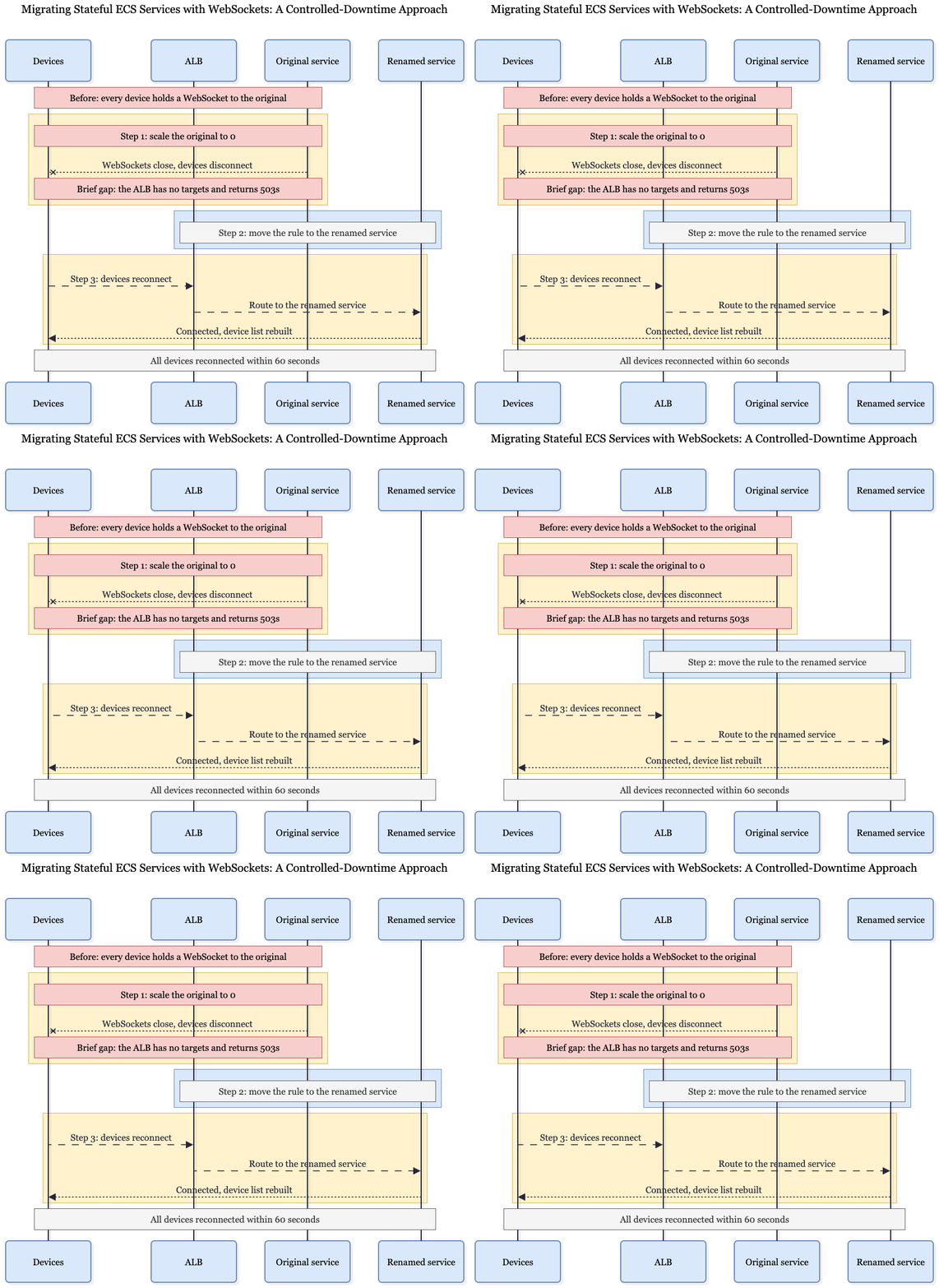
Would the devices reconnect on their own? Since the sandbox had no devices to test with, we checked the production logs. They showed that devices already disconnected and reconnected a few times a day, so a two-minute gap was normal for them.
We chose the quietest hour of the day, when traffic was around 5% of its peak.
Between scaling down the original service and moving the listener rule, the ALB briefly had no targets for this service and returned 503s. This was the downtime in our migration plan, which is why we chose the quietest hour. All connected devices reconnected within 60 seconds. Rollback still works, but it causes the same reconnect.
Lesson: If a cutover depends on client behavior, verify that behavior in production logs.
Results
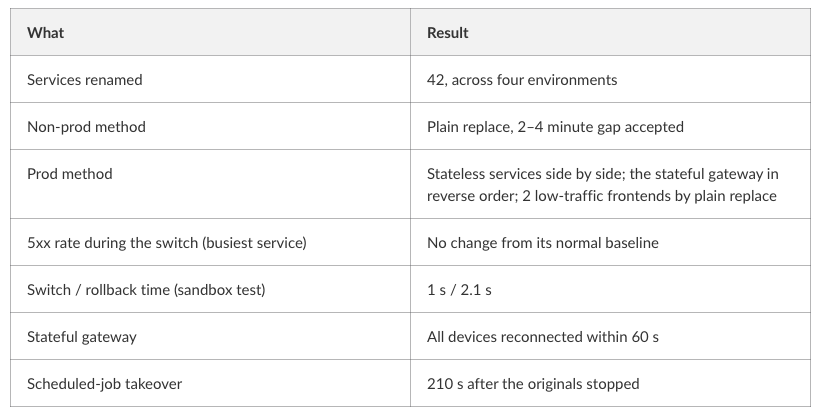
While both copies ran, the Fargate cost for that service doubled. We scaled the original services to 0 after verifying the renamed services and kept them available for rollback. Rollback then took 60–90 seconds (scale up, then switch) instead of about 1 second.
FAQ
Can ECS blue/green deployments do this? No. They swap tasks within one service, so the service name stays the same.
Why not create_before_destroy? The renamed service would receive live traffic as soon as its first task became healthy. We wanted to validate it first.
Why not weighted target groups? Weights are not only for gradual traffic shifts. A single rule weighted 100/0 can switch to 0/100 in one change, and that would also work. We preferred a separate parked rule because we never modify the live rule. The original service's routing remains untouched until the switch, and rollback requires changing one priority. Any partial split, such as 50/50, breaks services that keep state in memory.
Does this work with a Network Load Balancer? Not as written. NLB listener rules were added in 2026, but they can only match on the client's IP address type (IPv4 or IPv6), so there is no host-based rule to park. Use weighted target groups on the listener's default action or switch with DNS.
What if my rule is at priority 1? There is no lower priority available. Renumber the rules first or use a standard replacement.
How long did it take? Eight days, from the initial plan to the last production switch.
Conclusion
A service name you cannot change does not have to mean downtime. If the load balancer can control where traffic goes, you can run both services and switch traffic in one step. With an ALB, park the new rule at a higher priority number than the live rule, validate the renamed service, and then move its rule to a lower number so it is evaluated first.
Key lessons:
- Rename as little as possible, and explicitly set anything that depends on the service name.
- Test a feature flag with it enabled in a safe environment.
- Make plan checks verify what the plan actually contains.
- Check whether a service keeps state in memory before splitting its traffic.
- When runtime behavior is uncertain, run a short, reversible test.
Read More
- Can’t SSH into Fargate? Use ECS Exec to Debug Containers — Learn how to troubleshoot running ECS tasks and containers.
- Terraform with AI: Build AWS Infra (Cursor + MCP) — Explore practical Terraform workflows for managing AWS infrastructure.
- Zero-Downtime in Kubernetes: Deployment Strategies — Understand blue-green deployments, traffic switching, and rollback strategies.