
On this page
Our Kubernetes Pod Kept Getting Evicted. The Real Problem Wasn't Memory.

Overview
For two weeks, a log aggregation pod kept getting evicted whenever the node ran short on memory. It recovered quickly enough that, from the outside, it looked like a normal restart.
What looked fine at the application level turned out to be counterintuitive. The pod wasn't being evicted simply because it was the heaviest workload on the node, and a heavy Grafana query alone didn't explain why this particular pod kept disappearing. Its resource configuration affected how the kubelet's eviction manager ranked it under memory pressure, while a constraint on where the pod could run made recovery harder.
In this article, we'll show how we traced the pattern, why this pod became a strong eviction candidate under memory pressure, and how a small resource change stopped the eviction loop.
What triggered it
The obvious theory was log volume. A heavy Grafana query was pushing memory usage up, so that felt like the culprit. It wasn't.
The node hosting that pod had 13.9Gi of allocatable memory. A worker workload on the same node requested 11Gi of it. The log pod idled around 1.1Gi, which felt fine, so nobody thought about it.
Then someone ran a 24-hour log query in Grafana. The log pod ballooned to 4-6Gi while it scanned chunks. Node memory crossed the eviction threshold, the kubelet declared MemoryPressure, and it went looking for something to kill.
It found the only BestEffort pod on the node.
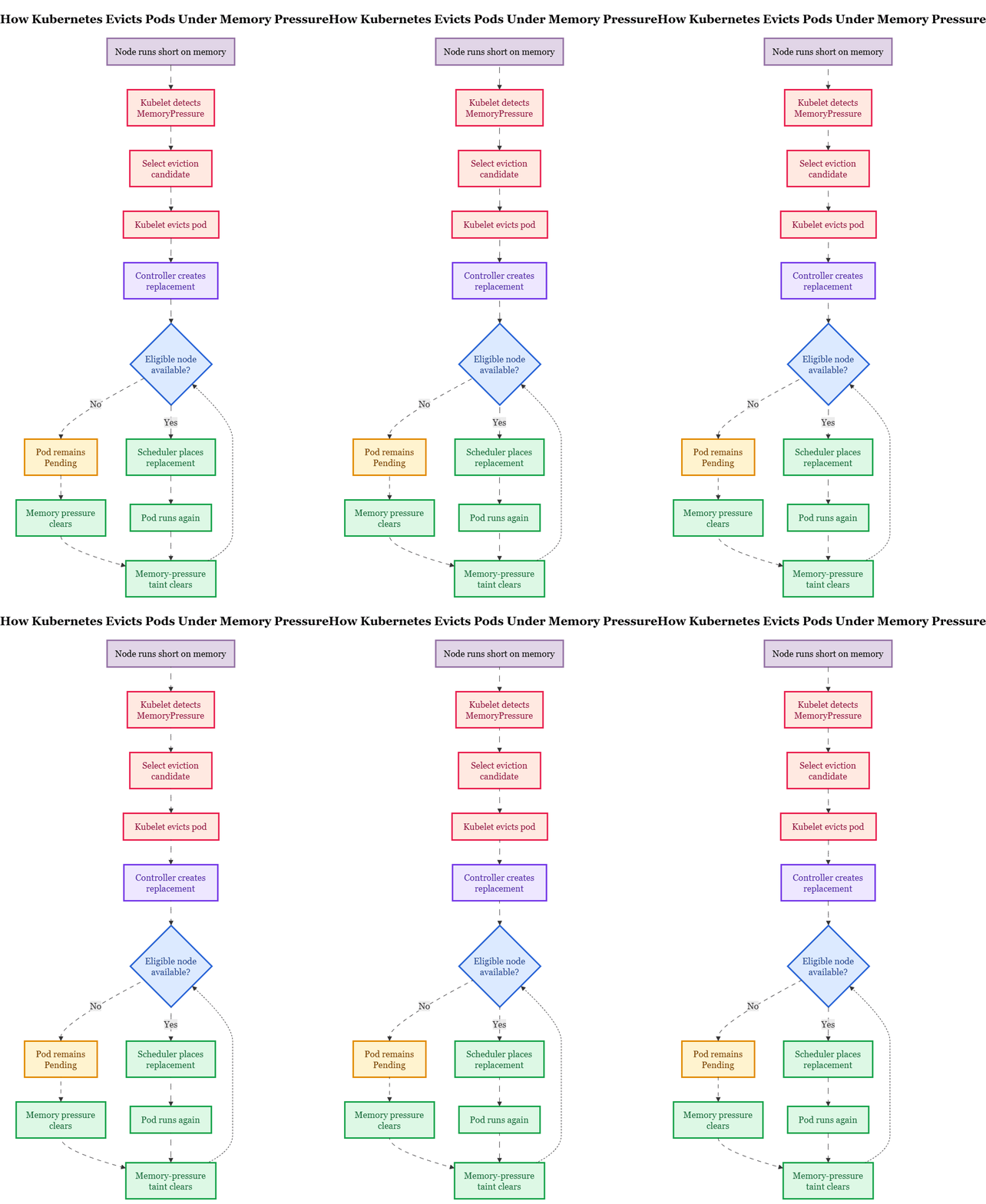

The kubelet evicted the pod and deleted it. The controller created a replacement, but it remained Pending.
Node affinity restricted the workload to the original node. That node was under MemoryPressure and carried the node.kubernetes.io/memory-pressure:NoSchedule taint. Because the replacement was still BestEffort, it did not automatically tolerate that taint, so the scheduler could not place it on the only eligible node.
Once memory pressure cleared and the taint disappeared, the replacement could be scheduled again. Six minutes later, the new pod finally landed. Then it happened again the next day.
We reproduced it on demand. One label query over a 24-hour range with limit 1000, and the pod was gone within a minute.
The surprise
The pod wasn't misbehaving. It wasn't the heaviest workload on the node. The kubelet strongly favored it for eviction because of a gap in the pod spec that's easy to skip when everything looks fine at idle.
The pod had no memory requests and no limits. That put it in the BestEffort QoS class, the bucket for workloads that never told Kubernetes how much memory they need.
When a node runs short on memory, the kubelet ranks pods by whether usage exceeds requests, then Pod Priority, then how far over request they are. QoS class is a useful shorthand for how that usually plays out, but it isn't the literal algorithm. BestEffort pods have a memory request of zero, so any usage makes them strong eviction candidates.
With the default kubelet configuration, the hard memory eviction threshold is memory.available<100Mi. Clusters can tune eviction thresholds, but when the node crosses that line, the kubelet starts evicting pods to get back under it.
A memory request is not paperwork for a capacity spreadsheet. It is a major factor in the kubelet's eviction ranking.
Current Kubernetes note: On Kubernetes 1.36 and later, optional tiered Memory QoS protection can change how memory requests interact with kernel-level protection when memoryReservationPolicy: TieredReservation is configured. The default is still None, so the behavior described here applies to most clusters today.
Why it became an outage
Eviction deletes the pod object. It does not move the existing pod elsewhere. A controller such as a Deployment creates a replacement, and the scheduler tries to place that replacement on a node that satisfies its constraints.
Node affinity pinned this workload to a single node, so there was no fallback node without the same scheduling constraints. While the original node remained under MemoryPressure, the kubelet applied the node.kubernetes.io/memory-pressure:NoSchedule taint. The scheduler then used that taint when deciding whether the replacement could be placed there. The replacement was still BestEffort, so it did not automatically tolerate that taint. Node affinity would have allowed the original node again once pressure cleared. But until the taint disappeared, the replacement had nowhere to go.
Pinning is often legitimate. A local PV, a specific instance type, a licensed node. But a pinned pod that is also BestEffort is strongly favored for eviction and has nowhere to go when the only eligible node is tainted for memory pressure. That's the combination that turned a memory spike into repeating downtime.
The fix
The fix wasn't "give it more memory." It was giving the pod a resource profile that changed how it behaved under pressure.
Here is what we set.
resources:
  requests:
    cpu: 500m
    memory: 4Gi
  limits:
    memory: 8Gi
Steady state was ~1.1Gi. Query peaks hit 4-6Gi. We set a 4Gi request to reflect normal usage plus a typical query, and an 8Gi limit as an upper bound for unusually heavy scans.
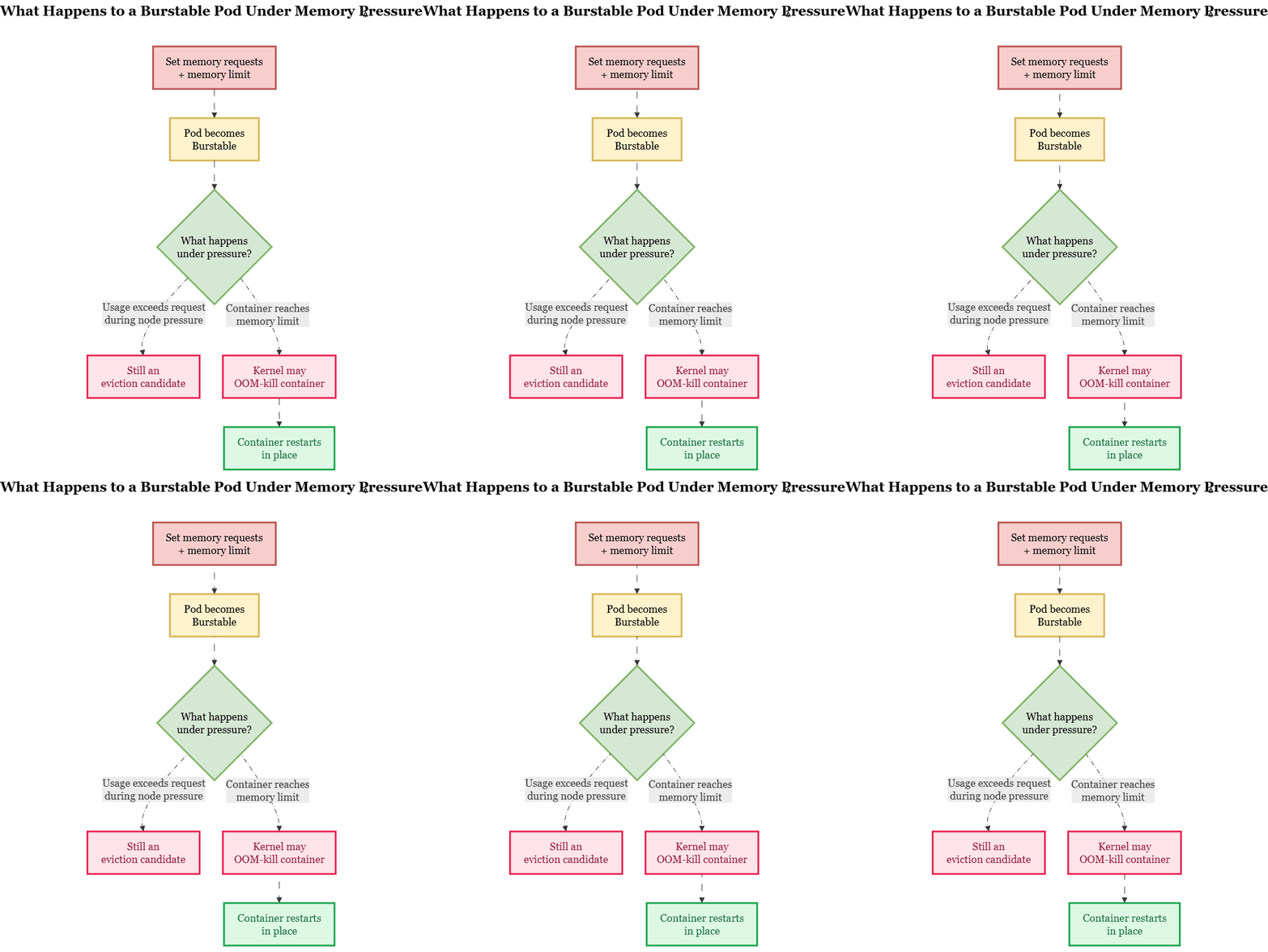
The pod is now Burstable. QoS class describes the resulting configuration. It is not itself the kubelet's eviction algorithm. Burstable pods also automatically tolerate the node.kubernetes.io/memory-pressure:NoSchedule taint, which removed one reason replacements had sat Pending.
Requests and limits solve different problems.
- Request: influences scheduling and the pod's position during node-pressure eviction.
- Limit: caps container memory. If the container reaches its memory limit, the kernel may OOM-kill it, after which the kubelet can restart the container without replacing the pod object.
As BestEffort, any memory usage exceeded a request of zero, so the kubelet strongly favored this pod for eviction whenever the node came under memory pressure.
The 4Gi request improved that position, but it does not guarantee immunity from eviction while usage sits above 4Gi. Query peaks of 4-6Gi can still exceed the request, and under node memory pressure the kubelet can still select a Burstable pod whose usage is over its request. If avoiding eviction entirely is the goal, size the request closer to the workload's expected peak, subject to node capacity. The 8Gi limit provides an upper bound.
Before the change, node memory pressure led to pod eviction, a replacement stuck in Pending, and a wait for the memory-pressure taint to clear.
After the change, the repeating eviction loop stopped. When memory spikes hard enough to hit the limit, the kernel may OOM-kill the container, after which the kubelet can restart it in place. The pod remained on the same node and retained its pod identity and IP. No new pod object, no reschedule dance. Under the query loads we cared about, the pod stayed up. Restart count has been flat since.
We re-ran the query that used to kill it. Label queries came back in 1.5s, range queries in 3.2s, and the pod stayed up.
What to check in your cluster
See which pods are running as BestEffort.
kubectl get pods -n <namespace> \
  -o custom-columns='NAME:.metadata.name,QOS:.status.qosClass' | sort -k2
Find BestEffort pods pinned to a node. That is the risky combination.
kubectl get pods -A -o json | jq -r '
  .items[]
  | select(.status.qosClass=="BestEffort")
  | select(.spec.affinity.nodeAffinity != null or (.spec.nodeSelector != null and (.spec.nodeSelector | length > 0)))
  | "\(.metadata.namespace)/\(.metadata.name)"'
Check for recent evictions.
kubectl get events -A --field-selector reason=EvictedIf a replacement pod sits Pending after eviction, inspect scheduler events and node taints.
kubectl describe pod <replacement> -n <namespace>
kubectl describe node <node>
kubectl get node <node> -o jsonpath='{.spec.taints}'
Look for node.kubernetes.io/memory-pressure:NoSchedule on the node and scheduling failures on the pod.
Look for pods with high restart counts.
kubectl get pods -A \
  --sort-by='.status.containerStatuses[0].restartCount' \
  -o custom-columns='NS:.metadata.namespace,NAME:.metadata.name,RESTARTS:.status.containerStatuses[0].restartCount,QOS:.status.qosClass' \
  | tail -20
Frequently Asked Questions
Why does Kubernetes evict pods?
Node memory pressure can cause the kubelet to evict pods.
What is BestEffort in Kubernetes?
BestEffort means a pod has no CPU or memory requests or limits.
What is Burstable QoS?
Burstable means a pod has at least one CPU or memory request or limit.
Can memory requests prevent pod eviction?
They change how Kubernetes considers the pod during memory pressure.
Why does node affinity make eviction worse?
A pinned pod may have nowhere else to run after eviction.
Summary
Set memory requests on everything. Including the unimportant stuff for unimportant plus BestEffort means it spends your node's stability budget first and takes the eviction cascade with it.
Size requests for the memory footprint you expect under normal and peak load. They influence scheduling and eviction ranking, but a pod whose usage exceeds its request can still be evicted under node memory pressure. Set memory limits where you understand the workload's peak.
A limit caps container growth and, if the container reaches it, the kernel may OOM-kill it while the kubelet restarts the container in place rather than replacing the whole pod. Skip CPU limits until you have a reason. Audit your BestEffort pods this week, and pay attention to any of them that are pinned to a node.
None of this is exotic. Two fields in a YAML file changed a daily outage into a non-event.
If this sounds familiar, KubeNine does Kubernetes resource and reliability work day to day. Happy to take a look.
Read More
If you're working with Kubernetes resources, logging, and reliability, you may also like:
- How Civo Kubernetes Routes Pod Traffic (Single Egress IP Explained) — Understand how Civo Kubernetes routes pod traffic and handles outbound connections.
Read the Civo Kubernetes networking guide - Loki vs Elasticsearch: Which Logging System Is Better for Kubernetes? — Compare Loki and Elasticsearch for Kubernetes logging and resource usage.
Read the Loki vs Elasticsearch guide - GKE Workload Identity Federation: Secure K8s Access — Learn how Kubernetes workloads can access Google Cloud services without long-lived service account keys.
Read the GKE Workload Identity guide