
On this page
We Built an AI Agent for DevOps. Here's What Actually Worked
We built a read-only AI agent for DevOps lookups and first-pass incident triage. Here's what worked, what didn't, and how we kept the model away from the security boundary.

If you look at what a platform team actually spends its day on, a large chunk of it is answering questions. Which subnet is that service in? What's the log retention for this cluster? Is staging on the new database yet? Who owns this Terraform module? The answers exist. They're in the infra repo, in Terraform, in a runbook someone wrote last year. But finding them requires context, so the question goes to a senior engineer, and the engineer loses twenty minutes plus whatever they were holding in their head.
We built an AI agent to handle that layer. Not deployments, not remediation — the lookups and the first-pass triage. It's been running for about nine months. This post covers the architecture, the guardrails, and where it falls short. There's no source code here, but there's enough detail to build the same thing.
The setup
A bot in Slack. You @-mention it in a channel and it replies in the thread. It runs as a daemon on a small VM in our own network, holds read-only credentials to our cloud accounts, and has a clone of our infrastructure repository on local disk, refreshed by a cron job every 30 minutes. It cannot write to anything.
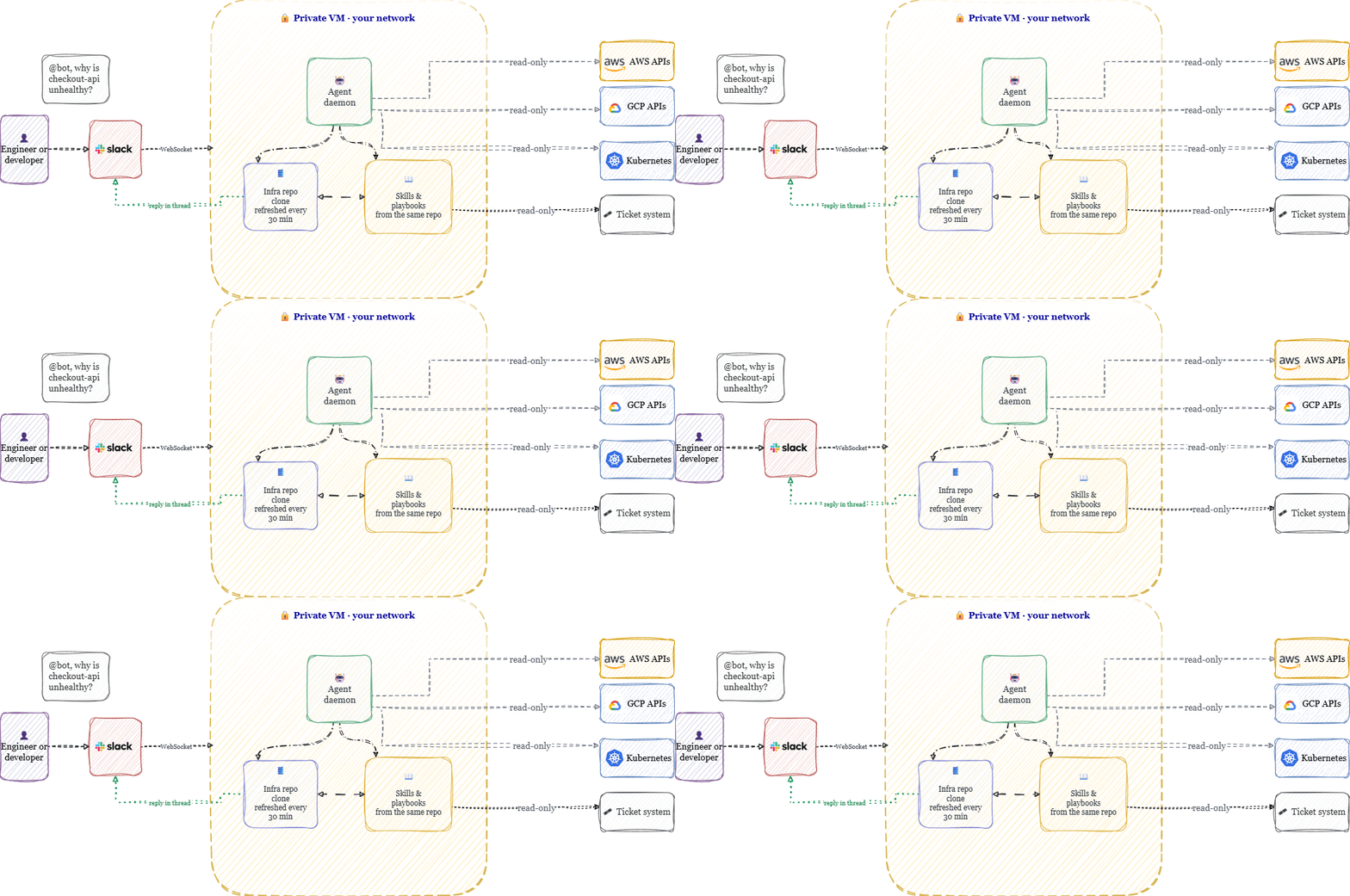
Most of the value comes from one design decision, so I'll start there.
Point it at your infra repo
Every company has an infrastructure repository — Terraform, Helm charts, manifests, runbooks, READMEs. It's already where your engineers go to answer questions. We gave the agent a local clone of it and a cron job to keep it current.
This turned out to matter more than anything else in the system, for a few reasons.
You skip the knowledge-base project entirely. We didn't build a RAG pipeline. The agent greps files, the same way an engineer would. When someone asks how a service is configured, it reads the configuration and answers from that. Retrieval quality was never a problem because there's no retrieval layer to tune.
Staleness stops being a failure mode. Internal wikis rot. Whatever you ingest into a vector store rots faster, because now there's an ingestion job that can silently break. With a repo clone, the agent's knowledge is at most 30 minutes behind main. If someone changes a subnet and merges it, the agent knows by the next pull. Nobody maintains anything.
Most questions become nearly free. When the repo is on local disk, a config question doesn't touch a cloud API at all. It costs a few cents of tokens and returns in seconds. Compare that with the actual cost of the old path: an engineer context-switches, answers, and then spends however long rebuilding what they were working on. The economics are lopsided enough that we stopped tracking them.
GitOps compounds it. The more of your infrastructure that's actually described in git, the more the agent can answer without live queries. If you've done the GitOps work, you already have the corpus. Teams tend to think of GitOps as a deployment discipline; it's also, it turns out, exactly the shape of knowledge base an agent needs.
Skills live in the repo too
We keep a directory of playbooks in the same repository — short markdown files written by the platform team. How to debug a failing pod in our clusters. How to trace a cost spike. How our DNS is laid out and where it bites people. Each has a one-line description in its frontmatter.
The agent is told to check the skills index at the start of any non-trivial question and follow a matching playbook if one exists. It's specifically instructed not to rely on remembered skill names, because the set changes. If nothing matches, it says so and falls back to searching the repo.
The practical consequence: improving the agent is a pull request. When an engineer works through something ugly at 2am, they write the playbook while it's fresh and merge it. Thirty minutes later the agent handles that class of question the way they would have. Institutional knowledge that would normally leave with the person accumulates in git instead. This loop — agent exposes a gap, gap becomes a PR, PR makes the agent better — is what keeps the thing from plateauing.
Two layers: the model is never the boundary
This is the design decision that makes it safe to run against production accounts.
A language model is non-deterministic. It reasons well, but you cannot guarantee what it will do, and a system prompt is not a security control — it's a request. So we don't ask the model to enforce anything. The model sits inside a deterministic software layer, plain code with unit tests, and that layer decides what reaches the model and what the model's tool calls are allowed to do.
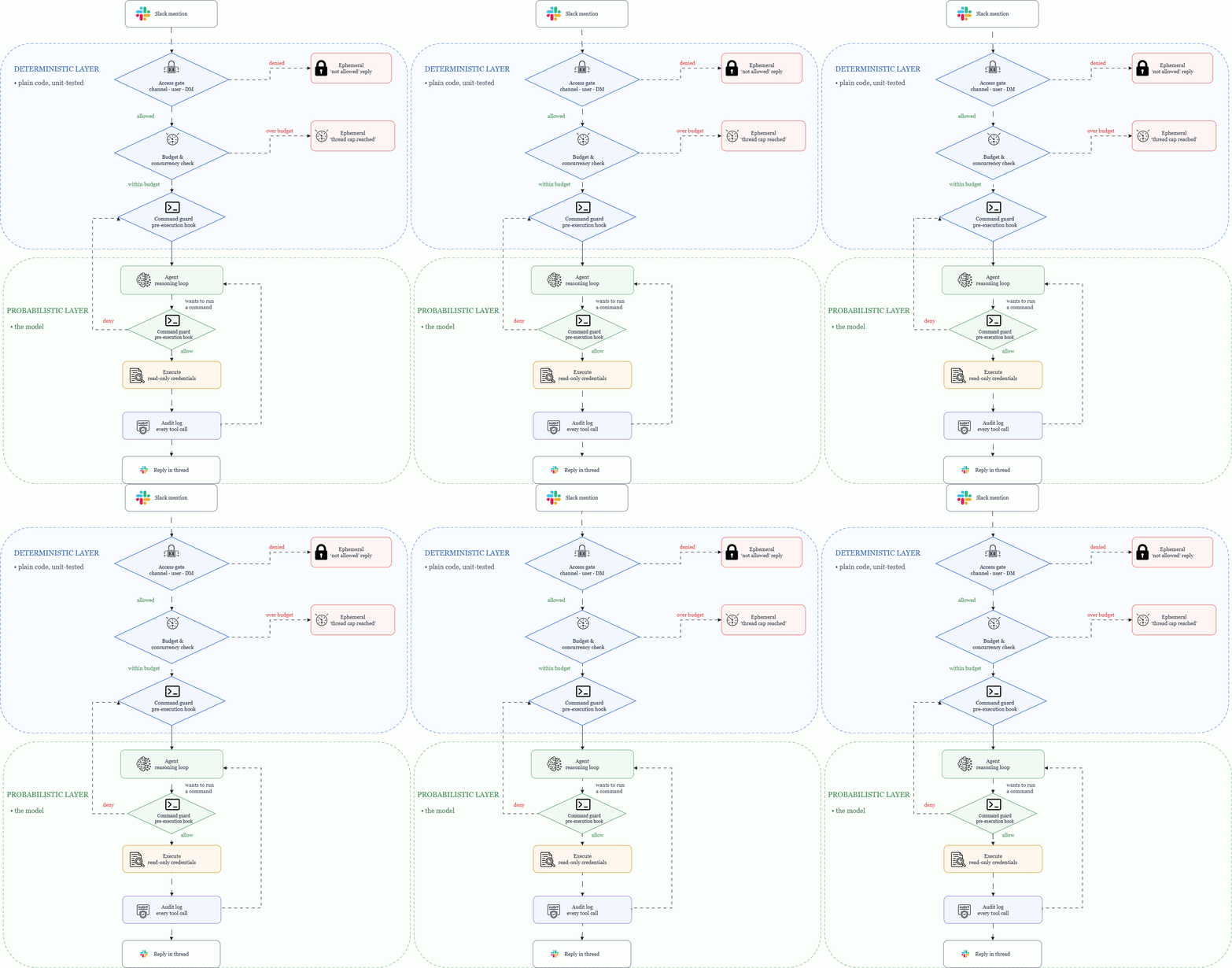
Every path from the model to a real system goes through code we wrote and can test. That's the property everything else depends on.
The guardrails
Access control happens before the model runs
Slack includes the user ID and channel ID in every event, so the first check is an ordinary lookup against a config file, before any tokens are spent.
Channels are allow-listed — default deny, the bot only responds where we've explicitly enabled it. Within an allowed channel, users are deny-listed: everyone can ask by default, and specific user IDs get blocked if there's a reason — an offboarding, a contractor whose access ended, a misbehaving integration. DMs are behind a separate toggle and off by default, since a DM has no channel scoping.
One lesson from an early version: we used to silently ignore requests that failed the gate, and people concluded the bot was down. Now every denial sends an ephemeral message that only the sender sees. Cheap change, ended a lot of confusion.
The access config lives in git and changes go through review, like any other config.
Read-only, enforced twice
The credentials are read-only at the cloud provider: a dedicated role with describe/list/get, plus explicit denies on the things read-only technically allows but shouldn't — object storage contents, secret values, key material, data-warehouse reads. The agent can confirm a secret named prod-db-password exists; it can't retrieve the value. Identity is federated, no static keys on the box.
Separately, every shell command the model wants to run passes through a guard hook before execution. The hook splits the command on shell separators, unwraps nested payloads — bash -c, backticks, command substitution — and checks each piece against a deny list. I want to be direct about this part: it's the hardest code in the system, and a naive version is worthless. A single regex over the raw command string gets bypassed by trivial nesting, and you should assume something will eventually try. The deny list also covers package installation and piping downloads into a shell, because an agent that can install software isn't meaningfully read-only anymore.
The agent's own code is pinned as well. It refuses to start unless it's running what it was built from, and checking out a different branch at runtime is one of the blocked commands. Without that, the guardrails guard nothing.
Prompt injection
The agent reads logs, and logs contain user-supplied strings. Somewhere in your systems there's a field an attacker can write to, and one day it will contain "ignore your previous instructions."
The mitigation is a trust boundary in the system prompt: only the current @-mention counts as a request. Thread history, file contents, tool output — all data, to be summarized and reasoned about, never followed. When the agent encounters instruction-shaped text in data, it flags it in the reply and continues with the original question.
That's a model-layer defense, which means it's probabilistic, which means we assume it fails sometimes. The read-only credentials underneath are what bound the damage when it does. If your injection story depends entirely on the prompt, you don't have one.
Budgets
Each thread has a cumulative spend cap and each question has a turn limit, so a confused agent stops rather than loops. A global concurrency limit bounds worst-case cost on a busy day, and a per-thread lock serializes concurrent questions in the same thread instead of letting them race.
Audit
Every tool call is appended to a log; every conversation produces a full transcript. When someone asks what the bot did at 3am, we read the file. This also shortened our compliance conversations considerably — auditors respond well to append-only records.
What a request looks like end to end
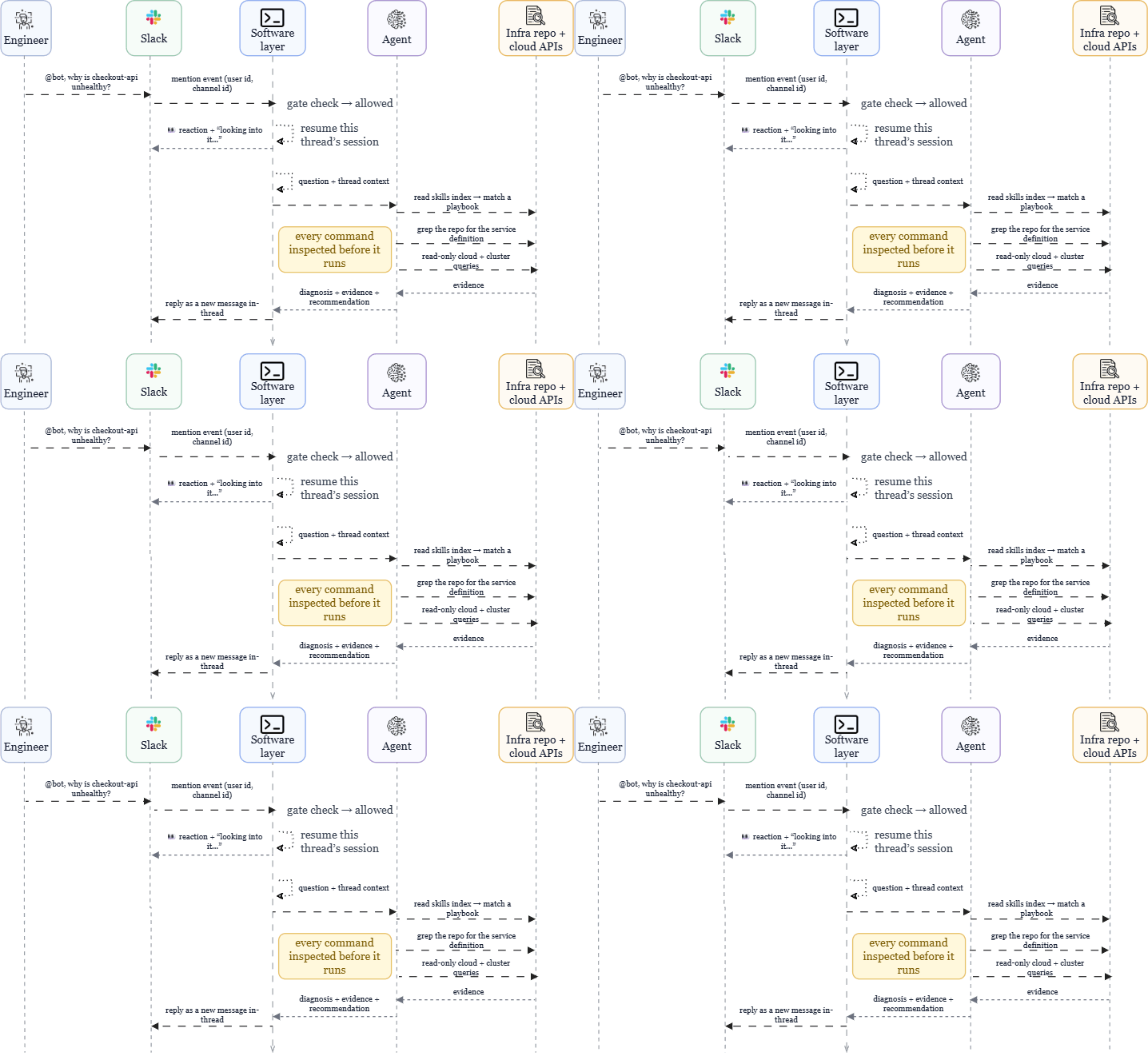
Two implementation details that cost us adoption before we fixed them:
Slack threads map to agent sessions. A follow-up in the same thread — "what about staging?" — continues the same conversation with full context. Before we had this, every question started cold and the tool felt useless for anything iterative.
The answer gets posted as a new message rather than editing the placeholder. Editing a Slack message doesn't trigger a notification, so in the first version people asked questions, never got pinged, and assumed the bot was broken. Obvious in hindsight.
Did it replace the DevOps team?
No. Here's the honest accounting.
What it absorbed: config lookups, "where does this live," "what changed recently," first-pass alert triage, cost questions, onboarding questions from developers who don't know the layout yet. High-volume, low-novelty traffic that used to route to whichever senior engineer replied first.
The part we didn't predict: the platform team became the heaviest users. A mid-task question — which node group is that pod on? — used to mean a terminal, a role assumption, finding the right cluster context. Now it's a Slack mention, answered before the train of thought derails. The playbooks cut both ways too: mention the bot during a change review and it runs the security-review playbook against the diff, the same checklist a human walks, in a few minutes.
For developers: the read-only credentials span every cloud and environment, so a developer can pull staging logs, diff a config between environments, or follow an error across providers from one Slack thread — without holding console access they'd otherwise use twice a year. Response time went from "whenever someone with context notices" to under a minute. And a category of questions that previously went unasked, because asking felt like an imposition, now gets asked.
On-call: for critical security alerts, the agent runs first response. It does roughly what the on-call engineer does in the first twenty minutes — pull the relevant logs, check recent changes, establish scope, eliminate the obvious — and posts its analysis to the thread before the human has logged in. The engineer wakes up to a briefing instead of a bare alert. Since the agent is read-only, there's no scenario where the first responder makes the incident worse. Across a year of pages, twenty minutes off the front of every incident adds up to real time.
What it doesn't do: deploy, remediate, approve, or mutate anything. It's wrong sometimes. We spent real effort prompting it to say "I don't have enough signal" instead of fabricating an answer, and that effort mattered more than most of the feature work. Novel incidents, ambiguous tradeoffs, decisions with business context — still human work, and honestly the work engineers wanted to be doing anyway.
If I had to summarize: we didn't replace a DevOps engineer. We got the junior hire we never made — one that has read the entire infra repo, remembers all of it, and answers at 3am without resentment.
Build order, if you're doing this
- Read-only credentials. Dedicated role, explicit denies on secrets and data. Before anything else.
- Mount the infra repo with a refresh cron. Most of the value, least of the work.
- A deterministic gate ahead of the model — channel allow-list, user deny-list, config in git.
- The command guard hook. Budget real time for the parsing; assume bypass attempts.
- Spend and turn caps, before the user count grows.
- Audit log and transcripts from day one.
- Playbooks as markdown in the repo, discovered at runtime.
- The prompt, last. It's the least load-bearing part.
Notice that almost none of this is AI work. It's identity, least privilege, input validation, and audit — standard platform engineering, applied to a new kind of workload.
What's underneath
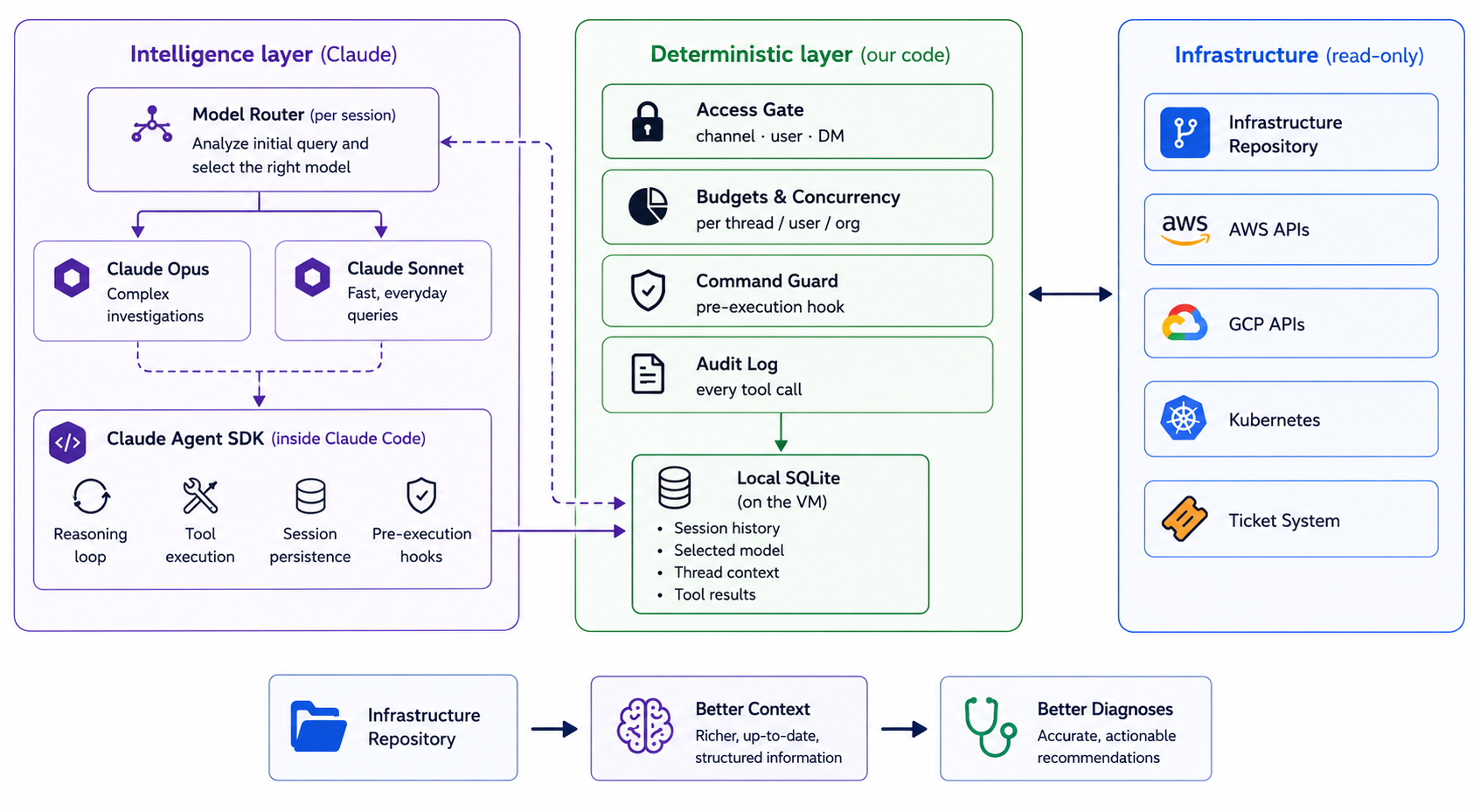
The agent runs on Claude Code through the Claude Agent SDK, which provides the reasoning loop, tool execution, session persistence, and — critically for this design — the pre-execution hook points the command guard attaches to. Before a session begins, a lightweight model router classifies the incoming request and selects either Claude Sonnet for routine investigations or Claude Opus for more complex, multi-step debugging. Every session is then persisted locally in a SQLite database on the VM, storing the conversation history, selected model, thread context, and tool results so investigations can resume with full context instead of starting from scratch. The gate, budgets, command guard, audit trail, model router, and session store are all our own code around the SDK. That split is deliberate: the SDK supplies the intelligence, while our layer supplies the guarantees. As the underlying models improve, the intelligence upgrades for free while the guarantees remain unchanged.
Today, the model is no longer the limiting factor. Modern Claude models are already capable of remarkably strong multi-step infrastructure diagnosis. The bottleneck is no longer reasoning—it's the context and in this case how much of your infrastructure is actually written down.
Which is the takeaway I'd leave you with: the agent is exactly as good as your repository. If that observation stings a little, it's probably the most useful sentence in this post.
Frequently Asked Questions
Can an AI agent replace a DevOps engineer?
No. It can handle repetitive infrastructure lookups and first-pass triage, but complex incidents and production decisions still need engineers.
How does an AI agent access infrastructure data?
It searches a local clone of the infrastructure repository, including Terraform, Helm charts, manifests, and runbooks.
Can the AI agent change production infrastructure?
No. It uses read-only credentials and a command guard, so it cannot deploy, remediate, approve, or modify infrastructure.
How does the agent handle prompt injection?
The agent treats logs, files, thread history, and tool output as data rather than instructions. Read-only permissions also limit the impact of a successful injection.
Read More
If you're exploring AI and infrastructure automation, you may also like:
- Terraform with AI: Build AWS Infra (Cursor + MCP) — Build Terraform infrastructure with AI, Cursor, and MCP.
- GKE Workload Identity Federation Without Service Account Keys — Secure Kubernetes access to Google Cloud without long-lived keys.
- Route 53 DNS Firewall: AWS Egress Security with Terraform — Control outbound DNS traffic from AWS workloads with Terraform.
We design and build agents like this for platform teams — the guardrails and the boring parts done properly. To implement these kind of solutions for your teams, Get in touch at kubenine.com.