
On this page
This One YAML Key Makes GitHub Actions Workflow Runs Easy to Identify
Learn how GitHub Actions `run-name` makes workflow runs easier to identify by displaying deployment versions, environments, and actors in the Actions list.

Introduction
I've been using github actions for years now and recently discovered this hack. It's so easy that I hated myself for not knowing it.
Manual deployments through workflow_dispatch are common. They also create a visibility problem that most teams only notice when something breaks. When every run is labelled Deploy, the Actions list stops being an operations surface and becomes a set of identical rows. The version, the environment, and the person who triggered the change sit inside the run — not on it.
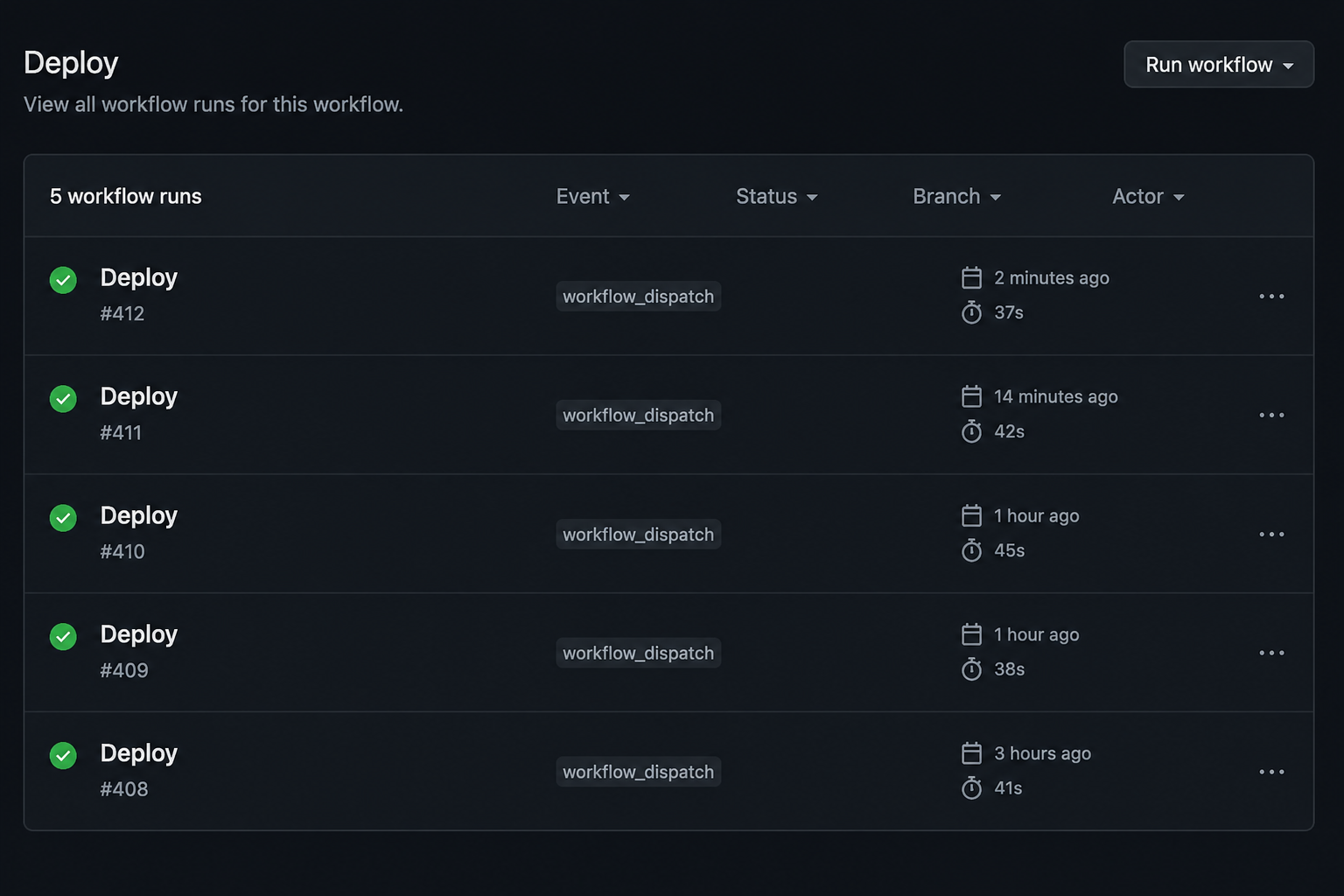
During an incident, that list is where engineers go first. If you cannot tell which row reached production, you spend the opening minutes of the response answering the wrong questions: who changed what, and where.
Where run-name comes in
Teams usually compensate with process. They rename workflows Deploy (prod) and Deploy (staging), split one deploy file into three, or put a dashboard on top of the Actions API. Those approaches work. They also treat a labeling problem as an architecture problem.
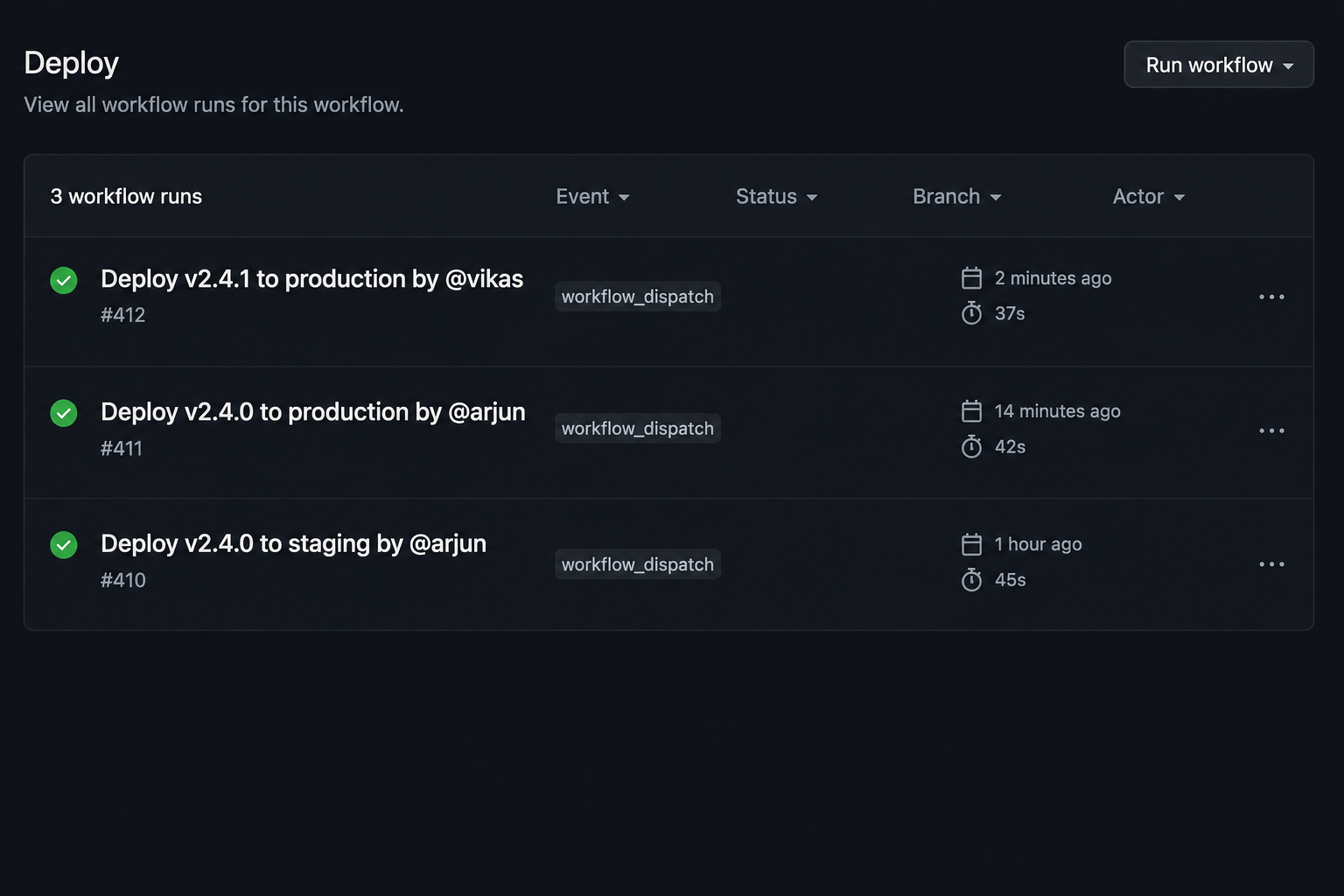
run-name labels each run when it is created — version, environment, and actor — so the list itself carries the context operators need:
What run-name is
run-name lets you customize the name of each workflow run shown on the GitHub Actions page. It does not change jobs, steps, or how the workflow executes — only what you see in that list.
It is a top-level key in the workflow file. It has been in the syntax since September 2022. It does not replace the workflow name. It only controls the run row.
How to use it
Here is a complete workflow you can paste and run. Trigger it from the Actions tab with a version and environment:
name: Deploy

on:
  workflow_dispatch:
    inputs:
      version:
        description: Version or tag to deploy
        required: true
        type: string
      environment:
        description: Target environment
        required: true
        type: choice
        options:
          - staging
          - production

run-name: Deploy ${{ inputs.version }} to ${{ inputs.environment }} by @${{ github.actor }}

jobs:
  deploy:
    runs-on: ubuntu-latest
    environment: ${{ inputs.environment }}
    steps:
      - run: echo "Deploying ${{ inputs.version }} to ${{ inputs.environment }}"
After it runs, the Actions list shows the version, environment, and actor on the row itself.
Useful values you can include
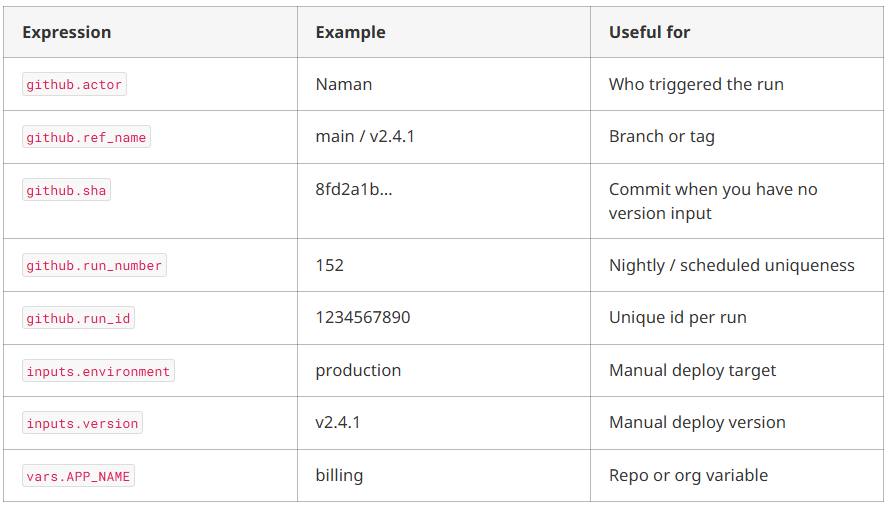
Only github, inputs, and vars are available in run-name. Step outputs and matrix values are not.
Other examples
Nightly tests:
on:
  schedule:
    - cron: '0 6 * * *'
run-name: Nightly tests · run ${{ github.run_number }}
Release from a tag:
on:
  push:
    tags: ['v*']
run-name: Release ${{ github.ref_name }} by @${{ github.actor }}
Docker image build:
run-name: Build image for ${{ github.ref_name }} · ${{ github.sha }}The most common mistake: empty inputs
If the same workflow also runs on push, this looks fine until it does not:
run-name: Deploy ${{ inputs.version }} to ${{ inputs.environment }}

on:
  workflow_dispatch:
    inputs: { ... }
  push:
    branches: [main]
On push, inputs.version and inputs.environment are empty. You get:
Deploy to #413 push just nowUndefined context properties become empty strings. No error. Guard anything that is not always present:
run-name: >-
  Deploy ${{ inputs.version || github.sha }}
  to ${{ inputs.environment || 'staging' }}
  by @${{ github.actor }}
>- keeps long names readable in YAML; newlines collapse to spaces. Keep the string short — the Actions list truncates.
It evaluates once, before anything runs
The biggest surprise is that run-name is evaluated before any jobs or steps start, so it cannot use values generated later in the workflow.

Contexts widen as you go down the file. run-name sits at the narrowest point. That ordering explains most of the limitations.
Ordinary expression functions — format(), contains(), join(), toJSON() — work normally. env, secrets, needs, steps, matrix, hashFiles(), and status helpers like success() do not.
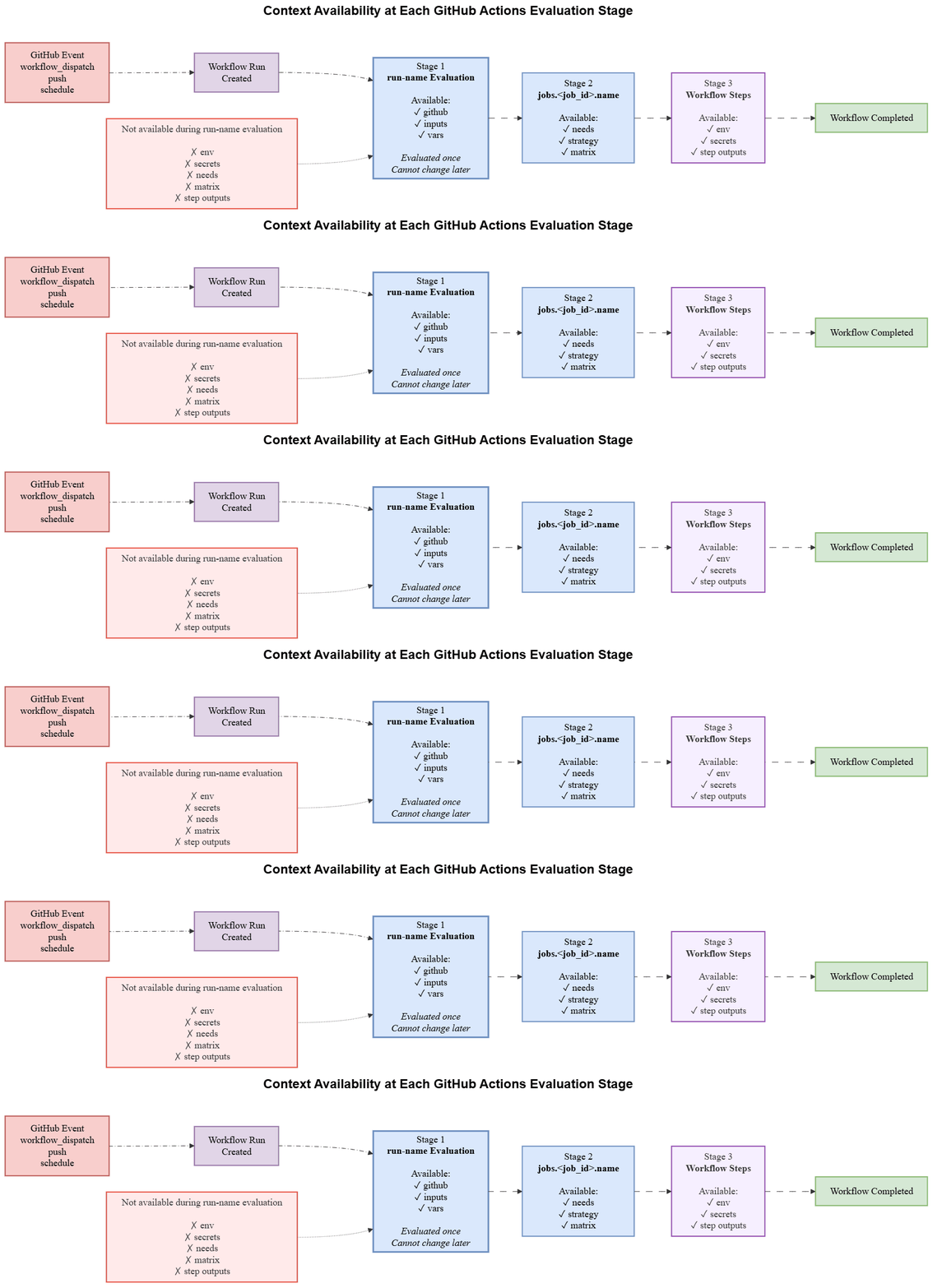
Docs quirk: the run-name prose mentions github and inputs. The context table also lists vars, and the table is correct.
Once set, the name does not change. There is no API to rename a run after creation. A re-run keeps the original name.
When this approach works best
Use run-name when the default list label is weak:
workflow_dispatchschedulerepository_dispatchworkflow_run
Those events produce walls of identical rows. Version, environment, and actor on the row pay off during incidents and audits.
When not to use it
Omit run-name (or leave it blank) and GitHub fills in event-specific text. Push uses the commit message. pull_request uses the PR title. For PR-triggered CI, that default is usually better than run-name: CI.
A workflow called via workflow_call does not get its own run — jobs land in the caller’s run — so run-name in the called file is ignored. Put it on the caller.
Also do not expect run-name to carry values computed mid-workflow. That is a different problem.
When run-name is not enough, name the job
If you need a semver from GitVersion in step three on the run list, run-name cannot see it. The value does not exist when the name is evaluated.
Use jobs.<job_id>.name instead. It evaluates later and gets needs, strategy, and matrix:
jobs:
  version:
    runs-on: ubuntu-latest
    outputs:
      tag: ${{ steps.gv.outputs.semVer }}
    steps:
      - id: gv
        run: echo "semVer=$(./scripts/version.sh)" >> "$GITHUB_OUTPUT"

  build:
    needs: version
    name: build ${{ needs.version.outputs.tag }}
    runs-on: ubuntu-latest
The run list stays generic. Open the run and the job reads build 2.4.1-rc.3.
Matrix jobs benefit even more. The default test (3.12, 5.0) is a tuple you have to decode against the file:
jobs:
  test:
    strategy:
      matrix:
        python: ["3.11", "3.12"]
        django: ["4.2", "5.0"]
    name: py${{ matrix.python }} / dj${{ matrix.django }}
A failed required check then says py3.11 / dj5.0.
Guidelines
- Use
run-namefor manual deploys and other weak-default events - Include the environment
- Include the version when you have it
- Include the actor
- Use
||fallbacks on multi-trigger workflows - Do not expect step outputs or matrix values in
run-name - Leave PR CI on the default PR title
- Put mid-workflow values on the job name instead
Frequently Asked Questions (FAQ)
1. What is run-name in GitHub Actions?
run-name is a top-level workflow setting that lets you customize the name of each GitHub Actions workflow run. It only changes how the run appears in the Actions list and does not affect jobs, steps, or workflow execution.
2. When should you use run-name?
run-name works best for workflows triggered by workflow_dispatch, schedule, repository_dispatch, and workflow_run. These events often create identical workflow runs, so adding the version, environment, or actor makes deployments easier to identify.
3. Can run-name use workflow inputs?
Yes. You can reference values from workflow_dispatch inputs, along with the github and vars contexts. If the workflow has multiple triggers, use fallback values because inputs are empty for events like push.
4. Can run-name use step outputs or matrix values?
No. run-name is evaluated before any jobs start, so it cannot access step outputs, job outputs, needs, or matrix values. For those values, use jobs.<job_id>.name instead.
5. Does run-name work with reusable workflows?
Not directly. A reusable workflow called with workflow_call does not create its own workflow run, so its run-name is ignored. Define the run name in the calling workflow.
6. Does run-name improve GitHub Actions performance?
No. run-name only changes the display name of a workflow run. It has no impact on execution speed, runner performance, or deployment behavior. Its main benefit is making workflow runs easier to identify during deployments, troubleshooting, and audits.
Conclusion
run-name does not change how your pipelines execute. It changes how quickly you can identify the right workflow run when something goes wrong.
The feature has been available since 2022, and adopting it takes just a single expression in workflows that would otherwise produce identical run names. The cost of skipping it becomes clear during a production incident, when engineers spend valuable time opening the wrong workflow run.
If your deployment process still relies on renamed workflows, duplicated deployment files, or external dashboards to answer who deployed what and where, it may be time to simplify your GitHub Actions workflows. KubeNine helps teams design and improve GitHub Actions workflows and release processes that are easier to operate and maintain.
Read More
- Stop Wasting Minutes on Every Build — Use This Self-Hosted Runner Setup
https://www.kubeblogs.com/fixing-slow-ci-cd-pipelines-after-migrating-from-jenkins-to-github-actions/ - Jenkins or GitHub Actions? Deciding the Right CI/CD Tool for Your Workflow
https://www.kubeblogs.com/jenkins-or-github-actions/ - Run GitHub Actions Locally with Act: CI Feedback in Seconds
https://www.kubeblogs.com/act-for-github-actions/