
On this page
How We Helped a Customer Refactor 34 Terraform Root Modules with Terragrunt Without Disrupting Production
Introduction
Terraform makes it easy to provision infrastructure as code, but managing a growing codebase becomes more challenging as the number of services and environments increases.
We faced this challenge while working with a client whose AWS infrastructure repository had accumulated 45 provider "aws" blocks across 34 root modules. Each environment had its own folders, leading to duplicated configuration and making shared settings harder to maintain. The goal was to simplify the Terraform repository structure while keeping development, sandbox, and production environments isolated across two AWS accounts.
We evaluated five Terraform repository layouts based on configuration reuse, deployment isolation, and operational complexity. We ultimately chose Terragrunt to centralise shared configuration, generate backend and provider blocks, and manage dependencies between infrastructure components while continuing to use Terraform modules to provision AWS resources.
In this post, we'll compare the approaches we considered, explain our Terragrunt repository structure, and walk through the migration process. We'll also cover the challenges we encountered while managing Terraform state, importing existing production resources, and preventing unintended infrastructure changes.
Versions and compatibility: We used Terraform 1.11 and Terragrunt 1.0 or later for the commands shown in this post. These examples use the newer Terragrunt CLI, including run --all, terragrunt backend bootstrap, and --queue-exclude-dir. Older versions use different command names and flags. Terraform import blocks require version 1.5 or later, removed blocks require version 1.7 or later, and S3 state locking with use_lockfile requires Terraform 1.11 or later. The Terragrunt exclude block requires version 0.68.16 or later.
The problem
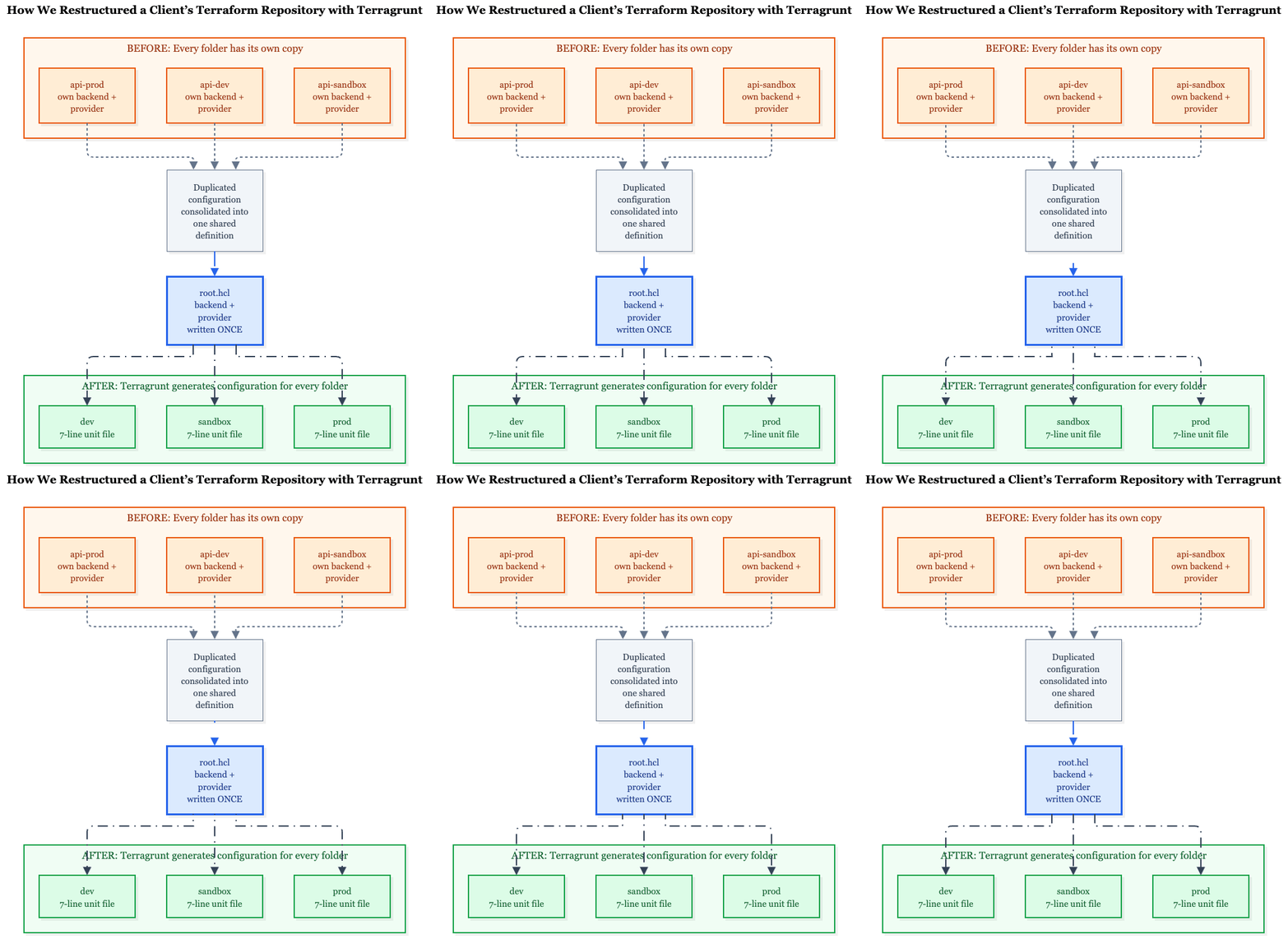
Before and after: replacing duplicated Terraform configuration with shared configuration.
The old repository had a separate folder for each service in each environment. For a given service, the production and sandbox folders contained around 45 identical lines of configuration. The main differences were the Terraform state key and a few environment-specific values.
# Repeated in almost every folder
terraform {
  backend "s3" {
    bucket = "<state-bucket>"
    key    = "api-prod/terraform.tfstate" # The main difference
    region = "us-east-1"
  }
}

provider "aws" {
  region = "us-east-1"
}

provider "aws" {
  alias  = "use2"
  region = "us-east-2"
}

# Two additional providers for us-west-1 and us-west-2
# were included only in folders that deployed to multiple regions.
Changing provider configuration meant editing dozens of files. The repository also contained outdated copies of modules, such as database and database-v3, along with committed Terraform plan and state files.
The client had four main goals:
- One codebase for all environments: Eliminate duplicated environment folders.
- A small blast radius: Ensure one
applychanges only one component in one environment. - Minimal additional tooling: Introduce no more than one new tool.
- Environment and account isolation: Support development, sandbox, and production across two AWS accounts.
Five Terraform Repository Layouts We Compared
We evaluated five approaches to structuring the Terraform repository:
- A. One root with a separate tfvars file for each environment: One state file manages the entire environment.
- B. One folder per environment: The existing approach, with separate folders for each environment.
- C. Terraform workspaces: Use a single configuration and
terraform workspace selectto choose the environment. - D. Layers with plain Terraform: Use a base root module and separate root modules for individual services.
- E. Layers with Terragrunt: Follow the same layered structure as option D, while using Terragrunt to generate backend and provider configuration.
The comparison below reflects our assessment of these approaches against the client's specific requirements. It is not a benchmark. More dots indicate a better fit for the criterion.
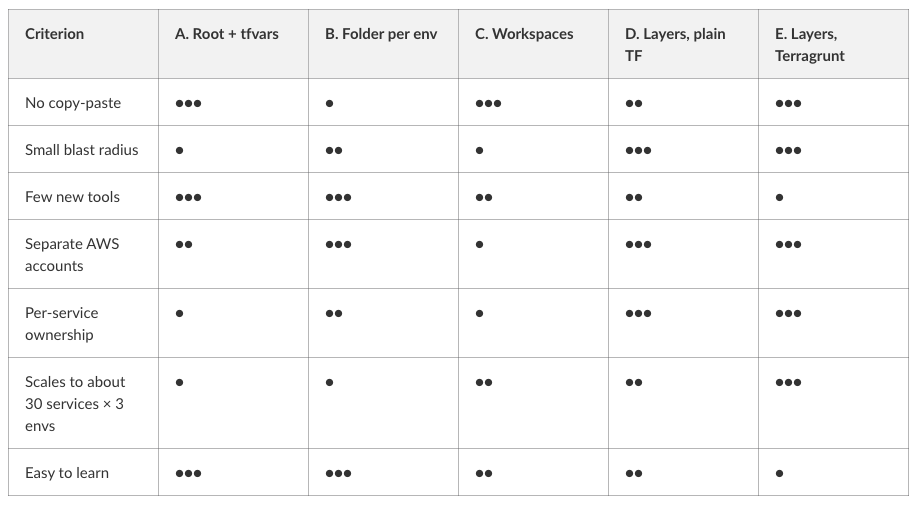
ption E scored lowest for the number of additional tools and ease of learning. However, the client allowed one new tool, so we accepted this trade-off.
Why We Rejected A, B, and C
- A. One root with separate tfvars files: Managing an entire environment in one state creates a larger blast radius. One production service's configuration alone was around 700 lines, and a change to the root configuration could affect any resource managed by that state.
- B. One folder per environment: This approach retains the duplicated configuration we wanted to eliminate.
- C. Terraform workspaces: The client's development and production environments were in separate AWS accounts. CLI workspaces share the same backend configuration and are not recommended for deployments that require separate credentials and access controls. Accidentally selecting the wrong workspace also increases the risk of running operations against the wrong environment.
Both D and E provide smaller, independent states for individual components. The main decision was whether to maintain the shared configuration and dependency wiring manually or let Terragrunt handle it.
What Plain Terraform Cannot Do
Using layers with plain Terraform (option D) reduces the blast radius, but it does not eliminate configuration duplication or the need to coordinate deployments across root modules.
- Each root module needs its own backend configuration. Root modules are independent Terraform configurations and cannot inherit backend settings from one another. AWS provider configuration must also be defined for each root that manages AWS resources. With one
baseroot and 30 service roots, this layout could require at least 31 backend configurations and corresponding provider configurations, with more if each environment has separate roots. - Backend blocks cannot use Terraform variables or locals. Backend settings must be defined directly or supplied through
-backend-configduringterraform init. This adds configuration work when managing many independent roots. - Reading outputs from another layer requires repeated configuration. Each
terraform_remote_stateblock needs the relevant backend details, including the state bucket and key. - Terraform does not automatically coordinate applies across independent root modules. You need a script or another orchestration mechanism to ensure the
baselayer is applied before dependent services.
Terragrunt addresses these problems by centralising backend and provider configuration and coordinating dependencies between components. It does not replace Terraform modules; Terraform modules remain responsible for defining the underlying infrastructure.
Why Not Something Else?
- OpenTofu: Its support for variables and locals in backend configuration addresses one limitation of Terraform. However, you still need provider configuration for each root module and a way to coordinate operations across roots. Switching to OpenTofu would also mean replacing the Terraform tooling the team already uses rather than adding a wrapper around it.
- Terragrunt stacks: Terragrunt stacks, defined using
terragrunt.stack.hcl, provide another way to generate units from a shared configuration. We chose_envcommonincludes because they follow an established pattern and keep each unit in a separate, readableterragrunt.hclfile. Stacks introduce another concept to learn, which did not fit our goal of keeping additional tooling simple. We can revisit them if our requirements change. - Other wrappers (Terramate and Atmos): Both tools address similar infrastructure management challenges but introduce their own workflows and configuration approaches. Atmos uses YAML-based stack configuration, while Terramate provides stack management and change detection. We needed a wrapper to centralise backend and provider configuration and coordinate dependencies. Terragrunt met those requirements using HCL, the same language already used throughout the repository.
Our Terragrunt Setup
We kept Terragrunt's responsibilities focused on three things: generating backend configuration, generating provider configuration, and coordinating dependencies between infrastructure components. Terraform modules remain responsible for defining the underlying resources.
Each unit lives in its own directory, contains a terragrunt.hcl file, and has its own Terraform state. The unit configuration includes root.hcl for shared settings and an _envcommon file for component-specific configuration shared across environments.
Our _envcommon pattern follows Gruntwork's terragrunt-infrastructure-live-example.
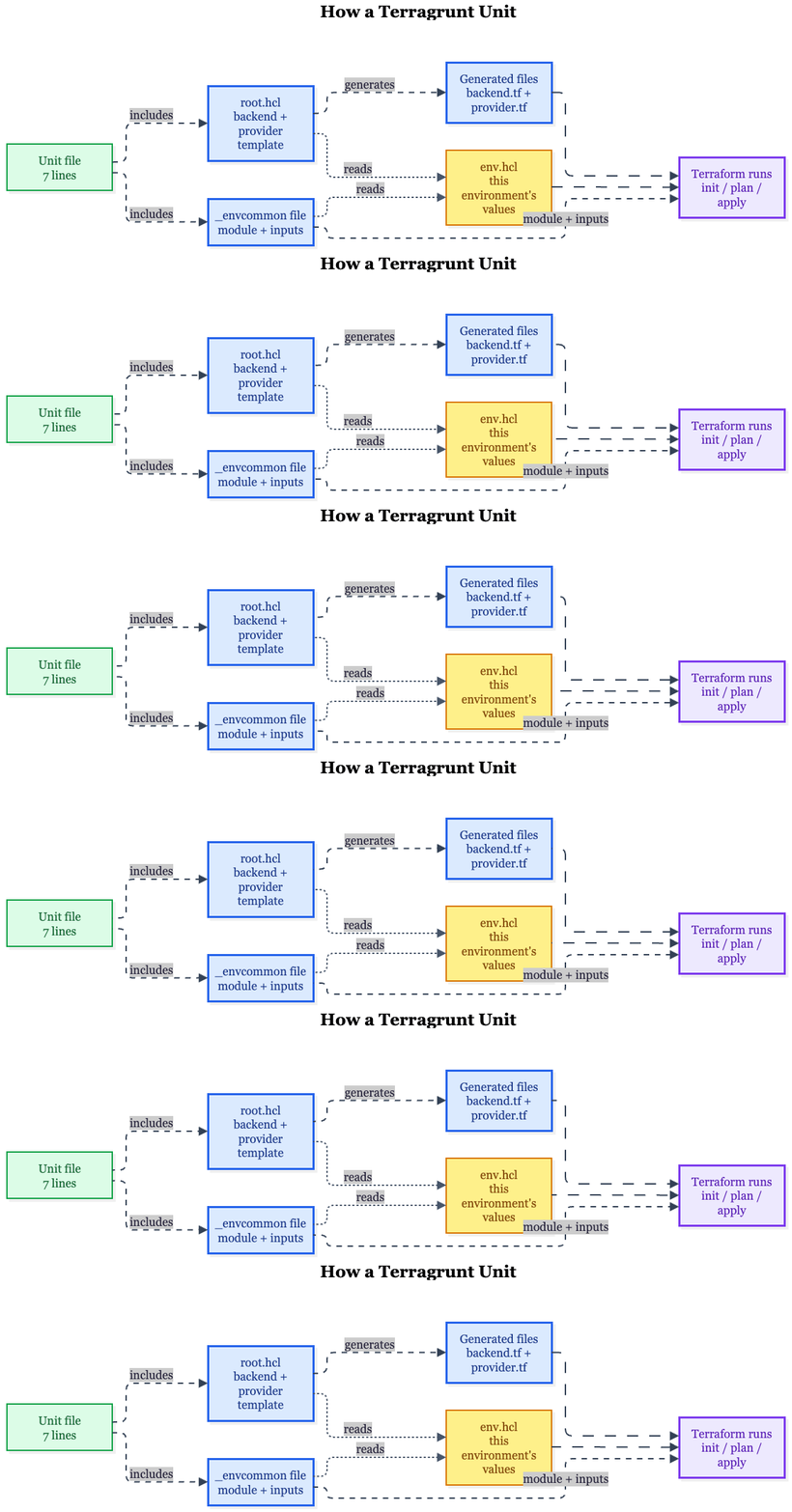
How one unit is assembled: two includes, one environment file, and generated backend and provider files.
infra/
├── root.hcl                  # backend + provider, written once
├── bootstrap/                # plain Terraform: state bucket + KMS key
├── modules/                  # plain Terraform modules
│   ├── base/                 # VPC, shared ALB, ECS cluster, security groups
│   └── services/<service>/
└── live/
    ├── _envcommon/           # each component declared once
    │   ├── base.hcl
    │   └── services/<service>.hcl
    ├── dev/
    │   ├── env.hcl           # dev values
    │   ├── base/terragrunt.hcl
    │   └── services/<service>/terragrunt.hcl
    ├── sandbox/              # same shape
    └── prod/                 # same shape
root.hcl
locals {
  env = read_terragrunt_config(find_in_parent_folders("env.hcl")).locals

  # Only prod's env.hcl sets these; dev and sandbox use the fallbacks
  owner_tag       = try(local.env.owner, "platform")
  environment_tag = try(local.env.environment_tag, "${local.env.name}-platform")
}

remote_state {
  backend = "s3"

  generate = {
    path      = "backend.tf"
    if_exists = "overwrite_terragrunt"
  }

  config = {
    bucket       = local.env.state_bucket
    key          = "${path_relative_to_include()}/terraform.tfstate"
    region       = local.env.region
    profile      = local.env.aws_profile
    encrypt      = true
    kms_key_id   = local.env.state_kms_key_arn
    use_lockfile = true
  }
}

generate "provider" {
  path      = "provider.tf"
  if_exists = "overwrite_terragrunt"

  contents = <<EOF
provider "aws" {
  region  = "${local.env.region}"
  profile = "${local.env.aws_profile}"

  # Stop if the credentials point to the wrong account
  allowed_account_ids = ["${local.env.account_id}"]

  default_tags {
    tags = {
      "deployed-via" = "terraform"
      Owner          = "${local.owner_tag}"
      Environment    = "${local.environment_tag}"
    }
  }
}
EOF
}path_relative_to_include()uses the unit's path relative toroot.hclto generate the state key, so keys do not need to be selected manually. Becauseroot.hclsits ininfra/, the key starts withlive/, for examplelive/dev/base/terraform.tfstate.allowed_account_idsstops provider operations if the AWS credentials point to an account outside the configured account ID.- The old repository also had additional regional providers, including the
use2alias and providers forus-west-1andus-west-2. The services we migrated did not use them, so the generated provider uses a single region from the environment'senv.hcl.
env.hcl
Each environment has a single env.hcl file containing its configuration values. Every unit in that environment reads this file, keeping environment-specific settings in one place.
# live/dev/env.hcl
locals {
  name              = "dev"
  region            = "us-east-2"
  account_id        = "111111111111"
  aws_profile       = "dev-sso"
  state_bucket      = "example-tf-state-111111111111"
  state_kms_key_arn = "arn:aws:kms:us-east-2:111111111111:key/..."
  name_prefix       = "app"
  vpc_cidr          = "10.0.0.0/16"
}
The Unit File
Each service has a terragrunt.hcl file that includes the shared root configuration and the component configuration from _envcommon.
# live/dev/services/api/terragrunt.hcl
include "root" {
  path = find_in_parent_folders("root.hcl")
}

include "common" {
  path = "${get_terragrunt_dir()}/../../../_envcommon/services/api.hcl"
}
This file is identical across environments. To add the API service to another environment, you can reuse the same seven lines.
_envcommon
The _envcommon directory defines each component once for all environments. Environment-specific settings are stored in a map, making it easy to compare resource configurations across development, sandbox, and production.
# live/_envcommon/services/api.hcl
locals {
  env = read_terragrunt_config(
    find_in_parent_folders("env.hcl")
  ).locals

  cfg = {
    dev     = { cpu = 256,  memory = 512,  desired_count = 1 }
    sandbox = { cpu = 256,  memory = 512,  desired_count = 1 }
    prod    = { cpu = 1024, memory = 2048, desired_count = 3 }
  }[local.env.name]
}

terraform {
  source = "${get_repo_root()}/infra/modules//services/api"
}

dependency "base" {
  config_path = "${get_terragrunt_dir()}/../../base"

  # Fake outputs so validate/plan work before base exists
  mock_outputs_allowed_terraform_commands = ["validate", "plan"]

  mock_outputs = {
    cluster_arn        = "arn:aws:ecs:us-east-2:000000000000:cluster/mock"
    vpc_id             = "vpc-mock"
    private_subnet_ids = []
  }
}

inputs = {
  name_prefix        = "${local.env.name_prefix}-${local.env.name}"
  cluster_arn        = dependency.base.outputs.cluster_arn
  vpc_id             = dependency.base.outputs.vpc_id
  private_subnet_ids = dependency.base.outputs.private_subnet_ids
  cpu                = local.cfg.cpu
  memory             = local.cfg.memory
  desired_count      = local.cfg.desired_count
}
The // in the source path tells Terragrunt to use services/api as the module directory while retaining the surrounding modules directory for resolving relative module references.
The dependency block reads outputs from the base unit and lets Terragrunt determine the dependency order. When you run terragrunt run --all apply from live/dev, Terragrunt can apply the base infrastructure before the API service. Older Terragrunt versions use run-all apply.
Use run --all when you need to operate across an environment's units. For day-to-day changes, run terragrunt apply from the individual unit's directory to limit the operation to that unit's state.
State Layout
Each Terragrunt unit has its own Terraform state file. The state key is derived from the unit's path relative to root.hcl, so state files follow the same structure as the repository.
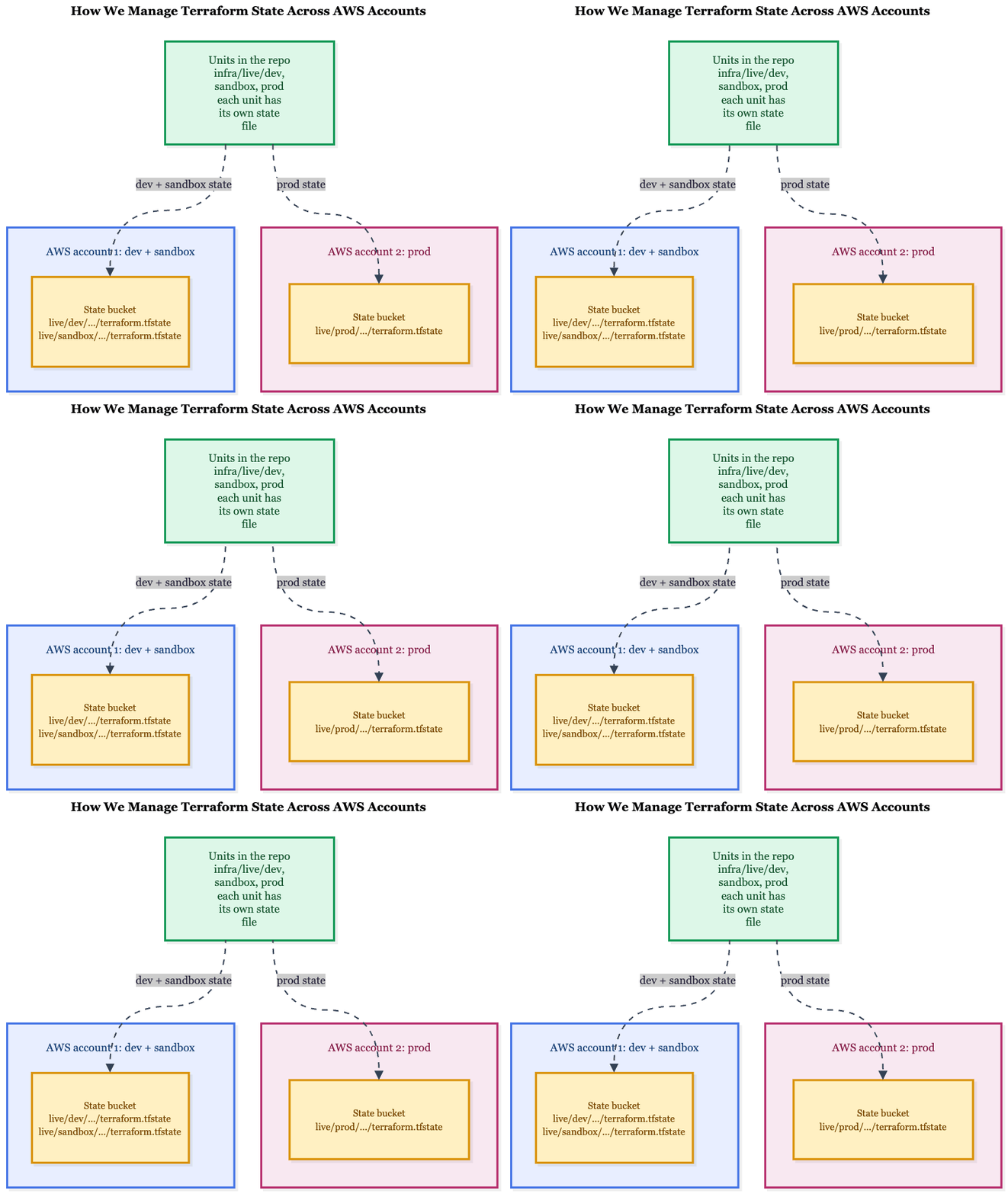
One state file per unit, one S3 bucket per AWS account.
The S3 bucket structure mirrors the repository's live/ directory:
s3://<dev-and-sandbox-account-bucket>/
└── live/
    ├── dev/
    │   ├── base/terraform.tfstate
    │   └── services/api/terraform.tfstate
    └── sandbox/
        └── ...

s3://<prod-account-bucket>/
└── live/
    └── prod/
└── ...- One bucket per AWS account: Development and sandbox share an AWS account, so they use the same bucket with separate
live/dev/andlive/sandbox/prefixes. Production uses a separate bucket in its own account. - Smaller blast radius: Each unit has an independent state file. An apply in
prod/services/apioperates on that unit's configuration and state, rather than managing every service through one shared state. - S3-native state locking: We use
use_lockfile = truewith Terraform 1.11 or later, avoiding the need for a DynamoDB table solely for state locking. See Terraform S3 Locking Without DynamoDB and the Terraform S3 backend documentation. - Encryption and access control: State files are encrypted using the account's KMS key, and the bucket policy blocks requests that do not use TLS.
Creating the State Bucket
Terragrunt supports bootstrapping an S3 backend bucket with settings such as versioning, encryption, and access logging. This functionality is opt-in, and the available commands depend on the Terragrunt version. Check the documentation for the version you use before running the bootstrap command.
We created the state buckets using plain Terraform instead. This keeps the S3 buckets, KMS keys, and bucket policies managed as regular infrastructure code.
That is why infra/bootstrap/ contains plain Terraform configuration. It is run once per AWS account to create the resources needed for remote state storage.
Dev Was New, Prod Was Not
Development and sandbox were deployed into a new, empty AWS account, so there were no existing resources to import. We applied the Terraform modules and verified that the infrastructure was created successfully.
Production was different. It remained in the existing AWS account, alongside resources still managed by the old repository. We made three changes to handle this safely.
1. Reuse the Existing VPC
We initially created a module to look up the existing VPC. Later, we removed that module because the VPC was stable and did not need to be recreated or managed through an additional lookup layer. Instead, production's env.hcl stores the existing VPC IDs directly.
2. Import the Database Configuration Without Taking Ownership
The production Aurora cluster was too important to risk recreating, and the old repository still managed it. We described the existing database in a legacy-db module and added Terraform import blocks for five resources:
- The Aurora cluster
- The writer instance
- The reader instance
- The DB subnet group
- The DB cluster parameter group
The security group and KMS key were referenced rather than imported. We added prevent_destroy to protect the resources from accidental destruction and used ignore_changes for tags still managed by the old repository.
import {
  to = aws_rds_cluster.this
  id = "<existing-cluster-id>"
}

resource "aws_rds_cluster" "this" {
  # Configuration based on the old module's source code

  lifecycle {
    prevent_destroy = true
    ignore_changes  = [tags, tags_all]
  }
}
We wrote the configuration using the old module's source code rather than relying on generated configuration alone. Then we checked the Terraform plan. The expected result was:
5 to import, 0 to add, 0 to change, 0 to destroyThis indicated that Terraform planned to import the five existing resources without proposing other infrastructure changes. However, a clean plan does not prove that every setting matches the live database. For example, ignore_changes hides tag differences, and some settings, such as the master password, are not returned by AWS for Terraform to compare.
The security group rule required by the new services was created in a separate, small unit. This meant the legacy-db unit did not need to be applied before the ownership handover.
The old repository remained the owner of the database. We used the new unit only for planning and drift checks. Because Terraform import blocks update state during apply, not plan, the plan continued to show five resources to import while the new state remained unchanged.
There was one important risk: applying the new unit would import the database resources into its state while the old repository still managed them. Running terragrunt run --all apply from live/prod could trigger that import unintentionally.
To prevent this, we excluded the legacy-db unit from run --all apply using an exclude block:
# In the legacy-db unit's terragrunt.hcl
exclude {
  if      = true
  actions = ["apply"]
}
This requires a Terragrunt version that supports the exclude block, such as 0.68.16 or later. The older skip attribute is no longer supported in the versions discussed here.
The exclude block keeps the unit available for run --all plan, allowing us to continue checking for drift. Alternatively, --queue-exclude-dir can exclude the unit from the entire run, including plans.
Both approaches apply to run --all; they do not prevent someone from running terragrunt apply directly inside the unit's directory. They are safeguards against accidental bulk operations, not a complete access-control mechanism.
When the old repository was ready to hand over ownership, the sequence was important: first, apply the import in the new unit; then, remove the resources from the old repository using a removed block with destroy = false.
removed {
  from = aws_rds_cluster.this # Resource address in the old repository

  lifecycle {
    destroy = false
  }
}
This tells Terraform to stop managing the resource in the old configuration without destroying the actual database. The from address must match the resource address in the old repository.
We also kept two limitations of prevent_destroy in mind. It only protects a resource while the resource block remains in the configuration, and it does not prevent someone from removing the resource from state with terraform state rm. It is a safeguard, not a lock.
3. Apply Production Tags Without Changing Development or Sandbox
Production required different default tags. We handled this through the try() fallbacks in root.hcl:
owner_tag       = try(local.env.owner, "platform")
environment_tag = try(
  local.env.environment_tag,
  "${local.env.name}-platform"
)
Only production's env.hcl defines the custom values. Development and sandbox use the defaults, so their plans showed zero changes from this tag configuration. New production resources also use a new name prefix to avoid colliding with resources managed by the old repository.
Problems We Hit
During the migration, we encountered several issues that changed how we structured the repository and managed deployments.
1. Backend Authentication Is Separate from Provider Authentication
Initially, we configured the AWS profile only in the provider block. However, terragrunt init failed with No valid credential sources found because the S3 backend also needed valid credentials.
Fix: Configure profile in remote_state as well as in the AWS provider configuration.
2. Windows Path Length Limit
A module cloned into .terragrunt-cache exceeded the Windows path length limit of 260 characters, causing terraform init to fail with Filename too long.
Fix: Enable long paths in Git:
git config --global core.longpaths true3. Use Mock Outputs Only for Validation and Planning
The mock_outputs setting lets us run validation and planning before the base unit exists. However, using fake outputs during an apply could pass invalid values, such as a mock VPC ID, to a real deployment.
Fix: Restrict mock outputs to validate and plan using mock_outputs_allowed_terraform_commands. This prevents the configured mocks from being used for apply.
4. CI and Terraform Conflict over ECS Task Definitions
Our CI pipeline registers a new ECS task definition with every release. The next Terraform apply could then revert the task-definition change made by CI.
We wanted Terraform to ignore task-definition changes for services deployed by CI. However, lifecycle.ignore_changes cannot be controlled using a variable. We used a flag to switch between two copies of the aws_ecs_service resource with count.
This changed the resource address, causing Terraform to plan a destroy and create instead of treating it as the same service.
Fix: Run terragrunt state mv to move the existing resource to its new address before applying. A Terraform moved block is another option when the address change is permanent.
5. Decide Early Where Service Configuration Belongs
We initially used one generic service module configured through _envcommon. Over time, it accumulated conditional logic to handle differences between services.
We eventually split it into a core module and a small wrapper module for each service. Fixed settings, such as ports and health-check paths, moved into the relevant wrapper.
Starting with this separation would have reduced conditional logic and avoided a later refactor.
Frequently Asked Questions
When should you use Terragrunt with Terraform?
Terragrunt is useful when managing multiple Terraform states, environments, or AWS accounts and reducing duplicated configuration.
How does Terragrunt differ from Terraform?
Terraform provisions infrastructure using modules. Terragrunt manages shared configuration, passes inputs, and coordinates dependencies between Terraform units.
Why use Terragrunt instead of Terraform workspaces?
Terragrunt supports separate states and environment-specific configurations, making it easier to manage deployments across multiple AWS accounts.
How do you manage Terraform state across AWS environments?
Use separate state files for individual units and S3 buckets for each AWS account. Enable encryption, access controls, and state locking.
Can you migrate existing AWS resources to Terragrunt?
Yes. Terraform import blocks can bring existing resources into a new state. Review the plan carefully and avoid managing the same resources from two state files simultaneously.
Can Terragrunt create an S3 backend bucket?
Yes. Terragrunt supports optional backend bootstrapping. In our setup, we used plain Terraform to create the S3 buckets, KMS keys, and bucket policies.
Conclusion
As our Terraform repository grew, duplicated provider and backend configuration became harder to maintain across services, environments, and AWS accounts. We chose Terragrunt to centralise this configuration and coordinate dependencies between infrastructure components.
We kept Terragrunt focused on backend configuration, provider generation, dependency ordering, and passing inputs. Terraform modules remain responsible for defining the infrastructure. Each unit has its own state, each environment has an env.hcl file, and shared service configuration is defined once.
If you're deciding how to structure a Terraform repository, compare the available approaches against your requirements for state isolation, configuration reuse, and operational complexity. For our client, the decision came down to one question: should we maintain the shared configuration manually or let Terragrunt generate it?
Read More
- https://www.kubeblogs.com/terraform-s3-locking-without-dynamodb/— Learn how Terraform state locking works with S3 and when DynamoDB is still needed.
- Terraform with AI: Build AWS Infra (Cursor + MCP) — Explore practical Terraform workflows for building and managing AWS infrastructure.
- AWS ECS Service Renaming with Terraform: Migration Guide — Learn how to manage Terraform changes safely when migrating existing AWS resources.