
On this page
Bash History Expansion: Why `!` in Passwords Can Cause 401 Errors

Overview
I lost most of a morning to an authentication failure that turned out to have nothing to do with authentication. The fix was obvious afterward, but the problem wasn't where you'd normally look.
Hitting an API with -u user:password from an interactive terminal is common. It also creates a failure mode that most people only notice when something breaks. When a password contains a !, Bash can rewrite the string before curl ever runs. The server then receives a credential you never typed, and every log after that points you toward the wrong system.
This article explains what Bash does with !, why it can affect credentials, and how to avoid it. More importantly, it highlights a debugging habit that is easy to skip: check what actually reached the system before trying to figure out why the system rejected it.
The 401 Authentication Failure
I needed to confirm the Grafana admin credential before wiring it into anything else:
curl -s -u "admin:S3cret!!" https://grafana.example.internal/api/orgThe response was 401 Unauthorized. Grafana logged password-auth.failed, so I assumed the password was wrong and started looking at the configuration:
# [security]
# admin_user = admin
# admin_password = admin
Both lines were commented out. That led me to a simple theory: Grafana stores users in its database after the initial setup, so maybe someone had rotated the password in the UI and I was using an old value. I raised it as a blocker.
That theory was wrong.
The password never reached Grafana unchanged. In an interactive Bash shell, the command is processed before curl runs, and a ! inside double quotes can trigger history expansion and change the string. One simple echo would have shown that before I escalated the issue..
Bash History Expansion: How ! Changes a Password Before curl Runs
In an interactive Bash session, ! starts history expansion. Bash performs history expansion before the command is executed, so the value can be changed before curl ever receives it.

Common forms:
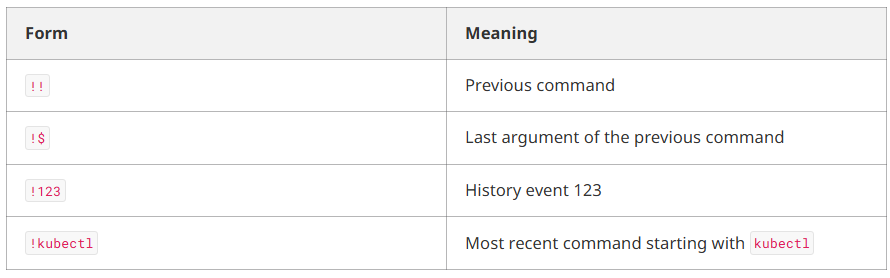
Useful when you mean to recall history. A trap when a password manager hands you a string full of
! and you paste it into double quotes.History expansion only runs in interactive shells. The same command can work fine in a script but fail when you paste it into your terminal. That is usually history expansion, not networking or caching.! and you paste it into double quotes.History expansion is normally enabled only in interactive shells. The same command can work fine in a script but fail when you paste it into your terminal. That is usually history expansion, not networking or caching.
#!/usr/bin/env bash

# fine in a non-interactive script
curl -s -u "admin:S3cret!!" https://grafana.example.internal/api/org
How Bash History Expansion Can Change a Password
Here's the actual issue: in double quotes, ! is not always treated as a normal character. In an interactive shell, Bash may expand it before curl runs. The same behavior applies to echo.
echo "S3cret!Pass"
# bash: !Pass: event not found

echo 'S3cret!Pass'
# S3cret!Pass
Double quotes do not stop history expansion. Single quotes do.
event not found is the safe case. Nothing runs, so you notice the problem. That is closer to what S3cret!Pass often does.
The false 401 comes from the other case: history expansion succeeds and substitutes a value silently.
!! is replaced by your previous command. The same idea applies to !$, !123, and !kubectl:
echo "S3cret!!"
# becomes something like:
# S3cretkubectl get pods -n prod
The shell rewrites the string, the command still runs, and curl sends a password you did not type. The server rejects it for the right reason, but the debugging story points to the wrong place.
How to Fix Bash History Expansion Problems
Best first. The last options are fine for a quick test.
Don't Put Secrets on the Command Line
This is the real answer. Everything below it is a workaround.
Arguments can land in shell history and may also be visible through ps while the process is running. On a shared bastion, that is a leak.
docker login -u admin --password-stdin < ~/.creds/registry
curl -s --netrc-file ~/.netrc https://grafana.example.internal/api/org
Use an Environment Variable Carefully
Better than a bare argument. Not perfect — environment variables can show up in /proc/<pid>/environ and core dumps.
This keeps the password out of shell history and away from ! expansion, but not out of ps. The shell expands $GRAFANA_PW before it starts curl, so the password is still in the curl argument list while it runs.
If you export the variable, it can also show up in /proc/<pid>/environ and core dumps.
read -rs GRAFANA_PW
curl -s -u "admin:$GRAFANA_PW" https://grafana.example.internal/api/org
read takes the line as literal text, so ! is just a character.
Use Single Quotes
Useful for quick interactive testing:
curl -s -u 'admin:S3cret!Pass' https://grafana.example.internal/api/orgThis breaks if the password itself contains a single quote. Use stdin, .netrc, or read instead.
Turn History Expansion Off
set +H                  # bash — e.g. in ~/.bashrc
setopt nobanghist       # zsh — e.g. in ~/.zshrc
Optional if you never rely on !!. Up-arrow still works.
On the day of the incident, I also got a 200 by putting a Base64 Authorization header on the request. That only proved the shell had been the culprit. Base64 is not encryption; HTTPS protects the credential in transit. Prefer stdin, .netrc, or read.
What to Check First When Debugging a 401
A 401 does not always mean the server has the wrong credentials. Sometimes the value was changed before it got there — by the shell, or later by YAML, CI variables, or templates.
Before you dig into config, rotation stories, or the database, ask: did the value I typed stay the same all the way through?
My Grafana theory needed three things at once: commented-out config, a silent password rotation, and nobody mentioning it. Each piece was plausible. Together, they were much less likely than asking, "Did my string actually arrive?"
If your team keeps burning hours on failures where the symptom and the cause live in different layers, that is usually a tooling and workflow problem — secret handling, credential injection, and how values move from laptop to cluster
Frequently Asked Questions
What is Bash history expansion?
Bash history expansion uses ! to recall commands from shell history in interactive Bash sessions.
Can ! in a password cause a 401 error?
Yes. In an interactive Bash shell, ! can trigger history expansion and change the password before curl sends the request.
How do I use ! in a Bash password?
Use single quotes for a quick interactive test:
curl -u 'admin:S3cret!Pass' https://grafana.example.internal/api/orgDo double quotes prevent Bash history expansion?
No. Double quotes do not prevent history expansion. Single quotes do.
Why does the same password work in a Bash script?
History expansion is normally enabled in interactive Bash shells, not non-interactive scripts. This can make the same command behave differently.
How do I disable Bash history expansion?
In Bash, use:
set +HHow do I debug a curl 401 error?
First check whether the credential reaching the server is the same value you entered. A 401 can result from a value being changed before curl sends it.
Conclusion
A 401 does not always mean the credentials are wrong. In this case, Bash changed the password before curl sent the request because it contained !.
The simple lesson is: before blaming the server, check what value actually reached it. Use proper quoting for quick tests and safer methods for handling credentials in regular workflows.
Read More
If you work with API authentication, credentials, or Kubernetes security, these related KubeBlogs articles may also be useful: