
On this page
We Restored the Docker Cache. The Build Still Started From Scratch.

Overview
A successful restore doesn’t always mean the Docker builder is actually using that cache. CI can restore Docker cache into the job while docker build still starts from scratch with no layer reuse.
We ran into exactly that kind of cache miss on one of our suites. Once we started timing the rest of the setup, we found a few more places where time was being wasted. Fixing those issues together cut the total wall time by roughly 80%.
In this article, we’ll unpack why this happens, how to spot it, and how to fix it.
How Docker layer caching actually works
The classic (pre-BuildKit) builder keeps a local cache keyed on a chain. For each instruction in your Dockerfile, it computes a cache key from the parent image ID plus the instruction string. For COPY and ADD, it also hashes the file contents. If it finds a local image whose parent and instruction match, it reuses that layer and moves to the next instruction. The first miss invalidates everything downstream. There is no going back.
That word local is the whole story. The legacy builder only consults images already present in the daemon's own image store, and it will not reach into a pulled or restored image and mine it for layers unless you point at it with --cache-from. It does not go looking. A CI provider that restores hundreds of megabytes of Docker cache has done its job correctly and told the builder nothing.
So the pipeline paid to download ~724 MiB of cache, paid to restore it, and then compiled eleven PHP extensions from source anyway. The cache was fine. Nothing consumed it.

The Diagnosis
Before changing anything, we named the phases on the ~6.7 minute run.
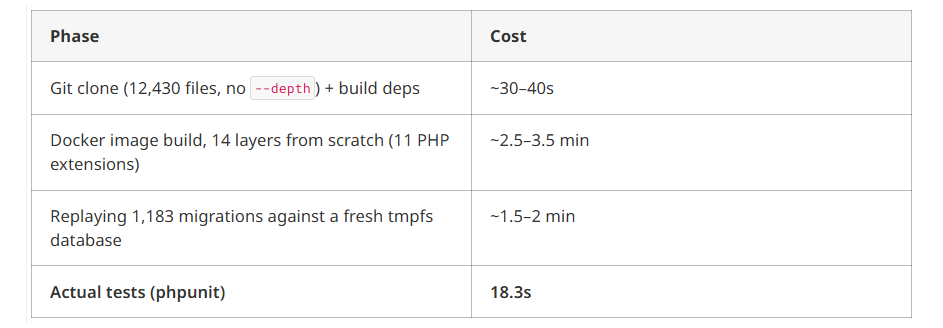
Tests were 4.5% of what people called the “test suite.” The plan was to shard those 18 seconds across four runners — and leave the real bottlenecks alone.
The Docker side looked like this:
caches:
  - docker
It worked as written. Every run, Bitbucket restored ~724 MiB. Green checkmark.
Build command, roughly:
docker build -t app:ci .Zero layers reused. Every run. The pipeline downloaded the cache, restored it, then compiled eleven PHP extensions from source. The cache was fine. Nothing consumed it.
Catch the same miss with phase timers and BuildKit plain progress:
t() { local label=$1; shift; local s=$(date +%s); "$@"; echo "PHASE ${label} took $(($(date +%s)-s))s" >&2; }

t clone   git clone --depth 50 "$REPO" src
t build   docker build -t app:ci .
t migrate ./bin/migrate
t tests   ./vendor/bin/phpunit
DOCKER_BUILDKIT=1 BUILDKIT_PROGRESS=plain docker build . 2>&1 | tee build.log
BuildKit prints CACHED on reused steps and a duration on the ones that ran. Expect hits and see none? Same class of bug.
The solution
We used BuildKit with a registry cache and mode=max. Below is that path first, then lighter alternatives if you are not there yet.
Fix the Docker cache (what we used)
If you compile in a multi-stage builder stage, registry cache + mode=max keeps cache for stages that never ship in the final image — often ~3 minutes vs ~20 seconds when warm.
docker buildx create --use --name ci-builder

docker buildx build \
  --cache-from type=registry,ref=registry.example.com/app:buildcache \
  --cache-to   type=registry,ref=registry.example.com/app:buildcache,mode=max \
  -t registry.example.com/app:ci \
  --push \
  .
Cache sits on a separate tag. App image stays clean. GitHub Actions: type=gha. Self-hosted runner with disk: type=local,dest=/cache.
Bitbucket shape (consume cache, not only restore CI’s docker cache):
# bitbucket-pipelines.yml (shape, not a full production file)
image: docker:24

pipelines:
  default:
    - step:
        services:
          - docker
        script:
          - docker buildx create --use --name ci-builder || true
          - |
            docker buildx build \
              --cache-from type=registry,ref=$REGISTRY/app:buildcache \
              --cache-to   type=registry,ref=$REGISTRY/app:buildcache,mode=max \
              -t $REGISTRY/app:ci \
              --push \
              .
Drop DOCKER_BUILDKIT=0 if it is still hanging around. Older configs often set it to silence a warning or dodge a plugin, then never remove it. With BuildKit off you lose parallel stages, content-addressed cache keys, RUN --mount=type=cache, and registry --cache-to.
Alternatives if you are not on buildx yet
Inline cache — minimal change, one image, one push:
export DOCKER_BUILDKIT=1
docker pull registry.example.com/app:cache || true

docker build \
  --build-arg BUILDKIT_INLINE_CACHE=1 \
  --cache-from registry.example.com/app:cache \
  -t registry.example.com/app:cache \
  .

docker push registry.example.com/app:cache
|| true keeps a cold first run from failing the job. Inline cache only covers layers in the final image — fine for simple Dockerfiles, weak when compile work lives in intermediate stages. Use mode=max when those stages are what you are paying for.
Legacy --cache-from without inline metadata is the minimum version. It only works if the pulled image still carries usable build history — which is why the options above exist.
Stop replaying every migration on every PR
Second biggest cost: 1,183 migrations, one by one, every run. The tests need the schema. They do not need the path that built it.
Commit a snapshot:
mysqldump --no-data --skip-comments --routines \
  --databases app_db > db/schema.sql
In CI:
mysql < db/schema.sqlTwo minutes down to about five seconds. Fail the PR when the snapshot drifts:
mysqldump --no-data --skip-comments --routines --databases app_db \
  | diff -u db/schema.sql - || exit 1
Pin dump flags so formatting noise does not flake the check. Keep one nightly job that replays migrations end to end on production-like data. That is where broken migrations show up. Charging every PR for the full replay is waste.
Skip the snapshot when the PR itself must prove the migration path, or when you need seeds beyond schema. Postgres: pg_dump --schema-only. Dump what your tests load — nothing more.
What we changed, and what we left alone
By return per hour of work:
- Schema snapshot instead of migration replay — ~2 min → ~5s
- Registry cache with buildx
mode=max(or a prebuilt base image with extensions baked in) — ~3 min → ~20s --depth 50on the clone — cheap, do it if the job does not need full history- Parallel test runners — only if test time grows.
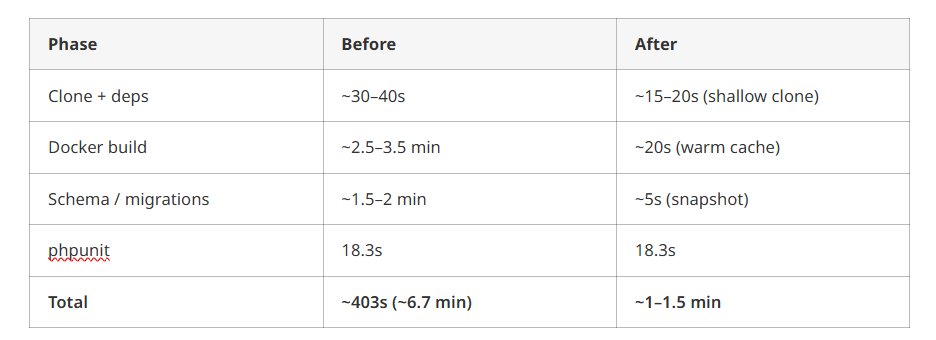
Item 4 had the most consensus and almost no gain. Split an 18-second phase across four runners and you save about 13 seconds, then spend the rest of the quarter chasing flakes.
Before you parallelize tests, check
- Cache restore is green, but the build shows zero
CACHEDlines. DOCKER_BUILDKIT=0is still in the config.- Clone is full depth with no need for history.
- Every PR replays hundreds of migrations.
- Actual test time is under ~30 seconds.
Time your pipeline before you rewrite it.
At KubeNine, we spend a lot of time inside CI pipelines and Kubernetes clusters, finding bottlenecks that are easy to overlook. If your builds are taking longer than they should, it’s worth measuring where that time is actually going.
Frequently Asked Questions
Why does Docker restore a cache but not use it?
Docker needs a configured cache source such as --cache-from to reuse restored layers.
What does --cache-from do?
It tells Docker where to find reusable build layers during the build.
What is BuildKit mode=max?
mode=max keeps cache from intermediate build stages, which helps multi-stage Docker builds reuse more layers.
Can parallel tests make CI faster?
Yes, but only when tests are a major part of the pipeline. In our case, tests took about 18 seconds, so they were not the main bottleneck.
Conclusion
The biggest lesson here was simple: a green cache restore does not mean Docker is actually using that cache. We were spending time restoring hundreds of megabytes of cache, only to rebuild the same layers from scratch.
Once we measured each part of the pipeline, the wasted time became easier to see. Fixing the Docker cache, replacing repeated migration replays with a schema snapshot, and making a few smaller changes brought the total wall time down by roughly 80%.
Measure the pipeline first. Find where the time is actually going, then fix the biggest bottlenecks.
Read More
If you're working on Docker and CI pipelines, you may also like:
- How to Avoid GitHub Token Rate Limiting Issues — Practical ways to handle GitHub token rate limits in CI.
- This One YAML Key Makes GitHub Actions Workflow Runs Easy to Identify — Make CI workflow runs easier to identify with
run-name. - Terraform with AI: Build AWS Infra (Cursor + MCP) — Use AI, Cursor, and MCP Server in Terraform workflows.