
On this page
Kubernetes Grace Period Is Not Your Grace Period

Overview
Your Kubernetes grace period might not be your real grace period.
terminationGracePeriodSeconds defines the Pod's termination grace-period budget, but it doesn't guarantee that your application gets that entire window. Inside the container, other components can have their own shutdown rules and timeouts. If one of those layers ends the process earlier, your application can be killed long before the Kubernetes grace period expires.
If you only look at the Kubernetes setting, you can end up with a system that looks generous on paper but still kills jobs much earlier in practice. When these timeouts are not aligned, deployments, node drains, and other routine operations can turn into interrupted jobs and hard-to-explain failures.
In this article, we follow the shutdown chain, see why the shortest shutdown timeout is the one that matters, and show how to identify and prevent these hidden gaps.
The problem
Jobs were dying in the middle of deployments. The runbook described a 90-second window for workers to finish their work, so graceful shutdown looked like it was already covered.
When we checked the actual configuration, that 90-second window did not exist. Kubernetes was configured with a 300-second terminationGracePeriodSeconds, but one worker tier ran supervisord without an explicit stopwaitsecs setting. That tier therefore used supervisord's 10-second default.
Jobs on that tier had configured timeouts of 180–400 seconds, depending on the job type. Staging showed no such failures, even though it used the same chart with the same missing setting. A clean staging run proved nothing about shutdown behavior.
The result was simple:
Runbook:                               90s   (not found in any config file)
Kubernetes grace period:              300s
Supervisor stopwaitsecs (tier B):      10s   <- not set, so the default applies
Configured job timeouts:          180–400s

Actual shutdown window:                10s
Kubernetes allowed 300 seconds, but the worker was stopped after 10.
Shutdown is not controlled by Kubernetes alone. There can be several layers between Kubernetes and the application, and each layer can have its own timeout. If those timeouts are not aligned, a shorter timeout underneath cuts the shutdown short, even when the Kubernetes setting looks perfectly reasonable.
How the shutdown actually works
When Kubernetes needs to stop a container, it does not kill the process immediately. It first runs the preStop hook, if one is defined, and then sends SIGTERM to the container's main process. This gives the application a chance to finish its current work and exit cleanly. If the container is still running when the grace period expires, Kubernetes sends SIGKILL.
The length of that Pod-level window is controlled by terminationGracePeriodSeconds. If it is set to 300 seconds, Kubernetes is willing to wait up to five minutes. If it is not set, the default is 30 seconds. But that does not mean the application is guaranteed five minutes.
There can be another layer inside the container that manages the application. In this incident, that layer was supervisord, running as the container's main process (PID 1). When supervisord receives SIGTERM, it forwards a stop signal to each program it manages and then waits for that program to exit. The wait is controlled by the program's stopwaitsecs setting, which defaults to 10 seconds when it is not configured. If the program has not exited by then, supervisord sends it SIGKILL.
So the shutdown looked like this:
Kubernetes grace period    300s   (Pod-spec limit)
preStop duration             0s   (no hook defined)
supervisord stopwaitsecs    10s   (kills the worker when it expires)
Longest job needs        up to 400s

Real shutdown window = min(grace period - preStop, stopwaitsecs)
                     = min(300 - 0, 10) = 10s
The job needs up to 400s, so it is cut off.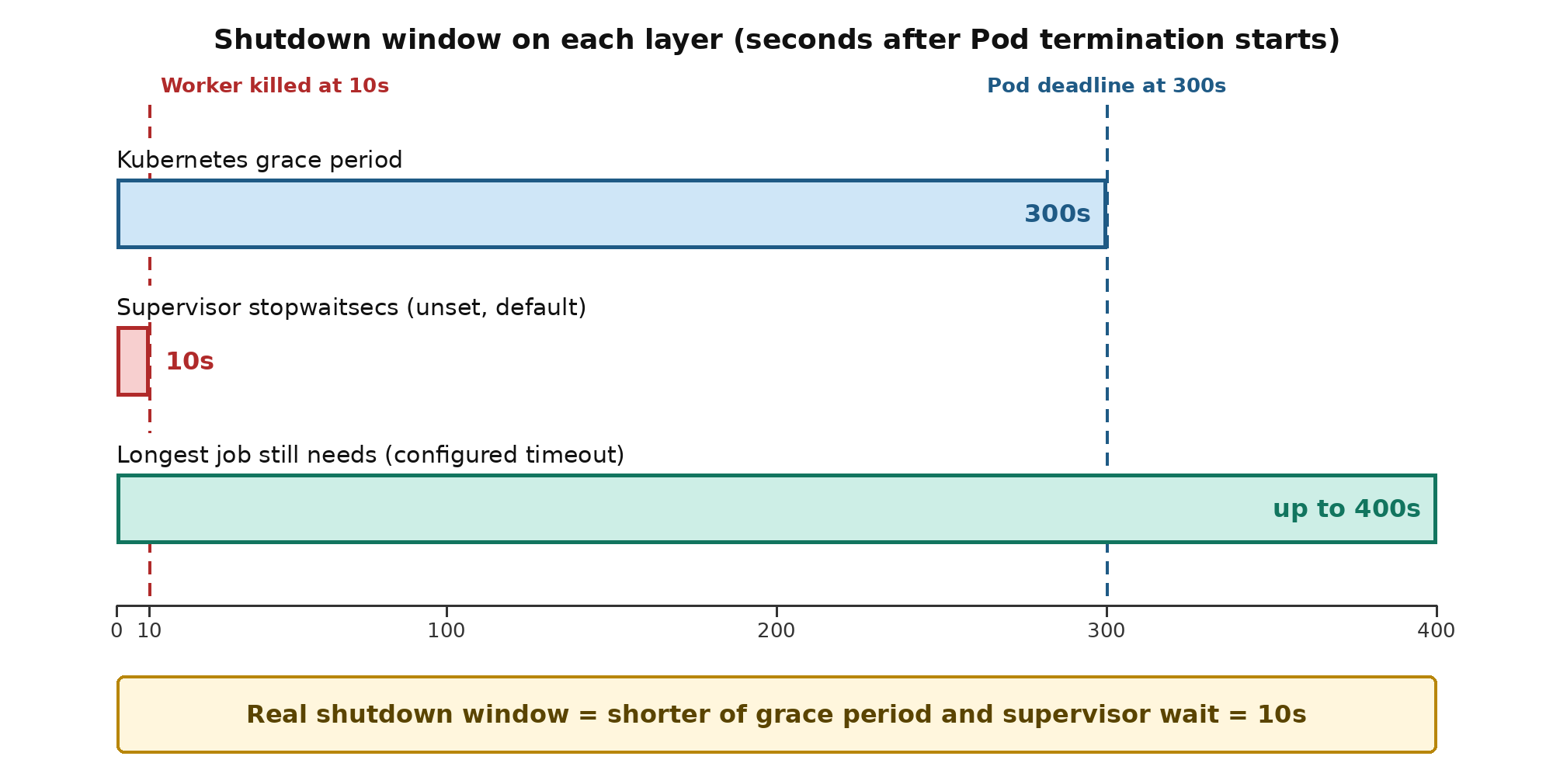
The job timeout is not another limit in this calculation. It is the time the application needs. The window the application actually gets is the shorter of the time left in the Pod grace period and the supervisor wait. If supervisord stops waiting after 10 seconds, the 300-second Kubernetes grace period does not help.
The application side was fine: the worker registered a SIGTERM handler, and the signal-handling support it depends on was present in the image. Supervisord simply never gave the handler a usable window.
A missing configuration becomes a problem when it silently activates a default that is much shorter than anyone expected.
The rule every workload should satisfy:
Longest job timeout <= stopwaitsecs <= (terminationGracePeriodSeconds - preStop duration)This is the rule for a single program. With several programs, the middle term becomes the sum-across-groups value described below.
Keep a margin of a few seconds on the right-hand side. The grace period clock starts before SIGTERM reaches your application, and supervisord needs a moment to exit after its program stops. If stopwaitsecs equals the grace period exactly, Kubernetes can send SIGKILL first.
preStop runs inside the grace period, so its duration is subtracted from the time left for everything else. For pure queue workers, treat preStop as 0 unless you have a deliberate reason to use one. In this chart, there was no preStop anywhere, so for the workers, it was not part of the problem.
Supervisord with several programs. The rule above holds for one program. When supervisord manages several programs, it stops them one group at a time, in reverse priority order, and each program is its own group unless you define a [group:...] section. stopwaitsecs is set per program, but programs in the same group are stopped at the same time, so a group waits for the largest stopwaitsecs among its members. Across groups, the waits add up instead of running in parallel. We checked this with Supervisor 4.3.0 and two programs that ignore SIGTERM, each with stopwaitsecs=5: the first was killed after 5 seconds and the second after 10. When we placed both programs in one [group:...] section, both were killed together after 5 seconds. Across groups, the total must fit in the budget:
sum over groups of (largest stopwaitsecs in the group) <= (grace period - preStop duration)The grace period is not always the final limit. Kubernetes can shorten the window for reasons outside the Pod spec: kubectl delete --grace-period or kubectl drain --grace-period can override it, kubelet graceful node shutdown has its own shutdownGracePeriod, which it splits between regular and critical Pods (or by priority class), autoscalers and node provisioners can enforce their own drain limits, and a Spot or preemptible instance may be reclaimed after a provider-specific warning (about two minutes on AWS). Check these for your environment as well.
One more case sits inside the Pod spec: a liveness or startup probe can carry its own terminationGracePeriodSeconds, which replaces the Pod-level value when a probe failure kills the container.
How the failure unfolded
On each deploy, the broken worker path looked like this:
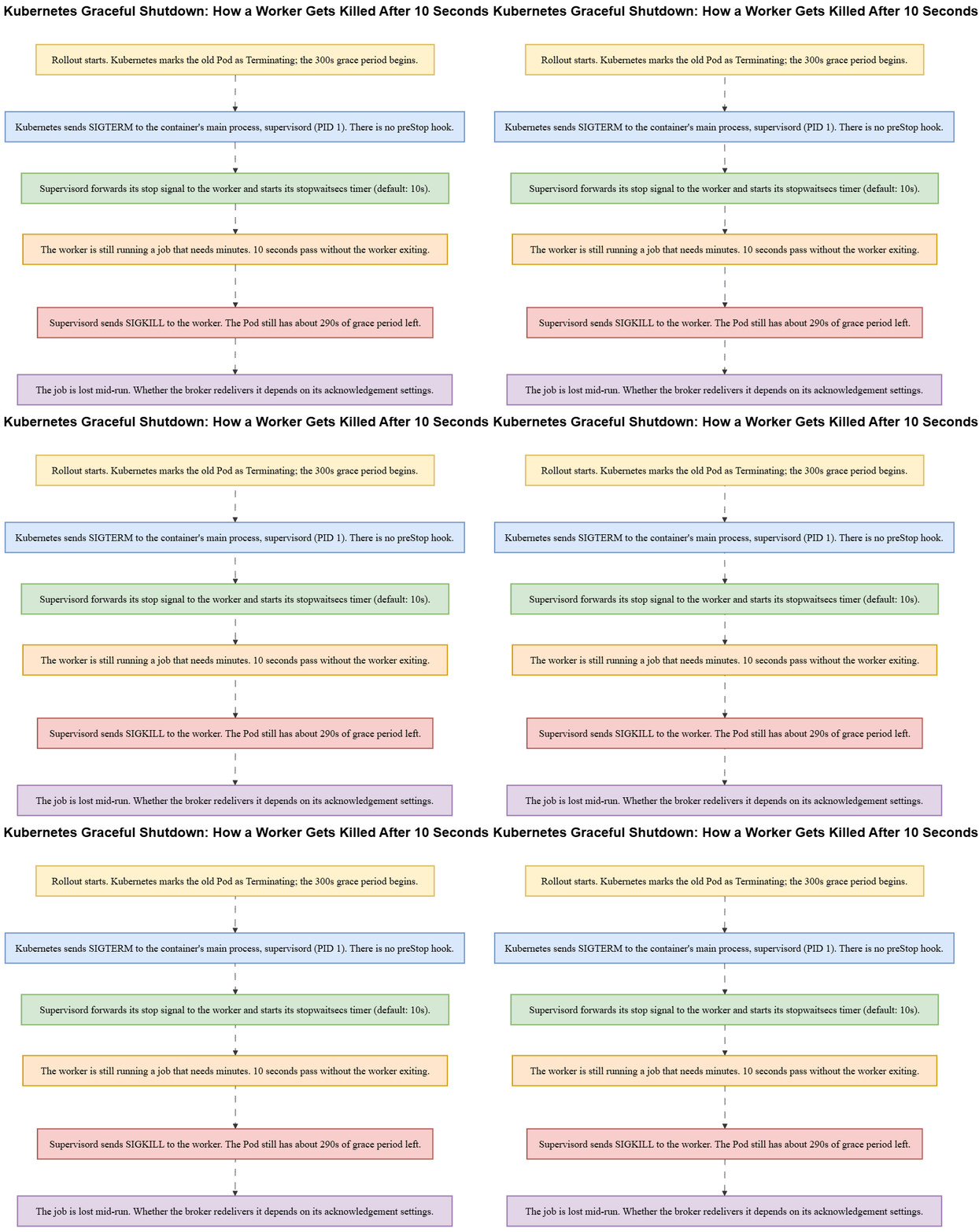
From Kubernetes' point of view, the Pod still had almost five minutes of grace period left. From the job's point of view, the world ended at ten seconds. Supervisord killed the worker inside the container, so the Pod deadline was never reached.
Two worker tiers lived in the same chart:
- Tier A had
stopwaitsecs=300. That is safer day to day, but it is still not enough for jobs that need up to 400s, because 400 is greater than 300. It also leaves no margin against the 300-second Pod grace period. - Tier B had no
stopwaitsecsat all, so the 10-second default applied and jobs were killed on every deploy.
The Pod template set terminationGracePeriodSeconds: 300 for every workload.
Root cause: the missing stopwaitsecs. The same chart had other gaps: no preStop hook, no PodDisruptionBudget (PDB, which limits voluntary evictions such as node drains but does not control rollouts), the Recreate deployment strategy (which stops all old Pods before starting new ones), and probes only on the web tier. These gaps were real, but they were not why jobs died at 10 seconds. Fix the shortest link first.
How to diagnose which layer fired
Before changing any configuration, prove which timeout expired first. Guessing leads to raising terminationGracePeriodSeconds while the supervisor still kills the worker at 10 seconds.
- Kubernetes events and Pod lifetimes: Pods finished terminating within seconds of the rollout starting, far short of the 300-second budget. Kubernetes' own deadline was not what fired.
- Supervisor logs: the worker program was stopped about ten seconds after the stop signal. Look for a line such as
killing '<program>' (<pid>) with SIGKILL, followed bystopped: <program> (terminated by SIGKILL). A stop at almost exactly ten seconds is the fingerprint of the defaultstopwaitsecs. - Application and job telemetry: in-flight jobs still had minutes left on their configured timeout when the process disappeared.
- How the worker ended: a hard stop by
SIGKILL, not a clean exit with status 0. A process killed bySIGKILLis reported with exit status 137 (128 + 9) by most shells and tools. The container itself may still show exit code 0 because supervisord exits normally after killing its child. Check the supervisor logs, not just the container's exit code.
Together, these rule out "the queue is flaky," "Kubernetes only gave us the default 30 seconds," and "our SIGTERM handler is broken." The Pod had a 300-second budget, and the handler never received a usable window. The supervisor default closed it.
The correct configuration
Align the chain so that each layer waits at least as long as the layer below it needs. If any layer is shorter than the job, that layer is your real grace period.
What fixed this incident: set stopwaitsecs deliberately on the broken worker tier, and make the whole chain consistent with the longest job timeout (400s) and the Pod grace period (300s). Those two already disagreed: a 400-second job cannot fit inside a 300-second Pod budget. Pick one of these options:
- raise
terminationGracePeriodSecondsandstopwaitsecsabove the longest job timeout, or - lower the job timeouts so they fit inside the Pod budget, or
- split long jobs so that a deploy never needs a multi-minute drain.
Do not set stopwaitsecs higher than the Pod grace period and call it done. The kubelet will still send SIGKILL at the Pod deadline. Update the runbook so that it stops advertising 90 seconds and states a number that exists in a file.
Illustrative check (not the client's final values; the workers here had preStop = 0):
Longest job timeout  <=  stopwaitsecs  <=  (grace period - preStop)

Example: a 180s job ceiling in a 300s Pod, with a margin on the supervisor wait:
  180 <= 280 <= 300 - 0   OK

This incident's longest job (400s) in a 300s Pod:
  400 <= ? <= 300         impossible until you raise the grace period,
                          lower the job ceiling, or split the jobs
Also confirm that the stop signal actually reaches the application. If a program's command= runs a wrapper script, either exec the application so that it replaces the shell, or make the wrapper trap and forward the signal. If the worker spawns child processes, check supervisord's stopasgroup and killasgroup options as well. Also check stopsignal: supervisord sends TERM by default, so if your worker drains on a different signal, stopsignal must match it. These are separate failure modes from "timeout too short," but they belong on the same checklist.
Finally, the application may have a shutdown timer of its own. Sidekiq, for example, waits 25 seconds by default for jobs to finish (the -t option), and Gunicorn's graceful_timeout defaults to 30 seconds. If your framework has such a setting, treat it as one more layer in the chain and check that it is at least as long as your longest job.
Audit checklist
For every workload, collect four numbers from files. If a number is absent, you are running on a default.
1. Kubernetes grace period    terminationGracePeriodSeconds (default 30s if unset)
2. Supervisor timeout         supervisord: stopwaitsecs (default 10s), per program
                              systemd:     TimeoutStopSec (default 90s unless overridden)
3. Application / job timeout  including any shutdown timer of its own (Sidekiq -t, Gunicorn graceful_timeout)
4. preStop duration           0 for most workers; subtract it from number 1 if set
Then confirm that the rule holds for each workload:
# Every Pod-level grace period set in your charts or manifests
grep -rn "terminationGracePeriodSeconds" ./charts ./manifests

# Every supervisor stop timeout
grep -rn "stopwaitsecs\|TimeoutStopSec" ./docker ./config

# Per file: count of program blocks, then count of stopwaitsecs lines
grep -rcE '^[[:space:]]*\[program:' ./config
grep -rcE '^[[:space:]]*stopwaitsecs[[:space:]]*=' ./config

# What is deployed (<none> in GRACE means unset, so the 30s default applies)
kubectl get deploy,statefulset,daemonset -A -o custom-columns=\
'KIND:.kind,NAMESPACE:.metadata.namespace,NAME:.metadata.name,GRACE:.spec.template.spec.terminationGracePeriodSeconds'
Compare the two counts for each supervisord config file. If there are more [program:] blocks than stopwaitsecs lines, at least one program is still using the default. That is how Tier B shipped. The pattern ignores commented-out lines, but it is only a quick check. It does not count [eventlistener:] or [fcgi-program:] sections, which also accept stopwaitsecs, so also read the effective configuration, including any files pulled in with [include].
The kubectl command covers Deployments, StatefulSets, and DaemonSets. CronJobs keep the Pod template under .spec.jobTemplate.spec.template.spec, and bare Pods carry the setting at .spec.terminationGracePeriodSeconds, so those need separate queries.
If one container runs several supervisord programs, take the largest stopwaitsecs within each [group:...] section, treat a program outside any group as its own group, and add those values across groups. That sum, not each value on its own, must fit in the grace period.
Action items: set the supervisor timeout on every program block, reconcile the job timeouts with the Pod budget, and make every document quote a number that exists in a file. Other zero-downtime gaps (PDB, deployment strategy, probes) may exist in the same chart. Fix them separately; they were not the cause of the 10-second kill.
Whenever a production timeout is quoted, it is worth tracing it back to the file it lives in.
FAQs
1. What is terminationGracePeriodSeconds in Kubernetes?terminationGracePeriodSeconds defines how long Kubernetes gives a Pod to shut down gracefully before it is forcibly terminated.
2. Why can a Kubernetes Pod terminate before its grace period expires?
A process inside the Pod can have its own shorter shutdown timeout. In this case, Supervisor's stopwaitsecs caused the worker to be killed after 10 seconds even though the Pod had a 300-second grace period.
3. What is stopwaitsecs in Supervisor?stopwaitsecs controls how long Supervisor waits for a managed process to exit after sending its stop signal before sending SIGKILL.
4. How should Kubernetes and Supervisor timeouts be configured?
The timeouts should be aligned with the longest job that needs to finish. The job timeout must fit within the Supervisor timeout, and the Supervisor timeout must fit within the Pod's available grace period.
5. How do you prevent workers from being killed during Kubernetes deployments?
Check the complete shutdown chain, including the job timeout, Supervisor stopwaitsecs, preStop duration, and terminationGracePeriodSeconds. The shortest timeout determines the worker's actual shutdown window.
Summary
The main lesson is simple: do not look only at Kubernetes. Look at the whole shutdown chain and check what each layer is actually configured to do.
For each workload, write down the actual timeouts and make sure they line up.
Longest job timeout
       <=
supervisor stopwaitsecs
       <=
terminationGracePeriodSeconds - preStop duration
If a container runs several supervisord programs, use the largest stopwaitsecs within each group and add those across groups.
The shortest shutdown timeout is the one that matters. If a timeout is not explicitly configured, find out which default is being used. And do not rely on documentation alone: a number in a runbook does not mean the system is configured that way.
That is exactly what happened here. The runbook said 90 seconds, Kubernetes allowed 300, and supervisord's 10-second default was what actually killed the jobs.
Trace the shutdown path, check the real configuration, and make sure every layer gives the next one enough time to finish.
Read More
- Stop Wasting Minutes on Every Build — Use This Self-Hosted Runner Setup
https://www.kubeblogs.com/fixing-slow-ci-cd-pipelines-after-migrating-from-jenkins-to-github-actions/ - Jenkins or GitHub Actions? Deciding the Right CI/CD Tool for Your Workflow
https://www.kubeblogs.com/jenkins-or-github-actions/ - Run GitHub Actions Locally with Act: CI Feedback in Seconds
https://www.kubeblogs.com/act-for-github-actions/
At KubeNine, we make sure everything is working the way you think it is. If you want a second pair of eyes on your charts before the next rollout, book a call.