
On this page
Managing Terraform State Locking in S3 Without DynamoDB
Learn when to use Terraform S3 locking without DynamoDB and when DynamoDB is still required for production. Includes architecture, risks, and best practices.

Introduction
If you’ve worked with Terraform, you’ve probably followed the standard setup:
- S3 for storing Terraform state
- DynamoDB for state locking
It’s widely recommended, and most teams implement it without questioning why.
But Terraform has evolved.
Today, Terraform S3 backend locking can handle state locking without DynamoDB. This introduces a simpler alternative — but also raises an important question:
Do you actually need DynamoDB for Terraform state locking anymore?
In this guide, we’ll break this down from a real-world DevOps perspective — not just configuration, but actual decision-making.
What is Terraform State Locking
Terraform state is the single source of truth for your infrastructure.
Whenever you run terraform apply, Terraform reads and updates this state file.
Without proper state locking:
- Multiple users or pipelines can run changes at the same time
- State files can become corrupted
- Infrastructure becomes inconsistent
Terraform state locking ensures that only one operation modifies the state at a time.
How Terraform Locking Works
At a high level:
- Terraform attempts to acquire a lock
- If a lock exists → execution stops
- If no lock exists → execution proceeds
- After completion → lock is released
The difference is in implementation:
- Terraform DynamoDB locking → lock stored as a database record
- Terraform S3 backend locking → lock stored as a
.tflockfile
Terraform S3 Backend Architecture
In a typical Terraform S3 backend setup:
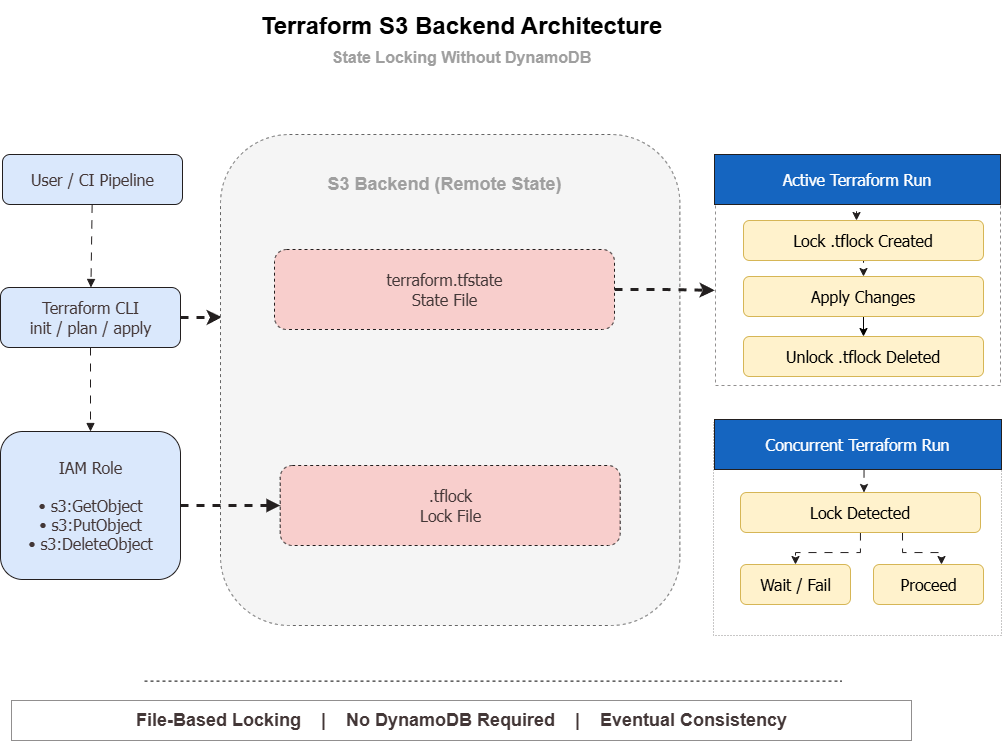
- Terraform CLI interacts with the S3 bucket
- Reads
terraform.tfstate(state file) - Creates
.tflockfile to acquire a lock - Executes infrastructure changes
- Deletes the lock after completion
This removes the dependency on DynamoDB entirely.
Terraform S3 Locking (Modern Approach)
Using Terraform S3 backend locking without DynamoDB simplifies your infrastructure.
Key Benefits
- No additional AWS service required
- Lower operational cost
- Easier setup and maintenance
- Faster onboarding for teams
For small teams and low-concurrency environments, this approach works well.
Terraform DynamoDB Locking (Traditional Approach)
The traditional setup uses DynamoDB for Terraform state locking.
Why DynamoDB Was Used
- Strong consistency guarantees
- Better handling of concurrent operations
- Automatic lock management
This makes DynamoDB more reliable in complex or high-scale environments.
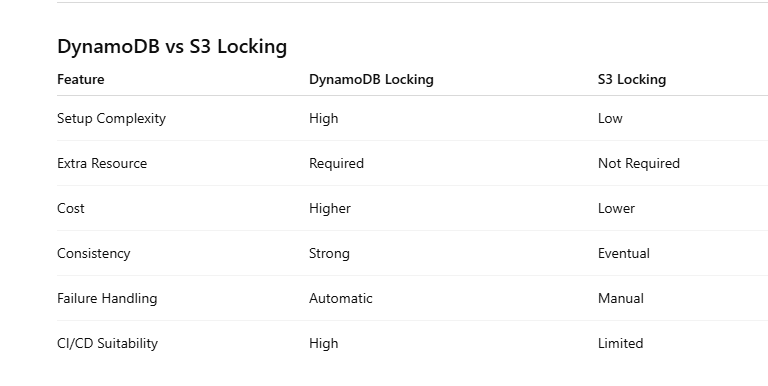
S3 vs DynamoDB Locking (Key Differences)
When to Use Terraform S3 Locking
Use Terraform S3 backend locking without DynamoDB if:
- You have a small team
- Infrastructure changes are controlled
- CI/CD pipelines are not running in parallel
- You want to reduce cost and complexity
This approach is ideal for startups and smaller environments.
When NOT to Use S3 Locking
Avoid S3-only locking in the following scenarios:
High Concurrency CI/CD Pipelines
Multiple pipelines running simultaneously can create conflicts.
Large Teams
More engineers increase the risk of concurrent operations.
Production-Critical Systems
Critical infrastructure requires stronger consistency guarantees.
In these cases, Terraform DynamoDB locking is the safer option.
Real-World Failure Scenario
One common issue with S3 locking occurs when Terraform crashes before releasing the lock.
What Happens
- The
.tflockfile remains in S3 - All future Terraform runs fail
Fix
aws s3 rm s3://your-bucket/path/.tflockThis manual cleanup is something every team using S3 locking should be prepared for.
Best Practices for Terraform S3 Backend
To safely use Terraform S3 backend locking, follow these best practices:
- Enable S3 versioning to protect state
- Use KMS encryption for security
- Separate state files for each environment
- Restrict IAM permissions (least privilege)
- Monitor state access and changes
Migration from DynamoDB to S3 Locking
Migrating from DynamoDB to S3 locking is straightforward.
Step 1: Enable Locking
use_lockfile = trueStep 2: Migrate State
terraform init -migrate-stateStep 3: Validate
Test concurrency scenarios before using this setup in production.
Decision Guide
If you're unsure which approach to choose, use this simple rule:
- Small team → S3 locking
- Low concurrency → S3 locking
- Large team → DynamoDB locking
- High CI/CD activity → DynamoDB locking
FAQ
Is DynamoDB required for Terraform state locking?
No, Terraform S3 backend locking can replace DynamoDB in many cases.
Is Terraform S3 locking safe for production?
Yes for small setups, but not ideal for high-concurrency environments.
What is the biggest risk of S3 locking?
Concurrency issues and stuck .tflock files.
Read More
If you're working on Terraform and cloud automation, you might also find these useful:
- https://www.kubeblogs.com/gcp-billing-kill-switch-with-terraform/
- https://www.kubeblogs.com/fluent-bit-vs-grafana-alloy/
- https://www.kubeblogs.com/how-civo-kubernetes-routes-pod-traffic/
Conclusion
Terraform S3 backend locking provides a simpler alternative to DynamoDB.
For small and medium setups, it reduces complexity and cost significantly.
However, for high-scale environments with frequent concurrent deployments, DynamoDB remains the more reliable option.
The key is choosing the right approach based on your workload — not blindly following defaults.