
On this page
AWS Network Firewall in Production: Fixing Asymmetric Routing
Overview
One of our clients needed better visibility into outbound traffic across their AWS environment to detect potential threats and understand where workloads were connecting.
We implemented AWS Network Firewall in each VPC, combining AWS-managed threat intelligence with custom Suricata rules to monitor egress traffic and generate actionable alerts.
However, routing traffic through a firewall does not guarantee that both directions of a connection are inspected. Without the correct return route, response traffic can bypass the firewall.
In this post, we explain the architecture, firewall rules, routing configuration, and the missing return route that made reliable egress inspection possible.
Deciding Where the Firewall Should Live
The first real decision was whether to use a centralized or distributed firewall architecture.
The AWS reference architecture uses a dedicated inspection VPC connected through a Transit Gateway, with every spoke VPC routing its egress traffic through it. It's a clean design, and on paper, it gets cheaper as the number of VPCs grows.
We didn't choose that approach. Production and non-production environments were still sharing an AWS account, but an account split was coming up. Building a Transit Gateway hub that we'd have to dismantle a few months later didn't appeal to us.
We also wanted the blast radius of a mistake to be limited to one environment rather than affecting all of them. So each VPC got its own firewall, deployed using the same Terraform module with different values.
This approach costs more per environment, as the numbers at the end show, but a mistake only affects one VPC. That made the rollout a lot calmer.
The Topology
Inside each VPC, the design follows a standard pattern. Egress traffic passes through the AWS Network Firewall endpoint before reaching the NAT Gateway.
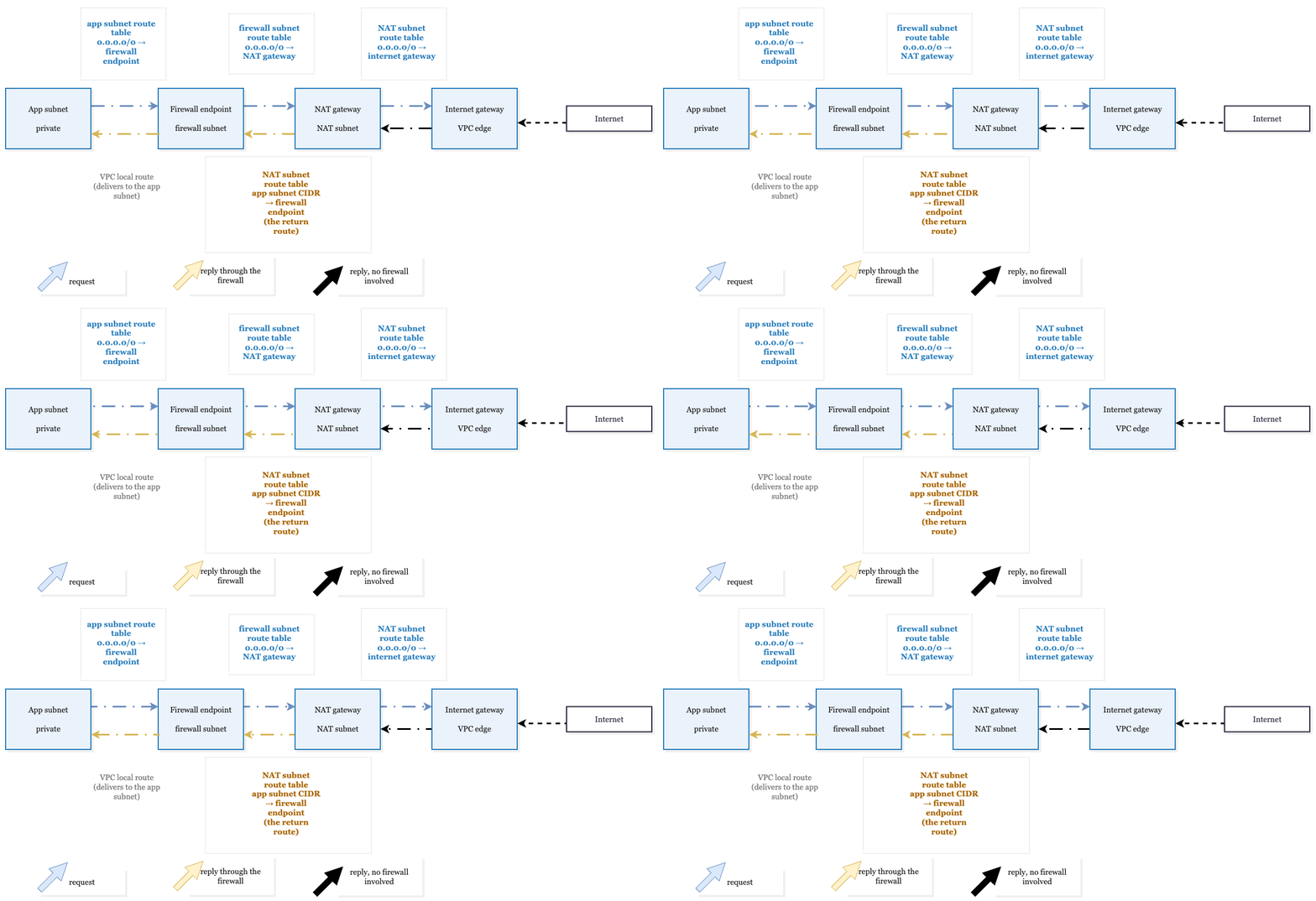
The firewall endpoint lives in its own small subnet. AWS recommends keeping other resources out of this subnet because the firewall can't inspect traffic to or from resources inside it.
To route traffic through the firewall, you need three route tables per Availability Zone:
- App subnet route table: Sends
0.0.0.0/0to the firewall endpoint in the same AZ. - Firewall subnet route table: Sends
0.0.0.0/0to the NAT Gateway in that AZ. - NAT subnet route table: Sends
0.0.0.0/0to the Internet Gateway and includes a return route that points the app subnet's CIDR back to the firewall endpoint.
That last route is the one people forget. We'll come back to it because it's the difference between a firewall that works as intended and one that sees only half of each connection.
We sized the firewall and NAT subnets as /28s. They only hold a firewall endpoint ENI or a NAT Gateway, so there's no reason to allocate more address space than necessary. Each NAT Gateway has its own subnet, keeping the return route in a route table that serves nothing else.
We also kept every hop within a single AZ. If an app subnet in one AZ routes through a firewall endpoint in another, you pay $0.01/GB in each direction and make that endpoint a dependency for an AZ it wasn't intended to serve.
The exception was QA, where a historical quirk meant a single route table spanned all six AZs, with one NAT Gateway behind it. We deployed one firewall endpoint there, accepted the cross-AZ charge because traffic volume was low, and moved on.
Throughput was never the concern. A single endpoint handles far more traffic than any of our environments generate.
Writing the Rules
AWS Network Firewall supports Suricata-compatible rules. Our custom rule group follows one simple principle: alert on traffic that doesn't use an expected protocol, while leaving expected protocols without rules of their own.
Here's a representative section of our rule set:
# Expected egress (tcp/443, tcp/53, udp/53, udp/443 for QUIC, udp/123 for NTP)
# gets no rule at all. The catch-alls below exclude those ports and a few others,
# and unmatched traffic passes, so the managed groups, which run first, see the whole flow.

# Application-specific allowlists go above the catch-alls
pass udp $HOME_NET any -> $EXTERNAL_NET 40000:49999 (msg:"allow-webrtc-media"; sid:1000050; rev:1;)
pass udp $HOME_NET any -> $EXTERNAL_NET 3478        (msg:"allow-turn";         sid:1000051; rev:1;)

# Things we want to hear about
alert tcp $HOME_NET any -> $EXTERNAL_NET 80  (msg:"alert-http-cleartext"; flow:to_server; sid:1000100; rev:1;)
alert tls $HOME_NET any -> $EXTERNAL_NET any (msg:"alert-watched-domain"; flow:to_server, established; tls.sni; dotprefix; content:".example.net"; nocase; endswith; sid:1000150; rev:1;)

# Everything else
alert tcp $HOME_NET any -> $EXTERNAL_NET ![80,443,53,21,22,3389] (msg:"alert-tcp-other"; flow:to_server; sid:1000200; rev:1;)

alert udp $HOME_NET any -> $EXTERNAL_NET ![443,53,123,3478]      (msg:"alert-udp-other";                 sid:1000210; rev:1;)
Don't write port-only pass rules for HTTPS or DNS. A pass that matches ends inspection of that flow, and AWS warns that a TCP rule can match the first packet of the handshake, before the stateful engine can identify the application protocol.
A pass tcp ... 443 therefore ends inspection before the TLS hello arrives, and the managed domain groups never see the hostname. AWS's suggestion for this is the flow keyword, such as flow:established, to_server, which keeps a rule from matching the handshake packets.
The slice above avoids the problem by giving HTTPS and DNS no rule at all. The only pass rules in it are for the WebRTC UDP ranges, and once one of those matches, the rest of that flow is no longer inspected, so the managed groups only ever see its first packet.
A few notes on the syntax, since we tripped on each of these. Port ranges use a colon (40000:49999), and exclusions use ![80,443].
The tls.sni rule is how you alert on a domain rather than block it, and dotprefix with endswith is what makes it cover subdomains too. Its flow:to_server, established keeps it from matching during the handshake. (AWS's own SNI examples also add ssl_state:client_hello, which helps when a ClientHello is fragmented.)
Because SNI only exists in a TLS handshake over TCP, a domain match like this can't apply to UDP media. WebRTC media and TURN packets carry no hostname, which is why that allowlist is by port rather than by provider. (DNS queries over UDP are the exception, and dns.query can match those.)
The rule group itself is small in Terraform:
resource "aws_networkfirewall_rule_group" "egress_protocols" {
  name     = "egress-protocols"
  type     = "STATEFUL"
  capacity = 200

  rule_group {
    rules_source {
      rules_string = file("${path.module}/rules/egress-protocols.rules")
    }

    stateful_rule_options {
      rule_order = "STRICT_ORDER"
    }
  }
}
STRICT_ORDER matters. Rules are evaluated in the order you write them, and the first pass that matches ends evaluation for that flow. That is why the allowlists sit above the catch-alls, and it has a bigger consequence for how the policy is arranged, which is next.
The Policy
The firewall policy is where our rule group and the AWS-managed rule groups get stitched together:
resource "aws_networkfirewall_firewall_policy" "this" {
  name = "egress-nf-policy"

  firewall_policy {
    stateless_default_actions          = ["aws:forward_to_sfe"]
    stateless_fragment_default_actions = ["aws:forward_to_sfe"]

    stateful_engine_options {
      rule_order              = "STRICT_ORDER"
      stream_exception_policy = "REJECT"
    }

    # Managed threat intel first. Priority order is evaluation order.
    dynamic "stateful_rule_group_reference" {
      for_each = {
        10 = "BotNetCommandAndControlDomainsStrictOrder"
        20 = "MalwareDomainsStrictOrder"
        30 = "AbusedLegitMalwareDomainsStrictOrder"
        40 = "ThreatSignaturesIOCStrictOrder"
      }

      content {
        priority     = stateful_rule_group_reference.key
        resource_arn = "arn:aws:network-firewall:${var.region}:aws-managed:stateful-rulegroup/${stateful_rule_group_reference.value}"

        # Observe only. Remove this block to enforce.
        override {
          action = "DROP_TO_ALERT"
        }
      }
    }

    # Our own pass/alert rules go after, so the managed groups get the first look at every flow.
    stateful_rule_group_reference {
      priority     = 50
      resource_arn = aws_networkfirewall_rule_group.egress_protocols.arn
    }
  }
}
We attached four managed groups: botnet command-and-control domains, malware domains, abused legitimate domains, and the threat signature IOC set. Those are the feeds we didn't want to maintain by hand.
Three things in that policy took us longer than they should have to get right:
The managed group ARNs need the StrictOrder suffix.
Every managed group comes in two flavours, ActionOrder and StrictOrder, and a strict-order policy has to reference the strict variant. Use the wrong one and CreateFirewallPolicy fails with a 400 whose message does not make the cause obvious.
There is no way to set a default "pass".
We went looking for a stateful_default_actions value that meant "anything that doesn't match a rule, let it through", and there isn't one. Every valid option either drops unmatched traffic or alerts on it, and alerting on every unmatched packet drowns your logs. Leaving the attribute out entirely gives you the silent pass we wanted.
The managed domain groups block by default, and a matching pass rule ends evaluation.
Attach one and change nothing, and it is already blocking. The override { action = "DROP_TO_ALERT" } block is what makes a managed group observe-only, and it has to be set on each group individually.
Domain lists you build yourself with rules_source_list follow the same pattern: a DENYLIST generates drop rules. (The API also accepts ALERTLIST for alert-only domain lists. We used a hand-written Suricata rule against tls.sni instead.)
Because the first matching pass rule terminates evaluation in strict order, the managed groups have to sit above your own pass rules, or allowed traffic never reaches the threat feeds at all. Priority alone isn't enough, though. A port-only pass that matches a flow's first packet still ends inspection before the hostname is visible, which is why the rule group above has no pass rule for 443.
Planning to put a firewall on your AWS egress traffic? KubeNine can review your routes and rules before you cut over.Book a call with KubeNine
Firewall, Logging, and the First Apply
resource "aws_networkfirewall_firewall" "this" {
  name                = "egress-nf"
  firewall_policy_arn = aws_networkfirewall_firewall_policy.this.arn
  vpc_id              = var.vpc_id

  dynamic "subnet_mapping" {
    for_each = var.firewall_subnet_ids

    content {
      subnet_id = subnet_mapping.value
    }
  }
}

resource "aws_networkfirewall_logging_configuration" "this" {
  firewall_arn = aws_networkfirewall_firewall.this.arn

  logging_configuration {
    log_destination_config {
      log_type             = "ALERT"
      log_destination_type = "CloudWatchLogs"
      log_destination      = { logGroup = aws_cloudwatch_log_group.nf_alert.name }
    }
  }
}

# Endpoint IDs come back on the resource. This map drives the route changes.
locals {
  nf_endpoints = {
    for s in tolist(aws_networkfirewall_firewall.this.firewall_status[0].sync_states) :
    s.availability_zone => s.attachment[0].endpoint_id
  }
}
Our endpoints took somewhere between five and twenty minutes to come up.
The nice property of this design is that the first terraform apply is completely safe. It creates the firewall, the subnets, the rule groups, and the log group, and nothing routes through any of it yet.
It's the kind of apply you can run in the middle of the working day. The firewall just sits there until you point traffic at it.
Cutting Over
This is the step that actually touches traffic, and we made a deliberate choice to keep it out of Terraform. The app subnets' route tables existed long before the firewall module did and are managed elsewhere. Importing them just to change one route felt like more risk than the route change itself.
So the cutover is two CLI commands per AZ, run back to back:
# 1. App subnet egress -> firewall endpoint (replaces the existing route to the NAT gateway)
aws ec2 replace-route --route-table-id "$APP_RT_1A" \
  --destination-cidr-block 0.0.0.0/0 --vpc-endpoint-id "$NF_VPCE_1A"

# 2. The return route. NAT subnet sends replies back through the firewall.
aws ec2 create-route --route-table-id "$NAT_RT_1A" \
  --destination-cidr-block "$APP_CIDR_1A" --vpc-endpoint-id "$NF_VPCE_1A"
One thing to expect at cutover: connections that are already open when you flip the route reach the firewall mid-stream, without the handshake it normally tracks. With stream_exception_policy = "REJECT", as in our policy, the firewall fails closed on a stream it can't keep tracking and sends a TCP reset, so the client can open a new session straight away. Long-lived connections may therefore have to reconnect. Check that your clients do that before you cut over a busy environment.
Rollback is the same pair in reverse order:
# 1. Remove the return route first
aws ec2 delete-route --route-table-id "$NAT_RT_1A" \
  --destination-cidr-block "$APP_CIDR_1A"

# 2. Then point app subnet egress back at the NAT gateway
aws ec2 replace-route --route-table-id "$APP_RT_1A" \
  --destination-cidr-block 0.0.0.0/0 --nat-gateway-id "$NAT_1A"
The order matters, though neither order is perfectly clean. Either one is asymmetric for the few seconds between the two commands, and AWS says Network Firewall doesn't support asymmetric routing.
If you restore the app route first, requests skip the firewall while replies still pass through it. Deleting the return route first leaves requests going through the firewall and replies bypassing it, which is the state our first cutover ran in. We picked that order for that reason.
Rollback takes effect in seconds. It's worth dry-running it before the real cutover rather than discovering during an incident that you had the wrong variable in your shell. Knowing the undo works is what makes it reasonable to cut over during business hours with people watching dashboards, instead of at two in the morning.
The second command is the one we didn't have on day one. It gets its own section because it turned out to be the most important thing in this post.
The Route We Added Later and Why It Mattered
Our first cutover only did step one. Outbound traffic went through the firewall, got inspected, and carried on to the NAT Gateway. The alerts flowed, and it took us a while to notice what we were missing.
Replies were coming straight back from the NAT Gateway to the app subnet over the VPC's local route, never touching the firewall. So the firewall was seeing every request and none of the responses. That has two consequences, one obvious and one not.
The obvious one is that stateful inspection stops being stateful. Network Firewall tracks a connection by seeing both directions of it. AWS is explicit that it doesn't support asymmetric routing: request and response traffic have to reach the same firewall endpoint, or stateful features such as application-layer inspection don't work correctly.
For us, that showed up as odd-looking logs, and it is very easy to lose an afternoon convinced the firewall is at fault when the actual problem is a missing route. We ran in alert mode and saw no outage. AWS doesn't document how a one-sided flow interacts with stream_exception_policy, and REJECT resets streams the engine can't keep tracking, so we wouldn't run this half-routed state with blocking turned on.
The less obvious consequence is a gap in what the signatures can see. A destination being allowed does not make what it sends back safe. AWS describes the IOC group we attached (ThreatSignaturesIOCStrictOrder) as including signatures that identify responses indicative of intrusion, such as certain web banners or signs that an attack succeeded. Those can only match if the response packets pass through the firewall.
We were getting none of that on the reply half of every conversation. One limit applies even with the return route: without TLS inspection, which we don't use, the firewall can't read the contents of encrypted HTTPS responses. The route covers plaintext protocols and handshake metadata, not the payload of an HTTPS download.
The fix is one route per AZ in the NAT Gateway subnet's route table, sending the app subnet's CIDR back to the firewall endpoint:
aws ec2 create-route --route-table-id "$NAT_RT_1A" \
  --destination-cidr-block "$APP_CIDR_1A" --vpc-endpoint-id "$NF_VPCE_1A"
It works because a route to the app subnet's CIDR is more specific than the VPC's local route, and AWS allows a firewall endpoint as the target of that kind of route.
After that, both directions of every flow traverse the firewall, and the engine sees whole conversations. The forward route alone gives you something that looks like a working firewall. The return route is what makes it one.

A Few Weeks in Alert Mode
We left each environment in alert mode for a while before thinking about blocking anything. The question we wanted to answer was simple: which signatures fire, and is any of that traffic something we actually depend on?
aws logs start-query \
  --log-group-name /aws/network-firewall/egress-nf-alert \
  --start-time $(date -d '7 days ago' +%s) \
  --end-time $(date +%s) \
  --query-string 'fields event.alert.signature_id, event.alert.signature, event.dest_ip
                  | stats count(*) as hits by event.alert.signature
                  | sort hits desc'

# start-query returns a query ID. Fetch the rows with:
aws logs get-query-results --query-id "$QUERY_ID"
A few things we learned from actually reading those logs.
Port-based alert rules fire per packet, not per flow. One long-lived connection that matches one produces hundreds of log lines. We didn't try to fix that in the rules. Instead, a small Lambda sits on a subscription filter, dedupes on source, destination, and signature with a short TTL in DynamoDB, and posts to Slack. The rules stay simple, and the channel stays readable.
Our biggest source of noise wasn't malicious at all. One of the services in QA uses a third-party WebRTC provider for video calls, and WebRTC media is UDP on high ports. Our "alert on unknown UDP" rule racked up more than four million hits in four days from that alone.
The fix was a pair of pass rules for the provider's documented ranges (UDP 40000 to 49999 for media, plus 3478 for TURN), placed ahead of the catch-all. Media packets carry no hostname, so there was nothing to match on except the port range.
Planning to put a firewall on your AWS egress traffic? KubeNine can review your routes and rules before you cut over.Book a call with KubeNine
Turning On Blocking
When you are ready to enforce, promoting a managed group from alert to drop is a one-line change:
content {
  priority     = stateful_rule_group_reference.key
  resource_arn = "arn:aws:network-firewall:${var.region}:aws-managed:stateful-rulegroup/${stateful_rule_group_reference.value}"

  # Remove this override to enforce blocking.
  # override { action = "DROP_TO_ALERT" }
}
Then run terraform apply. We did it one group at a time, starting with the botnet command-and-control list, on the reasoning that a true positive there is never going to be traffic you want to keep.
What We Got Out of It
The obvious gain is the one we set out for. Outbound HTTP and HTTPS connections from the private subnets are now matched against AWS's feeds for botnet command-and-control, malware, and abused domains.
Because both directions pass through the firewall, signatures can also match on the replies for plaintext protocols, though not on the contents of encrypted HTTPS responses. The domain feeds match on TLS SNI and the HTTP Host header, so UDP traffic such as QUIC is not covered by them. A match reaches the team within minutes through the Lambda and Slack pipeline described above.
For audits, that turns "how do you control outbound traffic?" from a paragraph of explanation into a one-line answer.
The less obvious gain was the inventory. Within the first couple of weeks in alert mode, we had a complete, classified list of every outbound protocol and port in use, per environment.
Most of it was expected. Some of it wasn't documented anywhere: the WebRTC media ranges above, an OpenTelemetry exporter on a QA box, and one instance resolving DNS externally instead of through the VPC resolver. None of it was malicious, but all of it was news to someone, and now we find out the moment something new appears.
The operational side also turned out well. The apply is safe, the cutover is two route changes per AZ, and the rollback is the same two in reverse and takes seconds. We moved three environments onto the firewall during working hours without an outage.
Other Things That Caught Us Out
A short list of operational surprises, mostly for the benefit of anyone searching for the error message.
- Teardown can deadlock. Remove a subnet from a
for_each-drivensubnet_mappingand Terraform tries to delete the subnet while the firewall still holds the mapping. The firewall won't release the mapping because the subnet is still in the plan. You break the loop by runningaws network-firewall disassociate-subnetsby hand, waiting ten to twenty minutes for the endpoint ENI to disappear, and then applying again. - Some traffic never reaches the egress path. Anything in a public subnet with a route straight to the Internet Gateway bypasses the firewall. So does traffic to peered VPCs, over a VPN gateway, or to S3 through a gateway endpoint, because those routes are more specific than
0.0.0.0/0. Traffic to interface endpoints also skips it because that traffic stays inside the VPC. We reach a couple of managed database vendors over peering, so that traffic stays outside the firewall's view. - DNS over HTTPS is a blind spot for any resolver-level DNS filtering you might also be running, such as Route 53 DNS Firewall. The firewall's connection-layer inspection is the backstop for that (an SNI rule can alert on known DoH providers), which is one of the reasons we wanted both layers rather than one.
- What It Costs
In US East (N. Virginia), pricing is $0.395 per endpoint-hour plus $0.065 per GB processed. The first number is fixed. It runs whether or not a single packet arrives, and running one endpoint per AZ multiplies it.
Here is a real, recent week from our production account, with three endpoints across three AZs:
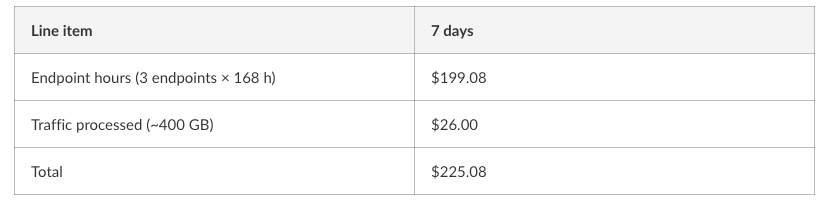
The endpoints were 88% of the bill. Annualised, that's a little over $10k a year for the endpoints and about $1.4k for the traffic. You would need to push roughly 13 TB a month through three endpoints before the per-GB charge even caught up with the hourly charge, and production is doing about 1.7 TB. Our non-production environments move a small fraction of that, so there the traffic line really is a rounding error.
Those are the firewall's own charges. AWS also waives the standard NAT gateway hourly and per-GB charges on a one-to-one basis when the NAT gateway sits in the same path as the firewall endpoint, which it does in this design. The real increase over a NAT-only setup is therefore lower than the totals above.
So for most teams this isn't a usage-based service in any meaningful sense. It's a fixed subscription, and "cost per GB inspected" is the wrong lens to evaluate it through. The better question is whether a fixed annual spend is worth turning outbound traffic into something you can see and act on. For an environment that holds customer data and goes through regular audits, we thought it was.
The one trap to watch for is the middle state. A firewall left in alert mode indefinitely, with the overrides never removed, is full price for a log stream. Put a date on the move to blocking when you start, or be honest with yourself that you're not ready for it yet.
FAQs
1. How does AWS Network Firewall work with a NAT Gateway?
AWS Network Firewall inspects outbound traffic before it reaches the NAT Gateway when the VPC route tables direct traffic through the firewall endpoint.
2. Why is a return route required for AWS Network Firewall?
A return route sends response traffic through the firewall endpoint, enabling stateful inspection of both directions of a connection.
3. How do you troubleshoot AWS Network Firewall routing issues?
Check the application, firewall, and NAT subnet route tables, especially the return route that sends traffic back through the firewall endpoint.
4. Does AWS Network Firewall support Suricata rules?
Yes, AWS Network Firewall supports Suricata-compatible stateful rules for inspecting and controlling network traffic.
Summary
If you run workloads on AWS and can't say what they connect out to, this is a fairly contained way to find out: a safe apply, a two-route cutover per AZ, and a rollback that takes seconds. The cost is predictable and mostly fixed.
And when you do it, add the return route on day one. We added ours later, and it was the difference between a firewall that watched requests leave and one that sees both halves of the conversation.
Read More
- VPC Endpoint vs NAT Gateway: Which AWS Networking Choice Reduces Kubernetes Costs?
- The Simplest AWS Security Hack: Route 53 DNS Firewall
- Still Paying High AWS Bills? Avoid NAT Gateway with VPC Endpoints
Planning to put a firewall on your AWS egress traffic? KubeNine can review your routes and rules before you cut over.Book a call with KubeNine →