
On this page
We Audited a Customer’s Pull Request Security Scans. Here's What We Found.
Overview
We audited the pull request security scans of one of our customers, a US fintech platform that sends text messages and takes payments for banks, credit unions, lenders and collections firms. Their software handles consumer account details and payments, and their own customers work in heavily regulated sectors.
The customer already had security scanning built into their development workflow. What they needed was proof that those scans covered what they appeared to cover, because a green check should mean the code and its libraries were actually checked, not just that the scanner stayed quiet.
The stakes are real. IBM's 2025 Cost of a Data Breach report puts the average US breach at $10.22 million, and breaches in financial services at $5.56 million globally. A vulnerable library that slips past a green check is one way into that kind of incident.
During the audit, we examined how dependencies were scanned, how results were processed, and whether checks were running as expected. We found several issues, including a Python repository where the scanner checked only around 20 of the 160 dependencies listed in its lockfile.
This article breaks down the five gaps we found, how we fixed them, and six checks you can run in 15 minutes to see whether your own security scans are working as expected.
Two Kinds of Scanners
Dependency scanners (Mend, Snyk, Dependabot) check the open-source libraries an app is built on. They read the lockfile, the file listing every library and exact version you install, and compare it against public databases of known security problems.
Code scanners (SonarQube, CodeQL) read the code the team wrote, looking for bugs, unsafe patterns, and passwords left in by mistake.
They check different things, but both report back the same way: a check on the pull request. That shared green check is where the trouble starts.
Five Places the Scanner Went Quiet
1. The Scan Finished, but It Never Saw the Libraries
A dependency scanner can only check libraries it recognizes. In a Python repository larger than 1 GB, the hosted scanner did not process the entire lockfile. The lockfile contained approximately 160 libraries, but the scanner reported only around 20, without displaying any errors or warnings
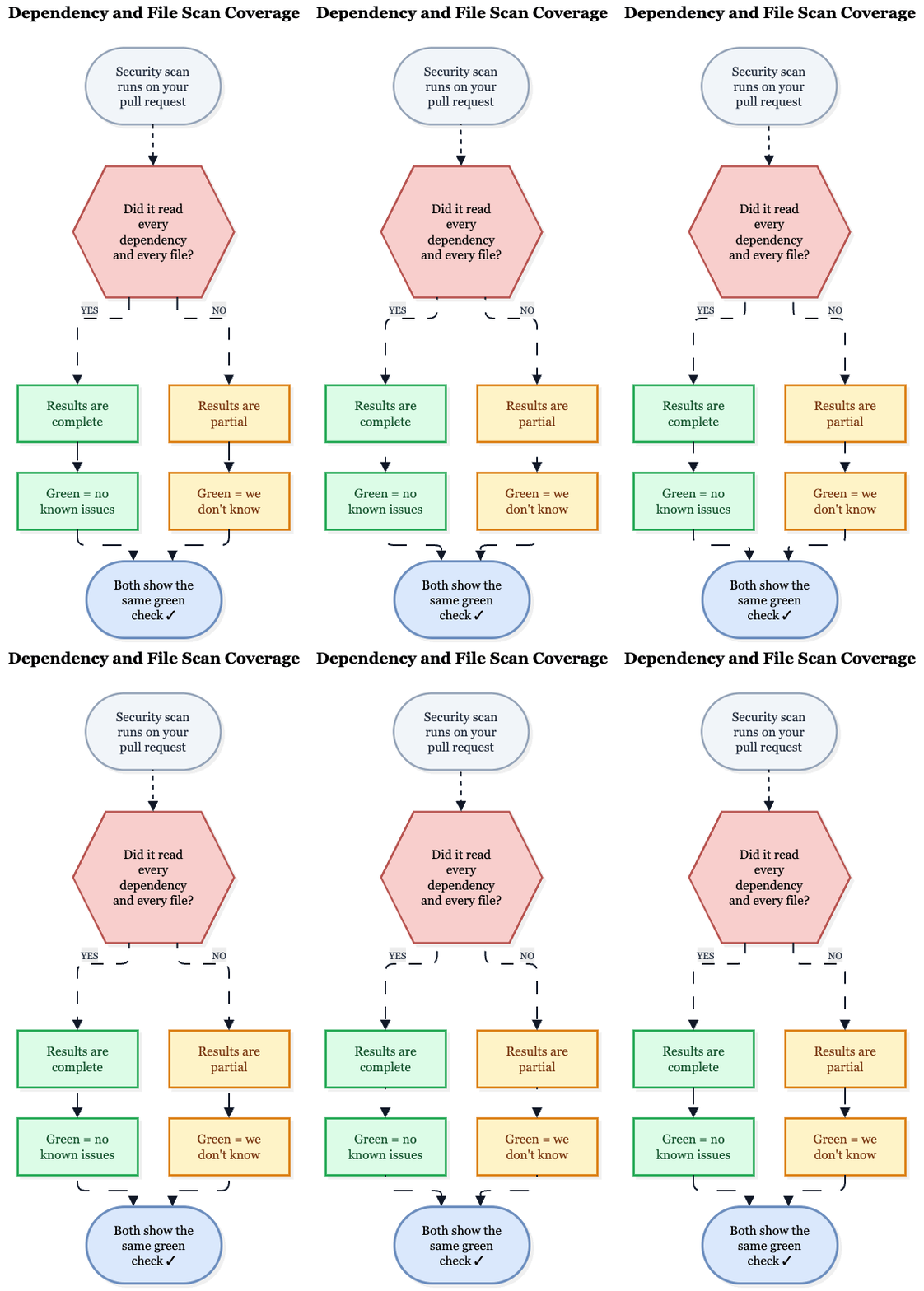
How we spotted it: We compared the scanner's library count with the lockfile. About 20 against about 160 means the scan isn't clean. It's unfinished.
What we did: We moved the scan into the customer’s own build pipeline and gave it a simple list of libraries instead of the whole repository. We added a guard that fails the build if that list ever comes out empty.
Result: The scan went from about 20 libraries to over 150 and surfaced real problems, including a critical one. If you suspect your own pull request checks have the same blind spot, KubeNine can review your scanner setup before a gap ships unnoticed.
Not sure what your pull request security checks actually cover? KubeNine can review your scanner setup before a gap ships unnoticed. Book a call with KubeNine →
2. The Scan Uploaded, but the Results Weren't Ready
Once the scan ran in the pipeline, we added a step that asks, "Did this change add new problems?" and fails if the answer is yes.
Uploading takes seconds, but the scanner needs a minute or more to check everything on its side. Ask too early, and the answer is "zero problems", simply because nothing has been checked yet. Where the check compares against a previous scan, a project's very first scan passes instantly because there is no earlier result to compare against.
How we spotted it: We planted a known problem on a test branch: an old library version with a well-known security hole. The scan stayed green.
What we did: The pipeline now waits until the results actually update before deciding pass or fail, and treats a brand-new project's first scan as unverified until the planted-problem test has passed. We kept the test branch and rerun it whenever the scanning setup changes.
3. The Library Server Said "Slow Down", and the Scan Kept Going
Java projects download their libraries from a public server called Maven Central. Hosted scanners typically do that from shared machines used by many customers at once, so Maven Central can start refusing requests to protect itself. This is rate limiting, and in the scan log it looks like this:
Received status code 429 from server: Too Many Requests
partial failure: gradle
Depending on the tool, the check either sits on red until people learn to ignore it or carries on with half a library list. Either way, nobody knows what's in the build.
How we spotted it: We read one full log per repository. This command finds the usual warning signs:
grep -Ei "status code 429|too many requests|timeout|could not resolve|partial failure|skipped" scan.logWhat we did: We ran the Java scans on the customer’s own build machines (a self-hosted runner). It doesn't share an internet address with other customers, and a local copy of libraries means fewer downloads, so throttling becomes far less likely. Many builds behind one company address can still add up, so a caching repository manager in front of Maven Central is the stronger fix.
4. No Check at All Can Mean Two Very Different Things
Most scanners only run in certain situations, usually on the main branch and on pull requests aimed at it. So when a pull request shows no scan check, there are two possible reasons, and they look identical:
- Working as designed: The pull request targets a branch the scanner is not set up to cover.
- Nothing is being scanned: The scanner should have run and didn't.
After seeing the harmless case a few times, people assume it every time. That's how the broken case slips through.
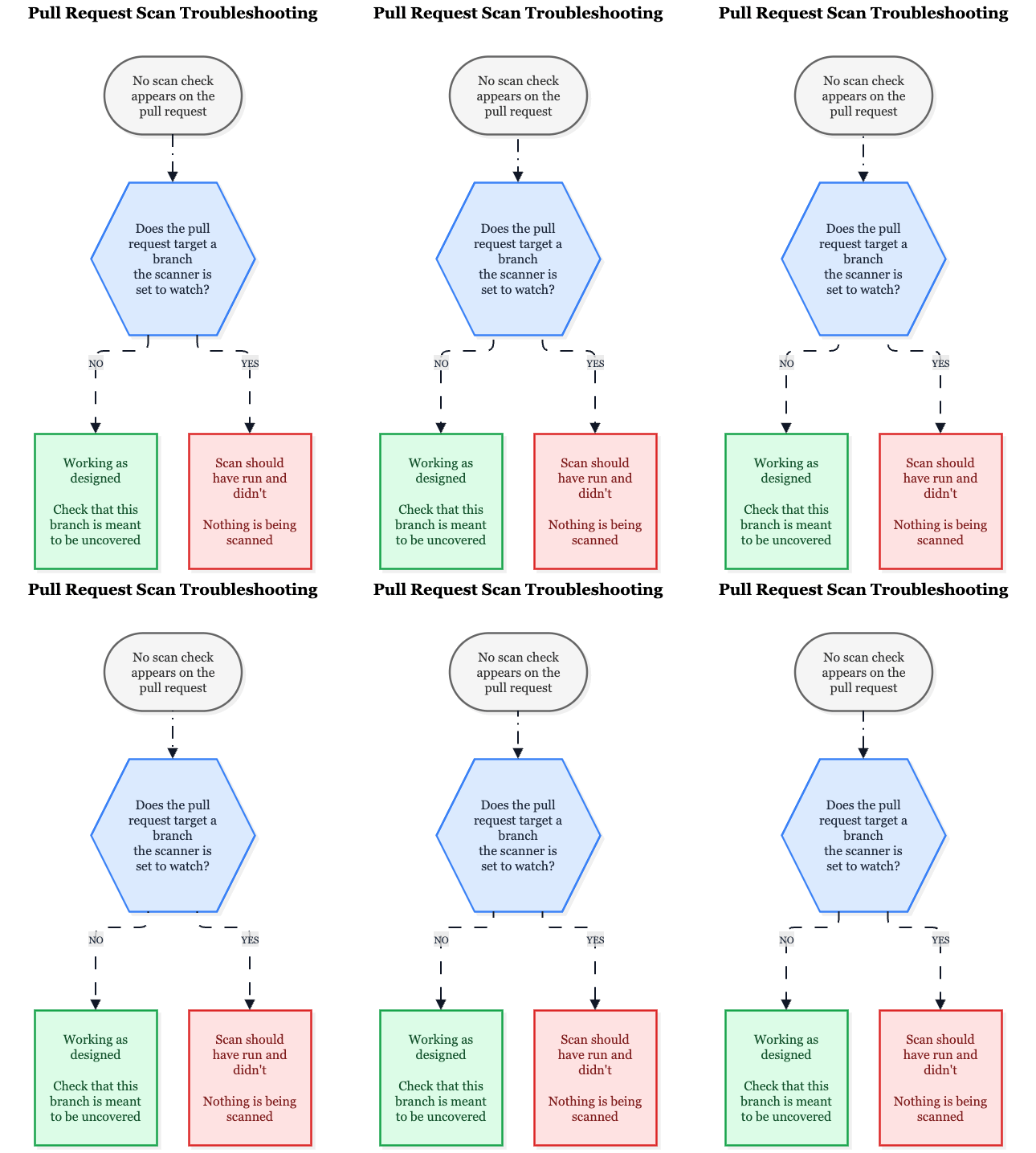
How we spotted it: We wrote down which branches and events each scanner was configured to run on, then opened pull requests that should have been covered and checked whether a check appeared.
What we did: We made the scan a required check, so the merge button stays locked until the scan has run and passed. In GitHub, that's a branch ruleset.
Making a Required Check Stick
- We gave someone a key. A small group of release approvers can override the check in an emergency. A lock nobody can open eventually gets removed by someone in a hurry.
- We tried it before enforcing it. Where the platform allowed, we ran the rule in "evaluate" mode first. It shows how often the rule would have blocked people before it actually does.
- We matched it to the scanner's branches. A required check on a branch where the scanner never runs leaves the pull request waiting for a status that never arrives. The ruleset covers the same branches the scanner does.
5. The Shared Token That Quietly Expires
Some code scanners, such as SonarQube, log in from the pipeline with a token, a long password made for machines. A token can be created with an expiry date, and one token is often shared by every repository in the company.
So one date can switch off scanning everywhere at once. If scans don't block merges, the failures are just red marks nobody has to look at, and new code keeps arriving unchecked.
How we spotted it: We read the token's expiry date in the scanner's admin settings, then asked who owned it and who would be told if it stopped working.
What we did: The token now lives in one secrets store and belongs to a service account rather than a person. The expiry is in a shared calendar, and a weekly job fails if the token stops working. Because the scan is now required, an expired token stops merges loudly instead of failing quietly.
Not sure what your pull request security checks actually cover? KubeNine can review your scanner setup before a gap ships unnoticed. Book a call with KubeNine →
Results
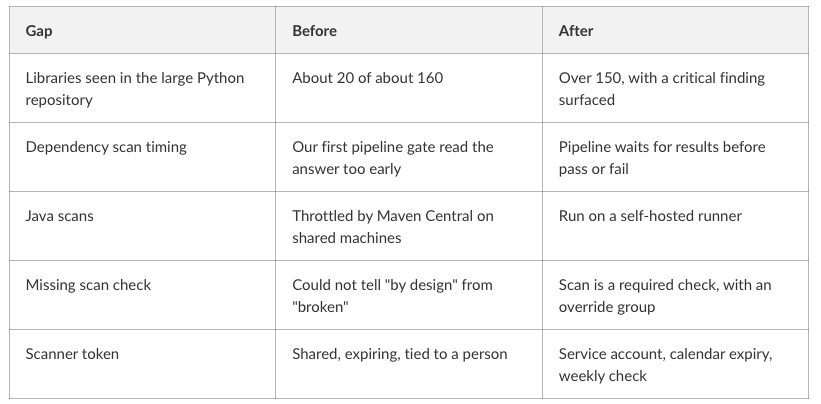
The trade-off: self-hosted runners are ours to maintain, and a required check can block a merge when the scanner itself is down. The override group exists for that case.
The 15-Minute Check
Pick one repository for each language you use:
- Count the libraries. Does the scanner's number match your lockfile?
- Plant a known problem. Does the scan turn red?
- Read one full log. Are there any 429s, timeouts, or skipped items?
- Open a pull request to a different branch. Do you know whether the scanner should run there?
- Check the token. When does it expire, and who gets notified?
- Make it required. Otherwise, a failed or missing scan won't stop anything.
Frequently Asked Questions
1. Why can a pull request security scan pass without detecting all dependencies?
A scanner may miss dependencies if it fails to read the lockfile or process the complete dependency list.
2. How can I verify that my dependency scanner is working?
Compare the dependencies detected by the scanner with the expected dependencies in your lockfile.
3. Why do security scan results sometimes show zero vulnerabilities?
The scanner may not have finished processing results when the pipeline checks for findings.
4. What causes Maven Central rate limiting during security scans?
Repeated dependency downloads can trigger HTTP 429 errors, causing incomplete dependency resolution.
5.Should pull request security scans be required before merging?
Yes. Required checks help prevent merges when security scans fail or don't run as expected. A controlled override can be kept for emergencies
Conclusion
A green check doesn't always mean your security scan is working properly. It only tells you that the scanner didn't report any problems. It doesn't tell you whether it checked everything.
During our audit, we found scanners that checked only around 20 of 160 libraries, returned results too early, or were slowed down by rate limits. We also saw how easily a scan can fail to run at all without anyone noticing.
Key Takeaways:
- Don't just ask, "What did the scan find?" Ask, "What did it actually check?"
- A check that has never failed hasn't really been tested. Make it fail on purpose at least once.
- Understand how your tools behave when something goes wrong. Some failures are easy to spot, while others go unnoticed.
- No findings doesn't always mean there are no issues. Make sure your system shows what was actually scanned.
- If a token or credential expires, make sure someone knows about it before it happens.
Read More
Your pip install Just Backdoored Your Kubernetes Cluster
A compromised Python dependency can put your entire infrastructure at risk. Learn how dependency attacks happen and why checking your packages matters.
Securely Accessing AWS Resources from GitHub Actions Using OIDC
Storing AWS credentials in CI/CD pipelines creates security risks. Learn how GitHub Actions can use OIDC to access AWS without long-lived credentials.
How to Avoid Pushing Secrets into Docker Images
Secrets can accidentally end up inside Docker images during builds. Learn how to prevent sensitive information from being exposed.
Not sure what your pull request security checks actually cover? KubeNine can review your scanner setup before a gap ships unnoticed. Book a call with KubeNine →