
On this page
We Consolidated 40 AWS ECR Repositories. One Terraform Variable Nearly Deleted Them.
See how we consolidated 40 AWS ECR repositories using Terraform, handled cross-account access, and avoided a costly production deletion.
Overview
We worked with a US-based fintech company that provides text messaging and payment solutions for banks, credit unions, lenders, and collections firms. Its platform handles consumer communications and payments, with services running on Amazon ECS across three environments: dev, sandbox, and production, spread across two AWS accounts.
Over time, its container images had spread across roughly 40 Amazon ECR repositories. Each environment maintained its own set of repositories, and some pipelines pushed the same images to multiple locations. This resulted in duplicated image storage, repeated vulnerability findings, and no straightforward way to identify which repository each service was actually pulling images from.
We decided to consolidate everything into one shared ECR repository per service, hosted in the production AWS account and used by all three environments.
However, the migration came with its own risks. An earlier dual-push approach had already caused a production outage when a pipeline overwrote a mutable image tag that a running service still depended on. Later, while preparing to delete the old repositories, we discovered that the same Terraform variable also controlled the new shared repositories. Applying the cleanup plan could have deleted the repositories that all three environments were actively using.
This article covers how we handled the AWS ECR repository consolidation, configured cross-account ECR permissions, copied container images without changing their digests, and avoided destructive Terraform changes. We'll also look at the IAM policy drift and leftover image replicas we discovered during the migration.
The setup
Before the migration:
- Dev and sandbox ran in one AWS account, while production ran in another.
- Each environment pushed images to its own set of repositories, and some builds pushed the same image to two places.
- Older repositories from previous setups were still around, and nobody was fully sure which services were still pulling images from them.
The costs were the usual ones. The same image was stored several times. The security scanner reported the same CVE for each copy, which buried the findings that actually mattered. Even answering the question, "Which repository is this service really pulling from?" required a lookup every time.
The target was simple: one repository per service, named after the service, with the environment moved into the image tag instead of the repository name.
How cross-account ECR pulls actually work
Dev and sandbox would now pull images from a registry in a different AWS account. This requires two separate permissions to allow access.
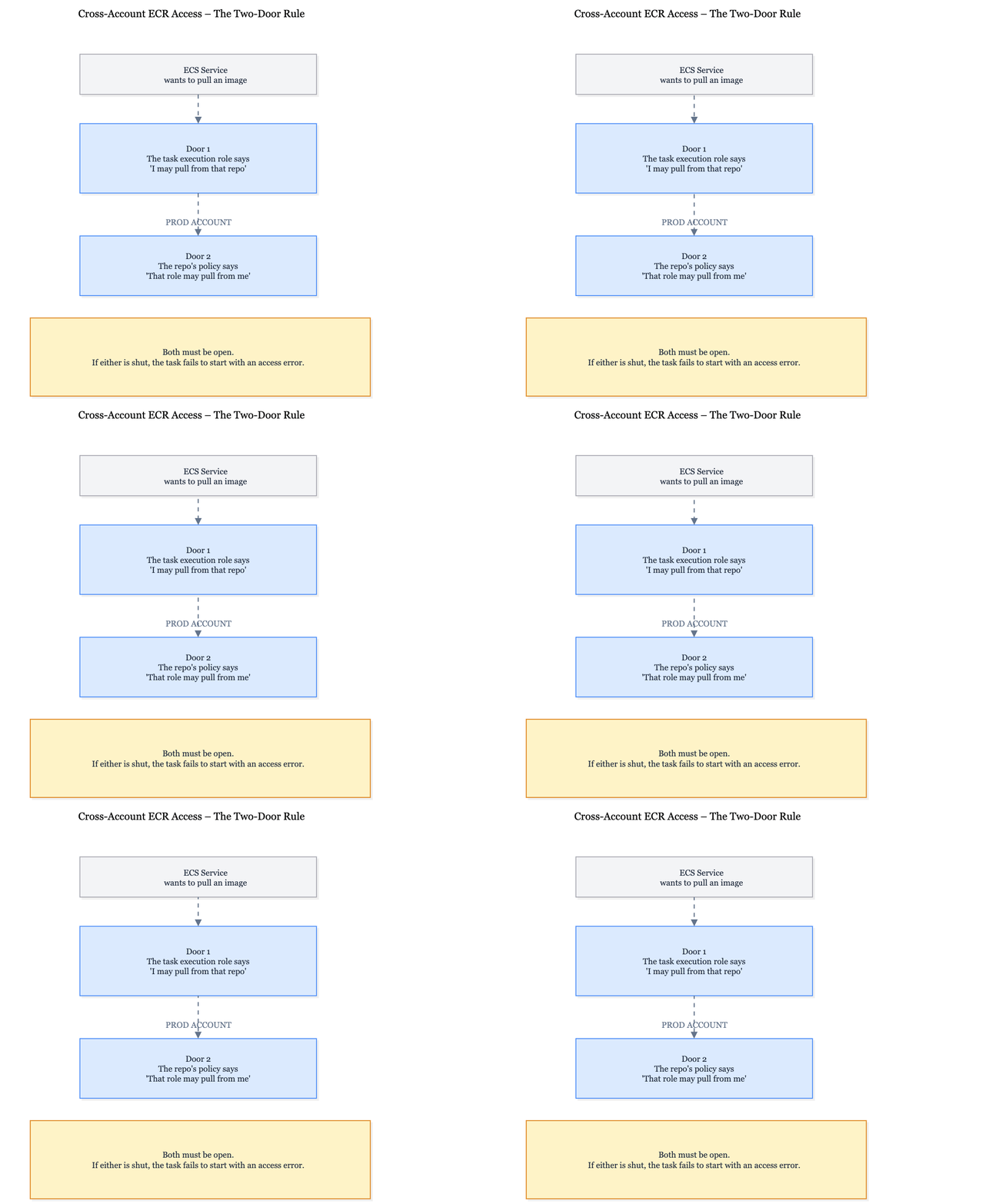
Door 1: The task execution role in the pulling account. It needs permission to pull images from the other account's repository and obtain an ECR authorization token:
{
  "Effect": "Allow",
  "Action": [
    "ecr:BatchGetImage",
    "ecr:GetDownloadUrlForLayer",
    "ecr:BatchCheckLayerAvailability"
  ],
  "Resource": "arn:aws:ecr:us-east-1:<prod-account-id>:repository/my-service"
}
ecr:GetAuthorizationToken goes in a separate statement with "Resource": "*", because it isn't scoped to a specific repository.
If the role already uses the AWS-managed AmazonECSTaskExecutionRolePolicy, the required ECR permissions are already available for any repository, since that policy grants these ECR actions on *. You only need the explicit statement when the role uses a custom policy.
Door 2: The repository policy in the production account. It must specify which roles are allowed to access the repository:
{
  "Sid": "AllowDevAndSandboxPull",
  "Effect": "Allow",
  "Principal": {
    "AWS": [
      "arn:aws:iam::<nonprod-account-id>:role/dev-my-service-task-exec",
      "arn:aws:iam::<nonprod-account-id>:role/sandbox-my-service-task-exec"
    ]
  },
  "Action": [
    "ecr:BatchGetImage",
    "ecr:GetDownloadUrlForLayer",
    "ecr:BatchCheckLayerAvailability"
  ]
}
If either door is closed, the task fails to start with an access error. The error often doesn't make it clear which side denied access. Make sure to specify the task execution role, not the task role. ECS uses the execution role to pull the image.
The repositories were also in a different region from dev and sandbox. Tasks without public IPs pulled images through their existing NAT setup, so no networking changes were needed. This added cross-region data transfer costs, along with NAT processing charges.
Fargate doesn't cache image layers between launches, so these costs can recur every time a task launches. ECR VPC endpoints are regional, so endpoints in the dev and sandbox regions would not have served a registry hosted in another region.
The migration order
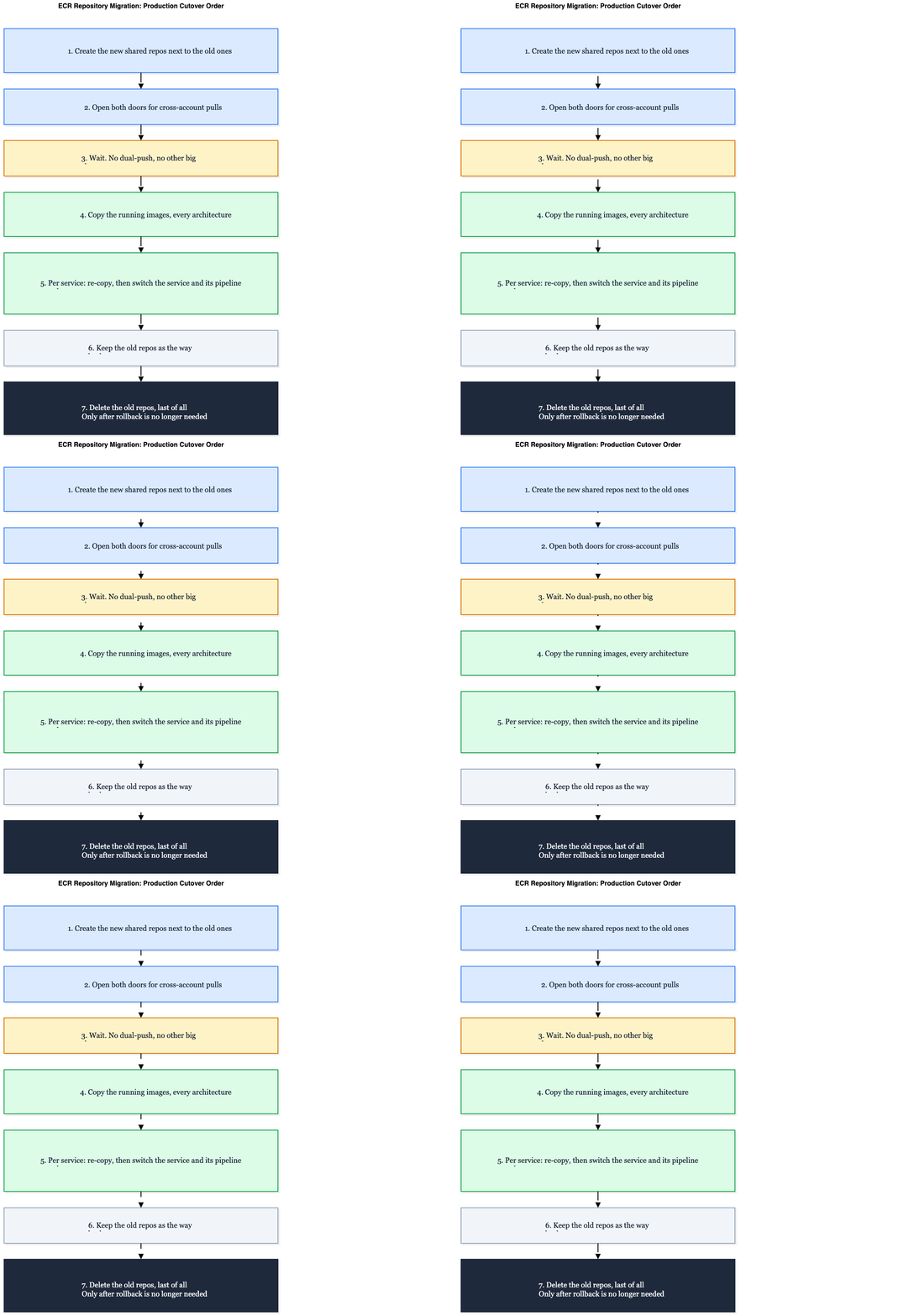
1. Create the new repositories next to the old ones
The new repositories were created through Terraform as a separate unit, so the old ones weren't touched. The first thing we checked was the Terraform plan:
Plan: 29 to add, 0 to change, 0 to destroy.Zero changes, zero destroys. Nothing managed by Terraform was scheduled for modification or deletion.
2. Open both doors before anyone needs them
We applied the repository policies and task execution role changes for every service, then checked them role by role before a single service pointed to the new repositories.
3. Wait
The customer was moving live traffic to their new platform in stages at the same time. We kept the new repositories empty until that traffic move was finished.
We had learned this the hard way. In an earlier phase of the same cleanup, the pipelines used a dual-push approach: every build went to both the old repositories and a new set. One production service's task definition still referenced a mutable tag in an old repository. A dual-push overwrote that tag with a fresh build. The next task launch pulled it, and production started running new code before anyone had planned to switch that service over. That build also contained a dependency bug, and the service went down until we rolled it back.
So, for the consolidation, we dropped dual-pushing completely. The new repositories stayed empty until the traffic move was finished, and two major changes never ran at the same time.
4. Copy the running images
Once traffic had settled, we copied the images each service was actually running into the new repositories, by digest, not by tag.
We used crane. Most of the images were multi-architecture (one tag holding both an amd64 and an arm64 build). By default, docker pull and docker push would have copied only the architecture of the machine running them, producing a different digest. crane copies the whole manifest, including every architecture, byte for byte, so the digest stays identical. It doesn't require a local Docker daemon (skopeo copy --all or docker buildx imagetools create would also work):
crane copy \
  <account-id>.dkr.ecr.us-east-1.amazonaws.com/old/my-service@sha256:<running-digest> \
  <account-id>.dkr.ecr.us-east-1.amazonaws.com/my-service:my-service-prod-1.0.0.1
There were two practical details. The copy ran from a CI job because only the pipeline's role was allowed to push to production ECR, not engineers using their own logins. The copy also had to be re-run right before each switch because the old repositories continued receiving new builds in the meantime. A copy from last week is not necessarily what's running today.
5. Switch each service and its pipeline together, one at a time
For each service, we re-copied the running image and then switched the service and its pipeline to the shared repository in the same step. From the next deployment onward, that service's pipeline pushed to the shared repository, and its task definition pulled from it. There was never a phase where two repositories were both acting as the source of truth for the same service.
Dev and sandbox went first. Production followed only after every service there had been verified against the shared repositories. To confirm which repository a service was actually pulling images from:
aws ecs describe-task-definition \
  --task-definition my-service \
  --query 'taskDefinition.containerDefinitions[].image'
6. Keep the old repositories as the way back
The old repositories stayed untouched for a while. If anything went wrong, any service could be pointed back to its old image in minutes.
The near-miss
Deleting the old repositories should have been the easy part. In dev, we emptied the Terraform list that defined them, applied the changes, and the repositories were gone.
While preparing the same change for production, we found that it would destroy far more than just the old repositories.
The old repositories and the new shared ones read the same input. Both Terraform units built their repository lists from a single variable in the production environment file. Emptying it to delete the old repositories would also have destroyed the new shared repositories, which dev, sandbox, and production were all pulling from by then. Every environment would have lost its images at once, and ECR deletions aren't reversible.
Dev hadn't exposed this issue because dev never had the shared unit. Only production did.
The fix was to give the legacy unit its own input, falling back to the old one so nothing else changed:
service_names = try(local.env.legacy_ecr_service_names, local.env.ecr_service_names)We then set legacy_ecr_service_names = [] for production only and added one rule before applying: the plan for the shared repositories must show no changes at all.
If you're about to run a cleanup like this in production and one Terraform input feeds more than one unit, KubeNine can review your plan before you apply it.
The second trap: IAM code that had drifted
The CI role needed permission to push images to the new repositories. That role was originally defined in an older Terraform setup, but its live policy had been extended manually over time. The Terraform code now granted far fewer permissions than the live policy.
Applying that code to "add" the new repositories would have replaced the live policy with the narrower version defined in Terraform, removing access that the pipelines depended on. Instead, we added the new permissions directly to the live policy and left the drifted Terraform code unchanged.
This created additional drift, so the actual fix is to bring the Terraform code back in line with the live policy later, in a separate change.
Before applying changes to older infrastructure code, compare it with what's currently deployed:
aws iam get-policy-version \
  --policy-arn <policy-arn> \
  --version-id $(aws iam get-policy --policy-arn <policy-arn> --query 'Policy.DefaultVersionId' --output text)
What we missed: replicas
One thing slipped past us. Replication rules (configured at the registry level and matching repositories by name prefix) were copying images from some of the old repositories to other regions.
Deleting a source repository doesn't delete its replicas. More than 100 GB of image copies remained in other regions and continued generating storage costs.
Check this before deleting anything. The first command shows the replication rules, and the second lists the repositories in the destination region:
aws ecr describe-registry --query 'replicationConfiguration'

aws ecr describe-repositories --region <destination-region>
Migration checklist
- Is the first apply additive only? Look for
0 to change, 0 to destroy. - Are both doors open? Check the task execution role and repository policy before switching any service.
- Is anything else changing at the same time? If so, wait.
- Are you copying what's running? Copy by digest, including every architecture.
- Do you re-copy right before each switch? Move one service at a time.
- Does the old Terraform code still match the live infrastructure? Compare it before applying changes.
- Does any input feed more than one unit? Review every production plan line by line.
- Do the old repositories replicate anywhere? Delete the replicas separately.
- Have you checked everything that references an image before deleting it? Check running tasks, current task definitions, Terraform pins, Dockerfile
FROMlines, and other tags pointing to the same digest.
Frequently Asked Questions
Can ECS pull images from an ECR repository in another AWS account?
Yes. The task execution role needs ECR pull permissions, including ecr:GetAuthorizationToken, and the repository policy in the other account must allow access.
Which role does ECS use to pull images: the task role or the execution role?
The task execution role. The task role is used by the application to access AWS services at runtime.
Does ECS work with ECR in a different region?
Yes. ECS can pull images across regions if network connectivity is available. However, cross-region data transfer charges and image pull latency should be considered.
Does deleting an ECR repository delete its replicas?
No. Deleting the source repository does not delete its replicas. Images in other regions remain until you delete them separately.
Should I dual-push to old and new repositories during a migration?
Only if no running service depends on the mutable tags being pushed to the old repository. Otherwise, overwriting a tag can cause unexpected image changes during subsequent task launches.
Summary
Nothing in this migration was technically difficult. Creating repositories, copying images, and changing policies are all routine tasks. The real challenge was getting the order right: start with additive changes, open both doors early, make one major change at a time, migrate one service at a time, and keep the old repositories until they are no longer needed.
The step that could have taken everything down looked almost identical to the one that had already worked in dev.
Read every production plan as if it's the first one.
Planning an ECR consolidation or an AWS account migration? KubeNine can review your repository layout, cross-account permissions and Terraform plans before anything is deleted. Book a call with KubeNine →