
On this page
We Found the Best Way to Connect RDS Across AWS Accounts, So You Don't Have To
How we gave a new AWS account access to one PostgreSQL RDS database without changing the old VPC. Why peering, Transit Gateway and classic PrivateLink didn't fit, the Terraform setup, costs, and the 350-second idle timeout to plan for.
Overview
When a company splits its workloads across AWS accounts, the services usually move first. A database takes longer because it holds live data, so moving it means copying that data and choosing a cutover window. Until then, you have to connect RDS across AWS accounts so the new account can reach the database in the old one, sometimes for weeks or months.
Reaching it means connecting the two accounts' networks, and the usual choices are VPC peering and Transit Gateway. But both need route table changes in the old VPC. That VPC is often shared production, so a bad route there can take down systems that were never part of your migration.
A customer of ours was in this position: an enterprise AI transformation platform serving large organizations, with applications in a new AWS account that needed to reach an existing PostgreSQL database. An outage in the shared VPC would reach every organization using the platform.
So the instruction was to change nothing that already exists in the old VPC: no route table edits, no security group edits, nothing on the database. The new account still had to read and write that database.
This article covers what we used, why peering, Transit Gateway and classic PrivateLink didn't fit, how we built it with Terraform, and the main catch to plan for.
Short answer: To connect RDS across AWS accounts without touching the old VPC, we used a VPC Lattice resource endpoint in the app account, backed by a resource gateway and resource configuration in the database account. In our setup it needed no route table or database security group changes, and the apps kept their RDS hostname and sslmode=verify-full. The main catch is the 350-second idle timeout, so add client keepalives.
What a resource endpoint is
The question was never how to connect the two networks. It was how to connect to one database. A resource endpoint is PrivateLink for things that aren't services, and four pieces make it work. In this post the database account is the old account that owns the database, and the app account is the new one whose applications need it. (AWS calls these the resource provider and the consumer.)
- Resource gateway (database account): ENIs in the database's VPC. Traffic leaves Lattice through these on its way to the database.
- Resource configuration (database account): describes what is being shared. For RDS this is the ARN type, pointing at the database.
- RAM share (database account to app account): grants the configuration to the app account.
- Resource endpoint (app account): ENIs in the app account's VPC that your applications connect to.
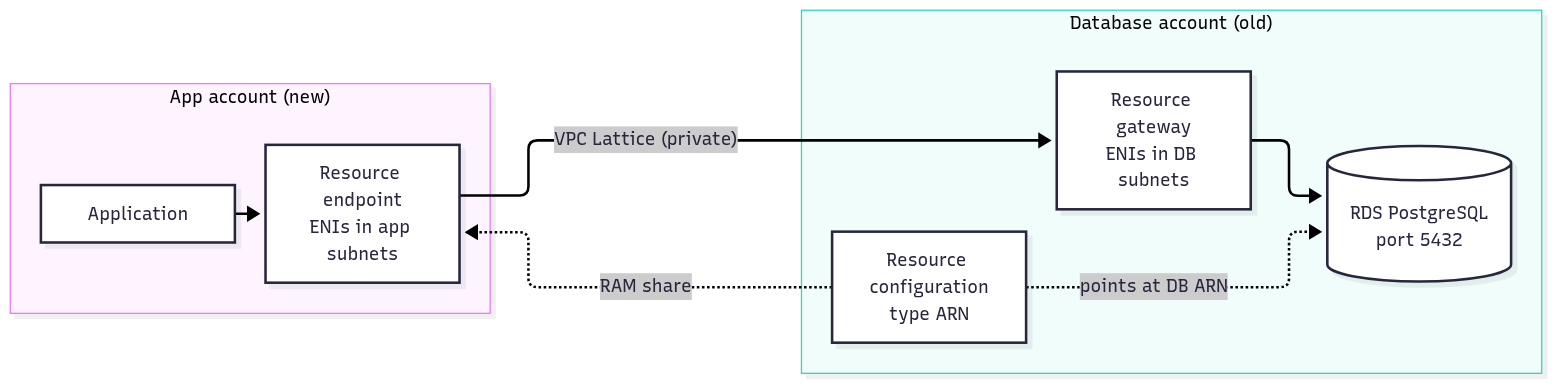
Traffic goes one way only. The app account can reach the database; the database account cannot reach anything in the app account through this path.
Two details make it a good fit for RDS:
- An ARN resource configuration points at the database itself rather than at an IP address, and AWS says it manages the child configurations for ARN resources. AWS does not say how it tracks the instance after an IP change, and we did not test one, so try a failover or an instance class change on a non-production copy before you rely on it.
- With private DNS on, the app account's VPC resolves the real RDS hostname to the endpoint. Applications keep their connection string, and TLS hostname checks keep passing.
Ways to connect RDS across AWS accounts that we ruled out
Here is the short version before the detail:
| Option | Needs route table edits in the old VPC | Needs a DB security group edit | Survives RDS IP change | verify-full TLS works | Fit for "one database" |
|---|---|---|---|---|---|
| VPC peering | Yes | Yes | Yes | Yes | Poor: connects whole networks |
| Transit Gateway | Yes | Yes | Yes | Yes | Poor: built for many VPCs |
| Classic PrivateLink (NLB) | No | No (see note 1) | No: NLB targets an IP | No, unless you add a private DNS zone | Good, with workarounds |
| Lattice resource endpoint | No | No (see note 1) | Expected, not tested | Yes | Good |
Note 1: "No" holds for this customer's setup only. Their database security group already allowed PostgreSQL from the whole VPC CIDR, and the resource gateway sits in that VPC, so no rule had to change. Neither Lattice resource endpoints nor classic PrivateLink remove the need for a rule when the database's security group is more restrictive. If yours is narrower, add a rule for the gateway's security group.
VPC peering was the first thing everyone suggested, and it would have worked. There is no hourly charge for a peering connection, and it is well understood. But peering means routes on both sides, which means editing route tables in the old VPC, plus a security group rule on the database. It also connects whole networks, and we found why that matters: a site-to-site VPN in the new account carries a route for a /24 inside the old VPC's CIDR, so peering the whole /16 would have sent part of the old VPC down the VPN tunnel (the router always picks the most specific matching route).
Transit Gateway is built for hubs with many VPCs, and we have two VPCs and one database. The only gateway in the old account was a test one with another environment already attached, so doing it properly meant a new gateway and dedicated route tables, roughly $73 a month in attachment hours before any data moved (two attachments at $0.05 an hour for 730 hours), and still route table changes in the old VPC.
Classic PrivateLink (a Network Load Balancer, an endpoint service, and an interface endpoint in the app account's VPC) is what we expected to build. It is one-way, it needs no routing between VPCs, and the database never knows the other account exists. Two things pushed us away from it:
- The NLB target is the database's IP address, and RDS doesn't promise a stable IP. Instance class changes and maintenance that replaces the host can both move it, and the instance had an OS update pending. When the IP changes, the target goes unhealthy and the app is down until someone (or some Lambda function you now have to write and own) registers the new one.
- By default the app connects to the endpoint's vpce-... hostname. The RDS certificate doesn't cover that name, so sslmode=verify-full fails. require still works, and so does verify-ca, but we would rather not give up hostname verification. A Route 53 private hosted zone that points the RDS hostname at the endpoint avoids this, but it is a workaround you have to set up and maintain, and not an AWS-documented RDS pattern.
If you are weighing these options for your own accounts, this comparison is the kind of review KubeNine runs before anything is built, so you find the route table and TLS surprises on paper instead of in production.
Testing it before it touched production
We built a throwaway copy first: a small Single-AZ PostgreSQL instance in one account and a test pod in another, with classic PrivateLink wired up alongside for comparison. What we learned:
- Single-AZ instances work. The docs only say "RDS databases".
- The database sees the gateway's IPs. The gateway translates source addresses to its own ENIs in the database's VPC, so an existing "PostgreSQL from the VPC CIDR" rule already lets it in. In our setup nothing changed on the database side; with a stricter security group you would need to allow the gateway.
- ARN configurations reject ports and protocol. Lattice derives them from the database.
The idle timeout, and why it nearly caught us out
Lattice resources have an idle timeout of 350 seconds. AWS documents no setting to change it for resources, and says TCP keepalives can be used to extend it. A direct connection inside a VPC is usually not cut off this soon, and connection pools are exactly the kind of thing that sits idle for a few minutes.
A classic NLB has the same 350-second default for TCP listeners. What differs between the two is what happens when the limit is hit.
What We tested:
we left sessions idle for seven minutes on both paths:
| Setup | Lattice resource endpoint | Classic NLB endpoint |
|---|---|---|
| RDS default server keepalive (300s) | survived | survived |
| Server keepalive raised to 1 hour, no client keepalive | hung | clean disconnect |
| Server keepalive raised, client keepalives_idle=60 | survived | survived |
RDS for PostgreSQL sends server keepalives every 300 seconds by default, just inside the 350-second limit, so it works out of the box. The danger is when someone raises that setting. Then:
- With the NLB, the client gets a reset, and so an error, as soon as it next sends data. This is AWS-documented behaviour.
- With Lattice, in our testing, the connection was left hanging until the client gave up, which is far harder to spot. This is our observation from our test environment: AWS documents the 350-second limit but not what happens when it is reached.
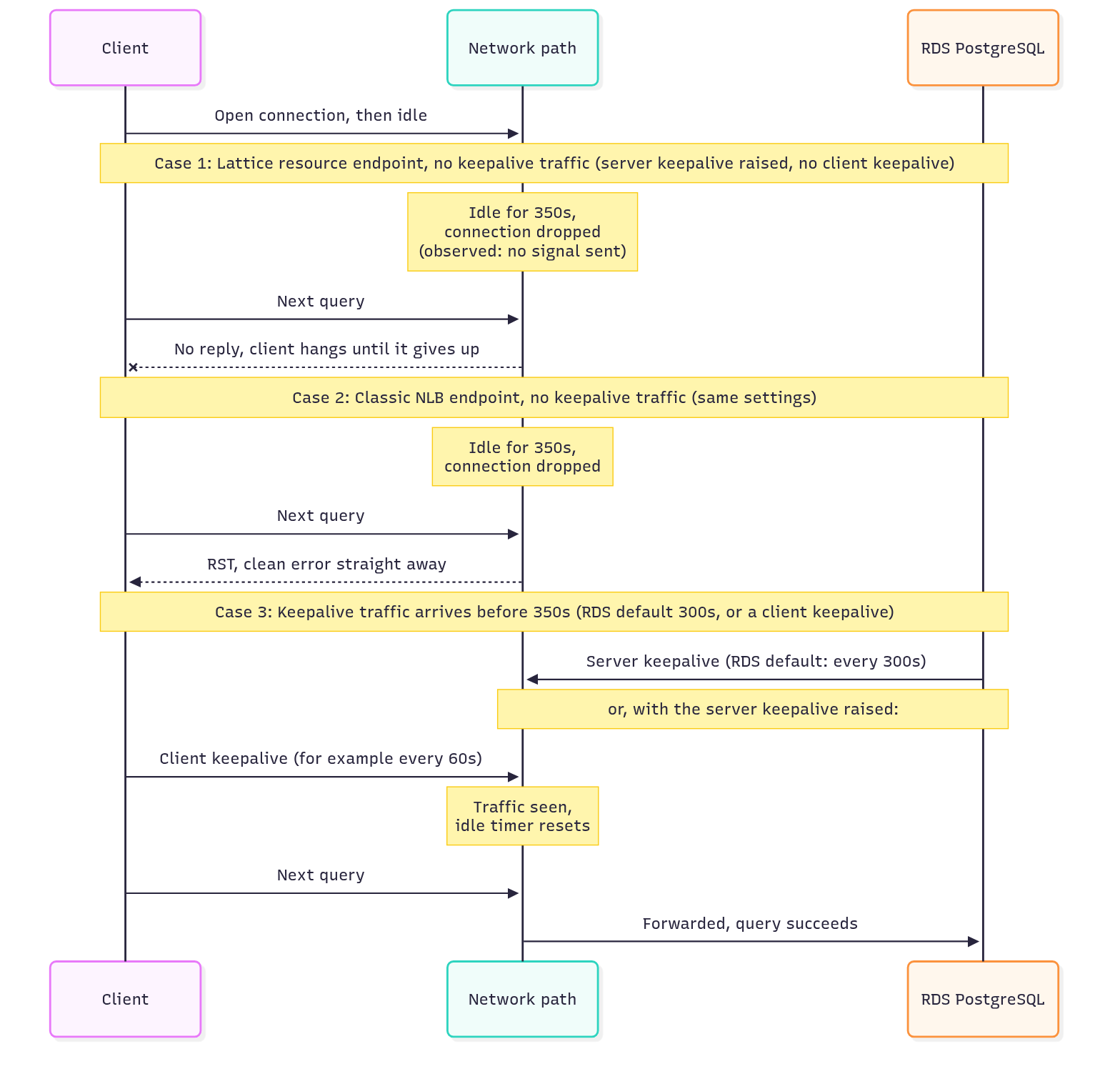
What to do:
- Leave tcp_keepalives_idle on the database at its default.
- Add client keepalives well under 350 seconds. With libpq, that is keepalives_idle=60.
- If your driver or pool can't send keepalives, make it recycle idle connections well under 350 seconds. With keepalives on, you don't need this.
If you already have connections hanging behind Lattice or PrivateLink and can't tell why, the KubeNine team can help trace it through your timeout and keepalive settings.
How we put it into production
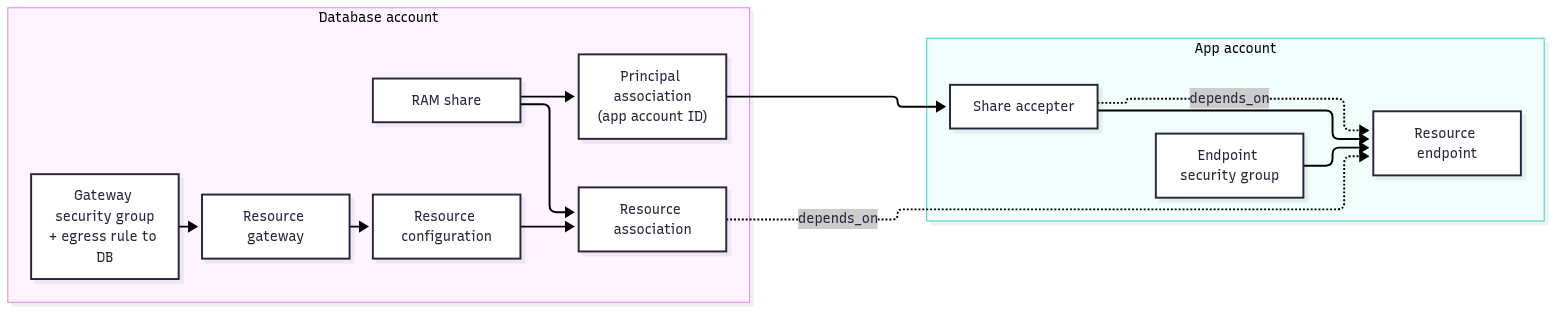
Everything on the database account's side is new, so nothing that already existed there changed. Both halves live in one Terraform stack with one provider per account. Each provider is pinned with allowed_account_ids, so a wrong profile fails instead of applying in the wrong place.
The diagram shows the order the resources depend on each other, including the two depends_on edges that matter at the end.
terraform {
  required_providers {
    aws = {
      source  = "hashicorp/aws"
      version = ">= 6.35" # resource_share_configuration needs 6.35.0 or later
    }
  }
}

provider "aws" { # app account
  region              = var.region
  allowed_account_ids = [var.app_account_id]
}

provider "aws" { # account that owns the database
  alias               = "database_account"
  region              = var.region
  profile             = var.database_profile
  allowed_account_ids = [var.database_account_id]
}
Database account: gateway and resource configuration
The gateway sits in the database's own private subnets, away from the busy application subnets. Its security group has no inbound rules and a single outbound rule to the database. (Terraform removes AWS's default allow-all outbound rule when it manages a security group, which is what we want here.)
Plan subnet space for the gateway. By default Lattice assigns 16 IPv4 addresses to each gateway ENI. You can choose a different number, from 1 to 62, when you create the gateway, but it cannot be changed afterwards. The addresses are used for address translation and cap the number of concurrent connections to the database: each address supports up to 55,000 simultaneous connections per destination IP.
resource "aws_security_group" "gateway" {
  provider = aws.database_account
  name     = "db-rgw"
  vpc_id   = var.database_vpc_id # no ingress rules
}

resource "aws_vpc_security_group_egress_rule" "gateway_to_db" {
  provider                     = aws.database_account
  security_group_id            = aws_security_group.gateway.id
  ip_protocol                  = "tcp"
  from_port                    = 5432
  to_port                      = 5432
  referenced_security_group_id = var.db_security_group_id
}

resource "aws_vpclattice_resource_gateway" "db" {
  provider           = aws.database_account
  name               = "db-rgw"
  vpc_id             = var.database_vpc_id
  subnet_ids         = var.db_subnet_ids
  security_group_ids = [aws_security_group.gateway.id]
}

resource "aws_vpclattice_resource_configuration" "db" {
  provider                    = aws.database_account
  name                        = "db-rcfg"
  type                        = "ARN" # no port_ranges or protocol for this type
  resource_gateway_identifier = aws_vpclattice_resource_gateway.db.id

  resource_configuration_definition {
    arn_resource {
      arn = var.db_instance_arn
    }
  }
}
Sharing: RAM
Both accounts are in the same AWS Organization today, but org-wide RAM sharing isn't enabled and the app account may move to a different organization later. So we share to the app account's ID, allow external principals, and set the share to keep working if the app account leaves the organization. That last setting can only be chosen when the share is created.
The app account then has to accept the share. Because org-wide RAM sharing isn't enabled, RAM sends the app account an invitation even though both accounts are in the same organization. RAM invitations for resource types outside its seven-day list expire after 12 hours, and that list doesn't name Lattice resource configurations, so accept promptly (the Terraform accepter below does it in the same apply).
resource "aws_ram_resource_share" "db" {
  provider                  = aws.database_account
  name                      = "db-share"
  allow_external_principals = true

  resource_share_configuration {
    retain_sharing_on_account_leave_organization = true
  }
}

resource "aws_ram_resource_association" "db" {
  provider           = aws.database_account
  resource_arn       = aws_vpclattice_resource_configuration.db.arn
  resource_share_arn = aws_ram_resource_share.db.arn
}

resource "aws_ram_principal_association" "db" {
  provider           = aws.database_account
  principal          = var.app_account_id
  resource_share_arn = aws_ram_resource_share.db.arn
}

resource "aws_ram_resource_share_accepter" "db" { # app account
  share_arn = aws_ram_principal_association.db.resource_share_arn
}
App account: the endpoint
This is where the settings that matter most live. The endpoint's security group controls which of your applications can reach the database.
resource "aws_security_group" "endpoint" {
  name   = "db-endpoint"
  vpc_id = var.app_vpc_id
}

resource "aws_vpc_security_group_ingress_rule" "app_to_endpoint" {
  security_group_id            = aws_security_group.endpoint.id
  ip_protocol                  = "tcp"
  from_port                    = 5432
  to_port                      = 5432
  referenced_security_group_id = var.app_security_group_id
}

resource "aws_vpc_endpoint" "db" {
  vpc_id                     = var.app_vpc_id
  vpc_endpoint_type          = "Resource"
  resource_configuration_arn = aws_vpclattice_resource_configuration.db.arn
  subnet_ids                 = var.app_subnet_ids
  security_group_ids         = [aws_security_group.endpoint.id]

  private_dns_enabled = true # can't be changed in place; Terraform would replace the endpoint
  dns_options {
    private_dns_preference        = "VERIFIED_DOMAINS_AND_SPECIFIED_DOMAINS"
    private_dns_specified_domains = [var.db_hostname] # the RDS hostname; this is the setup we tested
  }

  # the configuration is only visible once the share is accepted AND attached
  depends_on = [
    aws_ram_resource_share_accepter.db,
    aws_ram_resource_association.db,
  ]
}
That depends_on came out of code review. Without the resource association in it, a fresh apply can create the endpoint before the app account can see the configuration, and the apply fails. RAM can also take a few minutes to finish attaching a resource, so if an apply still fails on the endpoint, wait and run it again.
Checking the path, then cutting over
Before changing any app config, we checked the path from a temporary pod. The RDS hostname resolved to the endpoint, and psql with sslmode=verify-full (and sslrootcert pointing at the RDS CA bundle) and no password reached the password prompt. PostgreSQL negotiates TLS before authentication, so that proves DNS, routing and TLS without touching real credentials.
The cutover was new credentials in Parameter Store and a rolling restart. The new credentials belong to a dedicated database user for the new account's applications (see the list below for why). The connection string didn't change.
Things to be aware of
If you are thinking about this pattern, here is our short list:
- Private DNS at creation. AWS says that for a single resource configuration an update after the endpoint is created doesn't take effect, and in Terraform a change replaces the endpoint. In our testing, turning it on later reported success and changed nothing. The VPC also needs DNS hostnames and DNS support enabled. We scoped it to the exact RDS hostname with private_dns_specified_domains and tested that setup. AWS documents those options for custom domain names, and its RDS examples only switch private DNS on without setting them, so the default may be enough. We did not test the default. Once a private hosted zone exists for a name, all traffic to it from the VPC goes through Lattice. That affects every client in the app account's VPC, not just your app.
- Availability zone overlap. At least one availability zone of the endpoint and the gateway must overlap. Plan subnets on both sides together, and compare AZ IDs (like use1-az1), not AZ names (like us-east-1a). The same name can point to a different physical zone in a different account. Lattice also doesn't support some AZ IDs at all, for example use1-az3 and usw1-az2. The full list is on AWS's quotas page and can change, so check your subnets against it before you plan.
- Shared subnets. If the database's VPC uses shared subnets, either the VPC owner or a participant account can create the gateway. A participant must use security groups it owns, and an ARN configuration must point at a database in the gateway owner's account. Otherwise AWS says to use a domain-name target, which this post doesn't cover. The simplest setup is for the account that owns the database to create the gateway.
- Every connection comes from the gateway. The database sees the gateway's IPs, not the app account's, so the only way to tell consumers apart is the database user. Give each consuming application its own user, ideally with a connection limit, especially if the database is already shared.
- Less to look at than an NLB. AWS documents access logs for resource configurations (you must turn them on) but no NLB-style target health metrics, although its CloudWatch metrics page does list resource gateway and resource configuration metrics such as PacketsDropped and ActiveFlows. Turn on the access logs and add your own check, such as a scheduled connection test.
When not to use this
A resource endpoint is a poor fit if:
- many VPCs and accounts need broad, two-way connectivity (use Transit Gateway or Lattice service networks);
- you need to reach a whole subnet or application tier rather than specific resources (an ARN configuration points at one database; other Lattice configuration types cover ranges, which this post doesn't cover);
- you need to change the 350-second idle limit on the path (AWS documents no setting for it on resources);
- the database is publicly accessible (AWS's resource configuration docs say you can't create one for a publicly accessible cluster, so check whether your instance is affected).
What it costs
Prices below are the us-east-1 rates on AWS's pricing pages when we checked. Check your region. We counted one RDS ARN configuration as one resource for the hourly rate; the pricing pages don't say so explicitly.
| Item | Rate | Our monthly use | Cost |
|---|---|---|---|
| Resource endpoint, hourly | $0.02 per resource per hour | 730 hours | about $14.60 |
| Data processing, app account side | $0.01 per GB (first PB) | about 200 GB | about $2.00 |
| Data processing, database account side | $0.01 per GB (first PB) | about 200 GB | about $2.00 |
That is roughly $18.60 a month. The endpoint-hour and app-side data rates are on AWS PrivateLink pricing, and the database-side rate is on AWS VPC Lattice pricing. AWS's pricing pages list no separate hourly fee for the resource gateway, and AWS's docs say you are billed per GB of data processed by your resource gateways, so the database-account per-GB row is the gateway's charge. For comparison, the Transit Gateway option was about $73 a month in attachments alone. Cost wasn't what decided it, but it didn't argue against it either.
FAQs
What happens when the RDS IP address changes?
This is unverified: we did not test it, and AWS does not document it. An ARN resource configuration points at the database rather than an IP address, which is why we expected it to cope, but that is an expectation, not a guarantee. Don't assume Resource Endpoints handle an RDS IP change just because the configuration references the database ARN. Test a failover or an instance class change on a non-production copy before you rely on it.
Can I still use sslmode=verify-full?
Yes, if private DNS is enabled when the endpoint is created. The real RDS hostname then resolves to the endpoint, so the certificate check passes.
Can I raise the 350-second idle limit?
AWS documents no setting for it on resources. TCP keepalives are the documented way to keep a connection open.
Summary
The customer needed their new account to reach one database in the old account, with no changes to the old VPC. Peering and Transit Gateway both needed route table changes there, and classic PrivateLink needed either a DNS workaround to keep hostname verification or an IP address someone has to babysit. A VPC Lattice resource endpoint left the old VPC untouched, and the apps kept their hostname and certificate checks.
The main thing to plan for is the 350-second idle timeout. Keep the RDS keepalive default, add client keepalives, and don't expect a clean error if you skip them. In our testing there wasn't one.
It is also temporary for the customer. When the database moves into the new account, the endpoint and the database-account pieces are removed, and the old VPC goes back to exactly how it looked before.
Read More
More from the KubeNine blog:
- Reduce AWS Costs with VPC Endpoints (No NAT): how interface endpoints use PrivateLink, the same family as the resource endpoint in this post
- Running Out of VPC IP Addresses? Fix CIDR Exhaustion on AWS: useful before you plan subnet space for a resource gateway
- Tired of Switching AWS Accounts? Use AWS CLI Profiles: the profile setup behind the two Terraform providers above
Planning a cross-account database migration? KubeNine can review your network design and cutover plan before you start. Book a call with KubeNine →