Table of Contents
Introduction
Imagine this: you're working on a Java project that started with Hibernate managing your database migrations. Life was simple. You made changes to your entities, Hibernate generated the SQL, and everything worked.
But as your application grew, you needed more than what Hibernate could provide. You found yourself writing manual SQL commands directly in the database. Maybe you needed a trigger to automatically update timestamps. Perhaps you created a stored procedure to handle complex calculations. You added database functions for performance-critical operations. You built views to simplify complex queries.
These manual additions worked perfectly. Your application ran smoothly, and you moved forward with development. The database had everything it needed, and you didn't think much about it.
Then came the decision to migrate to Liquibase. You wanted better control over your database changes, version control for your schema, and the ability to roll back if needed. So you ran Liquibase's snapshot command against your existing database, generating changesets that captured your entire schema. You reviewed the output, saw tables and columns listed, and assumed everything was there.
Your application kept working. Why wouldn't it? Your original database still had all those triggers, procedures, functions, and views you added manually. Everything seemed fine.
The real test came months later. Your company needed to onboard a new tenant, which meant creating a fresh database instance. Your CI/CD pipeline needed a new testing environment. Or perhaps you were setting up a disaster recovery replica. You ran your Liquibase changesets against an empty database, confident that everything would work.
That's when things broke. Triggers weren't firing. Stored procedures returned errors saying they didn't exist. Views failed to load. Your application crashed because those database objects you added manually were never captured in your Liquibase changesets. They existed in your original production database, but Liquibase had no record of them, so it never created them in the new instance.
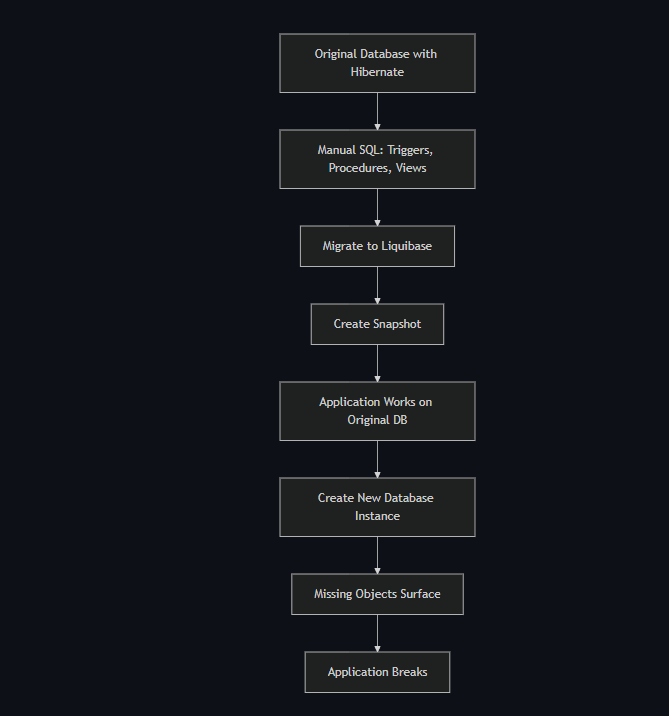
This is the hidden trap of migrating from Hibernate to Liquibase. The migration appears successful because your existing database still works, but new database instances reveal what was never captured.
The Core Problem
Liquibase diffs are designed to capture schema structure—the tables, columns, constraints, indexes, and relationships that define your data model. They excel at tracking these structural elements because they're the foundation of any database.
However, databases contain more than just structure. They include programmatic objects that execute code: triggers that fire automatically on data changes, stored procedures that encapsulate business logic, functions that perform calculations, and views that present data in specific ways.
When you generate a Liquibase snapshot from an existing database, the tool reads the schema metadata and creates changesets for structural elements. But programmatic objects often get overlooked, especially if they were added manually outside of any migration system. Your production database has them because you created them directly, but your Liquibase changesets have no record of them.
The application continues working on your original database because those objects already exist. But when you try to create a new database instance from scratch using only your Liquibase changesets, those missing objects never get created. The application breaks because it expects objects that don't exist.
This problem becomes critical in several scenarios:
- Multi-tenant applications: Each new tenant needs a fresh database, and missing objects break functionality
- CI/CD pipelines: Automated test environments fail when they can't find expected database objects
- Developer onboarding: New team members setting up local environments encounter the same issues
Why This Happens
Liquibase focuses on schema structure because that's what migration tools handle well. When you run a snapshot, it queries the database's information schema for tables, columns, and constraints. Programmatic objects like triggers and stored procedures exist in different system tables, and Liquibase may not query these by default.
If you added objects manually using raw SQL, there's no migration history to reference. Liquibase can't know about objects created outside its tracking system. It only discovers what it can find by examining the current database state, and if that examination doesn't include programmatic objects, they get missed.
Deep Dive: Solutions
Use Preconditions
Preconditions are Liquibase's way of checking conditions before executing changesets. They verify that objects exist or don't exist before performing operations, preventing errors and ensuring your changesets can run multiple times safely.
The onFail="MARK_RAN" attribute is crucial here. It tells Liquibase to mark the changeset as executed if the precondition fails, rather than throwing an error. This makes your changesets idempotent—they can run multiple times without causing problems.
Here's how to use preconditions for triggers:
<changeSet id="add-trigger-safely" author="developer">
    <preConditions onFail="MARK_RAN">
        <not>
            <objectExists type="trigger" name="audit_trigger" schemaName="public"/>
        </not>
    </preConditions>
    <sql>
        CREATE TRIGGER audit_trigger
        BEFORE INSERT ON users
        FOR EACH ROW
        EXECUTE FUNCTION log_user_changes();
    </sql>
</changeSet>
This changeset checks if the trigger exists. If it doesn't exist, it creates it. If it already exists, Liquibase marks the changeset as run and skips it. Preconditions work for all database object types: triggers, procedures, functions, views, sequences, and more.
Manual Changesets for Missing Objects
The first step in fixing missing objects is discovering what's missing. You need to audit your production database and compare it with what Liquibase has captured.
Start by querying your production database to list all programmatic objects:
-- List all database objects
SELECT 'trigger' as type, trigger_name as name, event_object_table as related_table
FROM information_schema.triggers
WHERE trigger_schema = 'public'
UNION ALL
SELECT 'function', routine_name, NULL
FROM information_schema.routines
WHERE routine_type = 'FUNCTION' AND routine_schema = 'public'
UNION ALL
SELECT 'procedure', routine_name, NULL
FROM information_schema.routines
WHERE routine_type = 'PROCEDURE' AND routine_schema = 'public'
UNION ALL
SELECT 'view', table_name, NULL
FROM information_schema.views
WHERE table_schema = 'public'
ORDER BY type, name;
Compare this list with what's in your Liquibase changesets. Any object in the database but not in changesets needs to be added. For each missing object, extract its definition, create a changeset with preconditions, and document its purpose.
Here's an example for a stored function:
<changeSet id="add-missing-calculate-total-function" author="developer">
    <preConditions onFail="MARK_RAN">
        <not>
            <objectExists type="function" name="calculate_total" schemaName="public"/>
        </not>
    </preConditions>
    <sql>
        CREATE OR REPLACE FUNCTION calculate_total(order_id INTEGER)
        RETURNS DECIMAL AS $$
        DECLARE
            total DECIMAL;
        BEGIN
            SELECT SUM(price * quantity) INTO total
            FROM order_items
            WHERE order_id = $1;
            RETURN total;
        END;
        $$ LANGUAGE plpgsql;
    </sql>
    <rollback>
        DROP FUNCTION IF EXISTS calculate_total(INTEGER);
    </rollback>
</changeSet>
Use CREATE OR REPLACE for functions and procedures so the changeset can run multiple times safely. Include rollback blocks to enable undoing changes if needed.
Verification Strategy
The only reliable way to catch missing objects is testing your migration on a completely fresh database. Create an empty database, run all changesets, then compare with production using queries to identify gaps. Add missing changesets and repeat until both databases match.
Use these comparison queries to find discrepancies:
-- Compare triggers
SELECT 'MISSING IN FRESH DB' as status, trigger_name, event_object_table
FROM information_schema.triggers
WHERE trigger_schema = 'public'
AND trigger_name NOT IN (
    SELECT trigger_name
    FROM information_schema.triggers
    WHERE trigger_schema = 'public'
    -- Query against your fresh database
);

-- Compare functions and procedures
SELECT 'MISSING IN FRESH DB' as status, routine_name, routine_type
FROM information_schema.routines
WHERE routine_schema = 'public'
AND routine_type IN ('PROCEDURE', 'FUNCTION')
AND routine_name NOT IN (
    SELECT routine_name
    FROM information_schema.routines
    WHERE routine_schema = 'public'
    -- Query against your fresh database
);

-- Compare views
SELECT 'MISSING IN FRESH DB' as status, table_name
FROM information_schema.views
WHERE table_schema = 'public'
AND table_name NOT IN (
    SELECT table_name
    FROM information_schema.views
    WHERE table_schema = 'public'
    -- Query against your fresh database
);
Run these queries comparing production against your fresh database. Any results indicate missing objects that need changesets.
Best Practices for Migration
When migrating from Hibernate to Liquibase, follow these practices to avoid missing objects:
- Audit before migrating: Before creating your first snapshot, document all manual SQL additions. Keep a log of every trigger, procedure, function, and view you've created
- Use database comparison tools: Tools like pg_dump for PostgreSQL or mysqldump for MySQL can help you extract object definitions
- Test on fresh instances: Always test your complete migration on an empty database before considering it complete
- Version control everything: Store all changesets in version control so you have a complete history
- Include rollbacks: Write rollback instructions for every changeset so you can undo changes if needed
- Use preconditions consistently: Make every changeset idempotent using preconditions
- Document object purposes: Add comments explaining why each object exists and what it does
Conclusion
Migrating from Hibernate to Liquibase requires capturing all database objects, not just schema structure. Audit your production database, create changesets for missing objects with preconditions, and test on fresh instances. This ensures new database environments have everything they need to function correctly.
Recent Posts