Table of Contents
Why Terraform with AI Matters in Modern DevOps
Writing Terraform for anything beyond a small setup quickly becomes tedious.
Once you start dealing with multiple modules, cross-resource dependencies, and AWS-specific quirks, the workflow slows down. Most of the time isn’t spent writing code — it’s spent checking documentation, fixing edge cases, and rerunning terraform apply.
Many teams are now experimenting with Terraform with AI to speed this up.
In practice, that only works partially — unless the AI has proper context.
How Terraform workflows traditionally worked
A typical workflow looks like this:
- Read Terraform docs
- Write modules and resources manually
- Run
terraform plan - Fix errors
- Repeat
For small setups, this is manageable.
For production infrastructure, it becomes repetitive and slow. Most engineers end up switching between Terraform registry docs, AWS docs, and their codebase constantly.
Limitations of Using Terraform with AI Without Context
The obvious idea is to use AI to generate Terraform.
In most cases, it starts like this:
“Generate Terraform for a VPC with public and private subnets”
You do get output. But:
- It may use outdated arguments
- It ignores your module structure
- Dependencies are incomplete
- It often fails during
terraform apply
👉 The core issue: AI does not understand your infrastructure context
Our First Attempt (RAG Failure) (Late 2024 - before advent of modern agents)
To solve this, we built an internal tool using:
- Vector database
- RAG (Retrieval-Augmented Generation)
The idea was to fetch Terraform documentation and index it in a vector database and provide it to an agent
It helped slightly — but failed in practice:
- Iteration was difficult - terraform plan and apply loop - fix errors
- Context size limitations
- No awareness of project structure
- Could not refine outputs
It generated code, but only for simple infrastructure. For complex ones it used to fail after a few iterations.
We didn't try to optimise it further because while we were in middle of it - cursor agents became extremely powerful and they pretty much solved this iteration problem.
What changed with MCP Server + Cursor
The behavior changed once we introduced Terraform MCP Server and used it with Cursor.
Instead of generating code blindly, the system now had access to:
- Terraform module documentation
- Input/output structures
- Resource relationships
The difference was noticeable.
The output was not perfect — but much closer to something usable.
How MCP actually changes the workflow
At a high level, MCP acts as a bridge between the editor (Cursor) and Terraform context.
Instead of guessing, the AI can:
- Look up module definitions
- Understand required inputs
- Follow dependencies across resources

This is the key difference from standard AI usage.
⚙️ What MCP Server Actually Does Internally
The improvement with MCP is not just better prompting — it’s access to structured Terraform knowledge.
The MCP server exposes tools that allow the AI to query real Terraform data:
Key MCP Capabilities:
- Provider Documentation Lookup
Fetches full documentation for resources, data sources, and functions - Module Discovery
Finds Terraform modules from the registry with usage examples - Module Details
Retrieves inputs, outputs, and configuration patterns - Policy Search
Helps identify best practices and security policies
👉 In simple terms:
Instead of guessing, the AI can look things up like an engineer would.
Terraform with AI vs Manual vs MCP (Comparison)
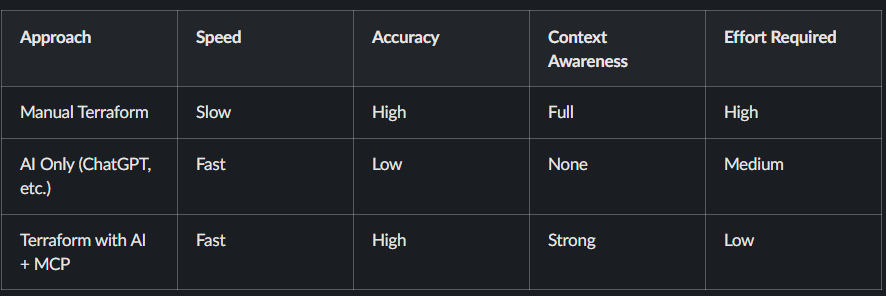
In practice, most teams try AI first, then realize that without context, results are unreliable. MCP fixes that gap.
A practical example: building AWS infrastructure
Let’s take a realistic setup:
- VPC with public and private subnets
- NAT Gateway and Internet Gateway
- Application Load Balancer
- Auto Scaling group (EC2)
- CloudFront distribution
- Cloudflare DNS
- Jump box for access
This is a typical production-style setup.
Writing this manually takes time — especially when wiring dependencies correctly.
How we approached it
Instead of writing everything manually, we broke the problem into smaller steps and guided the AI.
🧠 Full Prompt Used for Infrastructure Generation
Instead of vague prompts, we used a structured, step-by-step approach to guide the AI.
Start code generation. Do it step by step. Move to next step only after the current step is complete.

Step: Create VPC and Network Infrastructure - use vpc module
- Create VPC with appropriate CIDR block
- Create public and private subnets across 2 AZs
- Set up Internet Gateway
- Configure NAT Gateways in public subnets
- Configure route tables for public/private subnets

Step: Create Security Groups
- ALB security group (allow HTTP/HTTPS inbound)
- EC2 security group
    - allow traffic from ALB
    - allow ssh from the vpc
- Allow all outbound traffic

Step: Create Auto Scaling Group - use autoscaling module
- Create launch template for EC2 instances
- Use ubuntu ami for the instances
- Configure ASG across private subnets
- Use keypair named "vikas-aws"
- Add a user data script to install nginx and create a simple html page

Step: Create a jumpbox
- Create a jumpbox in the public subnet
- Ensure it has a public IP
- Allow SSH from internet

Step: Create Application Load Balancer - use alb module
- Create ALB in public subnets
- Configure HTTP listener
- Attach to autoscaling group

Step: CloudFront Distribution
- Configure CloudFront with ALB as origin
- Set caching TTL to 0

Step: DNS Configuration
- DNS handled via Cloudflare (no route53)
In practice, breaking the problem into steps like this improves output quality significantly compared to single prompts.
What the generated Terraform looked like
A simplified example:
module "vpc" {
  source  = "terraform-aws-modules/vpc/aws"
  version = "5.0.0"

  name = "demo-vpc"
  cidr = "10.0.0.0/16"

  azs             = ["us-east-1a", "us-east-1b"]
  public_subnets  = ["10.0.1.0/24", "10.0.2.0/24"]
  private_subnets = ["10.0.3.0/24", "10.0.4.0/24"]

  enable_nat_gateway = true
  single_nat_gateway = true
}
This wasn’t perfect out of the box, but:
- Structure was correct
- Inputs were mostly valid
- Dependencies were aligned
That already saves a significant amount of time.
What actually improved (based on usage)
From real usage:
Before:
- 2–4 hours to assemble infra
- Multiple documentation lookups
- Several failed applies
After:
- Initial setup generated in minutes
- Fewer structural errors
- Faster iteration
In most teams, the biggest gain is reduced context switching.
Operational considerations
This approach still requires discipline:
- Always run
terraform plan - Review changes carefully
- Do not trust generated code blindly
IAM policies and security configurations must always be reviewed manually.
When Terraform with AI Works Best
In most teams, this approach works well when:
- You are building new infrastructure
- You need to scaffold modules quickly
- You want to reduce repetitive work
It is less effective when used blindly or without validation.
When not to use this approach
Avoid relying on it when:
- Infrastructure requires strict compliance
- You don’t understand the generated code
- You need deterministic, audited configurations
This is not a replacement for Terraform expertise.
Where this fits in a DevOps workflow
This approach integrates naturally with:
- Git-based workflows
- CI/CD pipelines
- Infrastructure reviews
The deployment process does not change — only the way code is written.
Related reading
- https://www.kubeblogs.com/how-civo-kubernetes-routes-pod-traffic-single-egress-ip-explained/
- https://www.kubeblogs.com/gp3-vs-gp2-ebs-volume-aws/
- https://www.kubeblogs.com/self-hosted-github-actions-runner/
FAQ
What is Terraform with AI?
Terraform with AI refers to using AI tools to generate and manage infrastructure code more efficiently.
What is Terraform MCP Server?
It provides AI tools with Terraform context, including modules and documentation.
Is AI-generated Terraform safe for production?
Yes, but only after proper validation and review.
Conclusion
Terraform itself hasn’t changed.
What’s changing is how engineers interact with it.
Using Terraform with AI + MCP Server reduces friction in writing infrastructure — especially for repetitive setups.
It doesn’t replace engineering judgment, but it does make the workflow more efficient.
Recent Posts