Table of Contents
Introduction
Most of the large projects start small and when they do a very few care about the VPC CIDR, Subnet size, VPC peering and other networking aspects - people just want to move fast and get stuff done. For example, let's say you've designed your VPC with what seemed like a reasonable CIDR block. Maybe 10.0.0.0/16 - that's 65,000 IP addresses, right? Should be plenty. But then as time progresses you need to break it down into smaller subnets and that leads to a lot of fragmentation.
Fast forward a few years and your business grows. Now you have tons of Lambda functions, EKS pods, RDS instances, and that one team that keeps spinning up dev environments - they're all eating through IP addresses faster than you ever anticipated. And now you're staring at a problem: your VPC is running out of room.
Most folks are not aware of this but you don't need to tear everything down and start over. AWS lets you add secondary CIDR blocks to an existing VPC. However, there are certain limitations and challenges that you need to know about before you go this path.
What Secondary CIDRs Actually Solve
The most obvious use case is IP address exhaustion. But there are a few other scenarios where secondary CIDRs come in handy:
Workload isolation. Some teams like to carve out dedicated IP ranges for specific workloads - maybe Kubernetes pods get one CIDR while databases get another. This makes network policies and security group rules more predictable.
Connecting to on-prem networks. Your data center already uses certain IP ranges. By adding a non-overlapping secondary CIDR to your VPC, you can set up Direct Connect or VPN without IP conflicts.
Here's how it looks in practice:
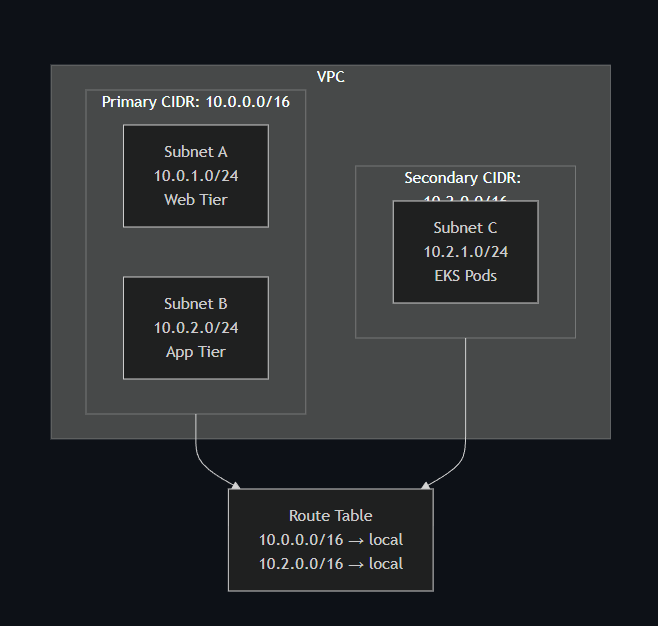
When you add a secondary CIDR, AWS automatically adds a local route to your route tables. Traffic between subnets in different CIDRs just works.
The Restrictions You'll Hit
This is where things get tricky. AWS has some restrictions that aren't immediately obvious.
You can't mix RFC 1918 ranges freely. If your VPC uses 10.x.x.x, you cannot add a secondary CIDR from 172.16.x.x or 192.168.x.x. You're locked into the same RFC 1918 family:
| Primary CIDR Range | Can Add | Cannot Add |
|---|---|---|
| 10.0.0.0/8 | Other 10.x.x.x ranges | 172.16.x.x, 192.168.x.x |
| 172.16.0.0/12 | Other 172.x.x.x ranges | 10.x.x.x, 192.168.x.x |
| 192.168.0.0/16 | Other 192.168.x.x ranges | 10.x.x.x, 172.16.x.x |
Some ranges are off-limits entirely. Avoid 172.17.0.0/16 - Docker uses it by default, and services like AWS Cloud9 and SageMaker can conflict with it. Also steer clear of 198.19.0.0/16.
VPC peering gets complicated. If you have an active peering connection, you can add secondary CIDRs as long as they don't overlap with the peer VPC. But if there's a pending peering connection, the requester VPC can't add any CIDRs until the connection is accepted or deleted.
Direct Connect has its own rules. When multiple VPCs share a Direct Connect gateway, none of their CIDR blocks can overlap - including secondary CIDRs. Adding a new CIDR to one VPC could break connectivity to another.
The primary CIDR is permanent. You can remove secondary CIDRs, but the original CIDR block you created the VPC with? That's there forever.
Adding a Secondary CIDR
The actual process is straightforward. Here's the CLI command:
aws ec2 associate-vpc-cidr-block \
    --vpc-id vpc-0123456789abcdef0 \
    --cidr-block 10.2.0.0/16
Then create subnets in the new range:
aws ec2 create-subnet \
    --vpc-id vpc-0123456789abcdef0 \
    --cidr-block 10.2.1.0/24 \
    --availability-zone us-east-1a
The CIDR goes through a few states: associating → associated. Wait for associated before creating subnets.
One thing that trips people up: existing subnets can't be resized or moved. If you've run out of IPs in a subnet, you can't expand it. You'll need to create a new, larger subnet in your secondary CIDR and migrate workloads over.
Conclusion
Secondary CIDRs are a can be very helpful when your VPC outgrows its initial design. They're especially useful for IP exhaustion, acquisitions, and hybrid connectivity scenarios.
Before you add one, check your existing peering connections, Direct Connect setup, and make sure you're staying within the same RFC 1918 family. A few minutes of planning saves hours of troubleshooting.
If you're dealing with complex multi-VPC architectures or need help planning your network topology, KubeNine can help you design it right the first time.
Recent Posts