
On this page
Civo Kubernetes: Where Does Your Pod's Traffic Actually Go?
A practical look at how Civo Kubernetes routes outbound pod traffic, handles SNAT, and exposes a shared public egress IP for API whitelisting and external connectivity.

Introduction
On Civo’s managed Kubernetes (built on K3s), worker nodes never get a public IP at all — only the control plane does. So no matter which node your pod lands on, its outbound traffic has to travel through that one public-facing gateway. It’s a deliberate architectural choice, and once you understand why Civo does this and how the routing actually works under the hood, a lot of things click into place.
In this post we’ll cover:
- How Civo uses one IP for all pod egress
- What to whitelist when third parties require it
- Edge cases to avoid
How Does Civo Route Pod Traffic to the Internet?
Architecture: One Public IP Per Cluster
Civo creates K3s clusters where:
- Only the control plane node gets a public IP
- Worker nodes only have private IPs (e.g.
192.168.1.x) on the cluster’s network - All pod egress is routed through the control plane’s public IP
So every outbound connection from any pod on any node appears from that same public IP.
Civo Kubernetes Egress Architecture
How Civo Kubernetes Routes Pod Traffic to the Internet

What We Observed
We ran a DaemonSet that executes curl ifconfig.me on every node. Result:
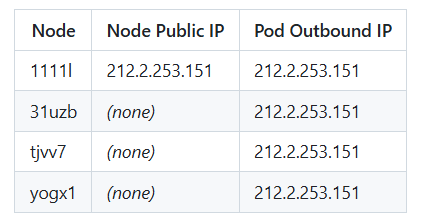
All pods report the same outbound IP, which matches the control plane node’s public IP.
How It Happens Under the Hood
- Pod networking – Pods use Flannel (or your CNI) with private pod IPs (e.g.
10.42.x.x). - Masquerading – Outbound traffic to the internet is SNAT’d to the node’s IP (standard Kubernetes behaviour).
- Worker nodes without public IPs – Worker traffic is routed via Civo’s network so it leaves via the control plane node’s public IP. The control plane acts as the cluster’s egress gateway.
Net result: a single, predictable egress IP for the entire cluster.
Sequence Diagram
How Pod Traffic Is NATed in Civo Kubernetes

IP Whitelisting Scenarios
What to Whitelist
If an external service (API, DB, webhook receiver, etc.) restricts access by source IP, you should whitelist:
The cluster’s API endpoint / external IP – this is your egress IP.
You can obtain it via:
# Civo CLI
civo kubernetes show <cluster-name>

# Or from kubeconfig
kubectl config view --minify -o jsonpath='{.clusters[0].cluster.server}'
# Then extract the host (IP or DNS)
What Not to Whitelist
- Pod IPs – They are private and never appear as source on the internet.
- Node internal IPs – Private (e.g.
192.168.1.x) and not visible externally. - LoadBalancer IPs – Used for inbound traffic only (ingress, LoadBalancer services), not pod egress.
- Reserved IPs – Used for instances or LoadBalancer services, not for default pod egress.
Whitelisting Checklist
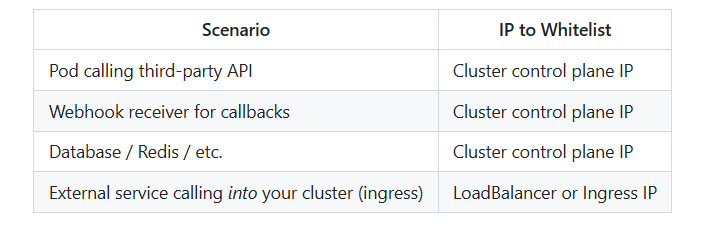
IP Whitelisting Flow Diagram
Which IP Should You Whitelist in Civo Kubernetes?

Edge Cases
1. Control Plane Node Replacement
Issue: If the control plane node is upgraded, replaced, or fails, the public IP can change.
Impact: Previously whitelisted IPs may no longer work; new egress IP may need to be whitelisted.
Mitigation: After any cluster change, verify egress IP with:
kubectl run ip-check --rm -it --image=curlimages/curl --restart=Never -- curl -s ifconfig.me2. Multiple Clusters, Multiple IPs
Issue: Each cluster has its own control plane and egress IP.
Impact: Clusters in dev/staging/prod each require separate whitelist entries.
Action: Whitelist all clusters that need to reach the external service, or use a shared egress path (e.g. proxy).
3. LoadBalancer vs Cluster Egress
Issue: LoadBalancer services get their own public IPs (e.g. 212.2.251.1, 212.2.253.14). These are for inbound traffic.
Impact: If a provider asks “which IP will call you?”, you give the cluster egress IP. If they ask “which IP will you use to call us?”, again it’s the cluster egress IP. Inbound traffic comes from the caller’s IP (or via proxy protocol if configured).
FAQs
Why do all pods share one public IP in Civo Kubernetes?
All pods in Civo Kubernetes share one public outbound IP because worker nodes use private networking. Outbound traffic is routed through the control plane node, which acts as the cluster egress gateway for the entire Kubernetes cluster.
Which IP should I whitelist for external APIs in Civo Kubernetes?
You should whitelist the cluster egress IP, usually the control plane node’s public IP. Pod IPs and internal node IPs are private and never appear externally. LoadBalancer IPs are only used for inbound application traffic.
How does SNAT work for pod egress traffic in Kubernetes?
Kubernetes uses Source Network Address Translation (SNAT) for outbound pod traffic. Pod IPs are translated to node-level IPs before traffic leaves the cluster. In Civo Kubernetes, outbound traffic is then routed through one shared public egress IP.
How can I check the outbound IP address of a Kubernetes pod?
You can verify the outbound IP of a Kubernetes pod by running a curl request from inside the cluster. This confirms which public IP external APIs, databases, and third-party services will see.
kubectl run ip-check --rm -it \--image=curlimages/curl \--restart=Never -- curl -s ifconfig.meWhy is a static outbound IP important in Kubernetes?
A static outbound IP makes IP whitelisting easier for external APIs, databases, SaaS platforms, and enterprise firewalls. It provides a predictable public source IP for Kubernetes workloads accessing external services.
What is the difference between a LoadBalancer IP and a Kubernetes egress IP?
A LoadBalancer IP is used for inbound traffic reaching your applications, while a Kubernetes egress IP is used for outbound traffic leaving the cluster. External services usually require the cluster egress IP for IP whitelisting.
Summary
On Civo Kubernetes, all pod traffic to the internet leaves through a single public IP: the control plane node’s IP. That’s the IP to use for whitelisting when pods call external APIs, webhooks, or databases. LoadBalancer and reserved IPs are for other use cases. Be aware of control plane replacement, multi-cluster setups when designing and operating integrations that depend on IP whitelisting.
Read More from KubeBlogs
- How to Create an Internal Load Balancer in Civo Kubernetes (Step-by-Step Guide) — Learn how to build a private internal LoadBalancer in Civo Kubernetes using firewall rules and Kubernetes annotations.
- How Civo Kubernetes Routes Pod Traffic (Single Egress IP Explained) — Deep dive into Kubernetes pod egress, SNAT, outbound traffic routing, and IP whitelisting in Civo K3s clusters.
- Your Kubernetes API Is Public — Here’s How to Make It Private — Secure Kubernetes API access using Cloudflare Zero Trust, WARP, and private networking.
- K3s vs Kubernetes (K8s): Performance, Architecture & Use Cases — Compare K3s and Kubernetes architecture, performance, scalability, and production use cases.
- Fix GKE 504 Errors Using BackendConfig (Step-by-Step Guide) — Learn how to troubleshoot Kubernetes load balancer timeout issues and optimize BackendConfig settings in GKE.
For raw data and commands used in this analysis, see artifact.md.