
On this page
Stop Over-Engineering Django State Machines (Use This Instead of django-fsm)
Learn how to build a Django state machine without django-fsm using django-lifecycle hooks. A simple, scalable approach for real-world workflows and CI/CD systems.

If you're trying to implement a state machine in Django without using heavy libraries like django-fsm, there’s a simpler approach you might already be using without realizing it.
Using django-lifecycle hooks, you can build a declarative state machine directly inside your models without introducing new abstractions or DSLs.
Most real-world systems — including deployment pipelines, ticketing systems, and async workflows — don’t need complex state machine frameworks. They need one simple rule:
When a field changes from X to Y, trigger a specific action.
This article shows how to achieve that using django-lifecycle.
Why Most Django Apps Need a State Machine
You may or may not realise it, but every application with non-trivial business logic eventually needs a state machine.
- An order goes from
pendingtopaidtoshipped - A document goes from
drafttoreviewedtopublished
The standard advice is to use libraries like:
- django-fsm
- django-viewflow
- python-statemachine
These work, but they introduce:
- Additional dependencies
- New abstractions (DSLs)
- More complexity than needed
In most cases, all you really need is:
When this field changes from X to Y, do Z.
How django-lifecycle Works (Architecture Overview)

Architecture diagram showing how django-lifecycle hooks act as a state machine by triggering actions based on model field changes
he Pattern: Hooks as State Transitions
The core idea is simple.
Instead of defining transitions like this:
class OrderStateMachine:
    transitions = [
        {'trigger': 'pay', 'source': 'pending', 'dest': 'paid'},
        {'trigger': 'ship', 'source': 'paid', 'dest': 'shipped'},
    ]
You write:
from django_lifecycle import LifecycleModel, hook, AFTER_UPDATE, AFTER_CREATE

class Order(LifecycleModel):
    status = models.CharField(max_length=20, default="pending")

    @hook(AFTER_UPDATE, when="status", was="pending", is_now="paid")
    def on_payment_received(self):
        send_receipt_email.delay(self.id)

    @hook(AFTER_UPDATE, when="status", was="paid", is_now="shipped")
    def on_order_shipped(self):
        send_tracking_email.delay(self.id)
The hook decorator declares that after the model is saved, if the status changes from one value to another, a specific method runs. That is a state transition.
You get the behavior of a state machine without introducing a separate library.
What You Get for Free
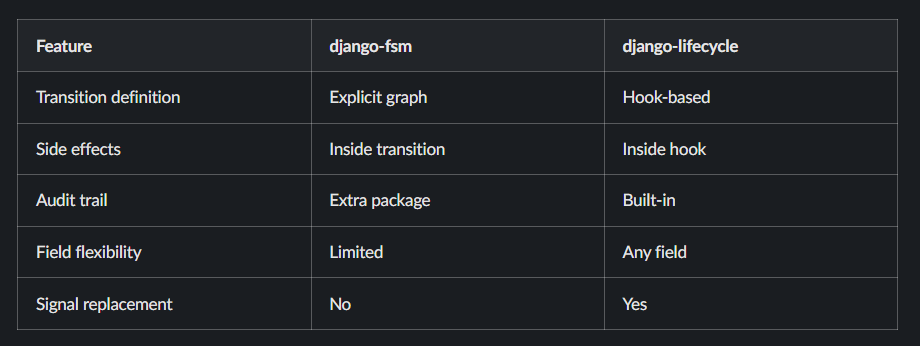
- Transition guards: hooks only fire on exact transitions
- Side effects: logic is defined inside each hook method
- Audit trail support:
self.initial_value("status")gives previous state - Implicit control: invalid transitions simply don’t trigger hooks
What You Don’t Get (and Often Don’t Need)
- Visual state diagrams
- Built-in transition validation before save
.can_transition()helpers
These can still be implemented if required using additional hooks or model methods.
Real-World Examples
Deployment Pipeline (CI/CD Use Case)
A CI/CD deployment runs asynchronously. When it completes, you update metrics and invalidate caches. When it fails, you only invalidate caches.
class Deployment(LifecycleModel):
    status = models.CharField(max_length=20)  # running, completed, failed
    project = models.ForeignKey("Project", on_delete=models.CASCADE)

    @hook(AFTER_SAVE, when="status", was="running", is_now="completed")
    def on_deployment_completed(self):
        recalculate_project_metrics.delay(str(self.project.uuid))
        recalculate_team_metrics.delay(self.project.team_id)
        invalidate_project_cache.delay(
            project_id=str(self.project.uuid),
            team_id=self.project.team_id,
        )

    @hook(AFTER_SAVE, when="status", was="running", is_now="failed")
    def on_deployment_failed(self):
        invalidate_project_cache.delay(
            project_id=str(self.project.uuid),
            team_id=self.project.team_id,
        )
Support Ticket with Audit Trail
Support tickets move across multiple states, and each transition creates an audit entry.
class Ticket(LifecycleModel):
    status = models.CharField(max_length=20)
    title = models.CharField(max_length=200)

    @hook(AFTER_CREATE)
    def on_ticket_created(self):
        TicketHistory.objects.create(
            ticket=self,
            action_type=TicketHistory.ActionType.CREATED,
            previous_status="",
            new_status=self.status,
            performed_by=None,
            comment=f"Ticket created: {self.title}",
        )

    @hook(AFTER_UPDATE, when="status", has_changed=True)
    def on_status_changed(self):
        previous_status = self.initial_value("status")

        if self.status == self.Status.CLOSED:
            action_type = TicketHistory.ActionType.RESOLVED
            performed_by = getattr(self, "_resolving_user", None)
            comment = getattr(self, "_resolve_comment", "") or "Ticket resolved"

        elif self.status == self.Status.OPEN and previous_status == self.Status.CLOSED:
            action_type = TicketHistory.ActionType.REOPENED
            comment = "Ticket reopened by customer"

        elif self.status == self.Status.SNOOZED:
            action_type = TicketHistory.ActionType.SNOOZED
            performed_by = self.snoozed_by
            comment = self.snooze_reason

        elif self.status == self.Status.OPEN and previous_status == self.Status.SNOOZED:
            action_type = TicketHistory.ActionType.UNSNOOZED
            comment = "Ticket marked as active"

        TicketHistory.objects.create(
            ticket=self,
            action_type=action_type,
            previous_status=previous_status,
            new_status=self.status,
            performed_by=performed_by,
            comment=comment,
        )
Invoice Processing Workflow
class Invoice(LifecycleModel):
    status = models.CharField(max_length=20)
    final_pdf = models.FileField(blank=True)

    @hook(AFTER_UPDATE, when="status", is_now=InvoiceStatus.APPROVED)
    def on_approved_generate_pdf(self):
        pdf_bytes = PDFService().generate_invoice_pdf(self)

        receipts = self.receipts.filter(file__isnull=False)
        if receipts.exists():
            merged = merge_pdfs(
                pdf_bytes,
                *[r.file.read() for r in receipts],
            )
            self.final_pdf.save("invoice.pdf", ContentFile(merged), save=False)
        else:
            self.final_pdf.save("invoice.pdf", ContentFile(pdf_bytes), save=False)

        self.save(update_fields=["final_pdf"])
Watching Non-Status Fields
@hook(AFTER_UPDATE, when="final_pdf", has_changed=True)
def on_pdf_ready_notify(self):
    if not self.final_pdf:
        return
    invoice_pdf_ready.send(
        sender=self.__class__,
        invoice=self,
    )
Hooks work on any field type, not just status fields.
django-lifecycle vs django-fsm
Best Practices
- Name hook methods based on transitions, not actions
- Use
initial_value()for tracking previous state - Keep hooks small and focused
- Offload heavy operations to async workers
FAQ
Can you build a state machine in Django without django-fsm?
Yes, django-lifecycle allows you to define state transitions using model hooks without additional libraries.
What is django-lifecycle used for?
It replaces Django signals and enables conditional logic when model fields change.
When should you use a state machine in Django?
When your application has defined workflows such as orders, deployments, approvals, or ticket systems.
Read More on KubeBlogs
If you're exploring DevOps, Kubernetes, and cloud infrastructure, these guides will help you go deeper:
- How Kubernetes Routes Pod Traffic with a Single Egress IP
https://www.kubeblogs.com/how-civo-kubernetes-routes-pod-traffic-single-egress-ip-explained/ - GP3 vs GP2 EBS Volumes: Performance and Cost Comparison
https://www.kubeblogs.com/gp3-vs-gp2-ebs-volume-aws/ - How to Set Up a Self-Hosted GitHub Actions Runner
https://www.kubeblogs.com/self-hosted-github-actions-runner/
These articles cover Kubernetes networking, AWS storage optimization, and CI/CD infrastructure — useful when scaling beyond local development environments.
Conclusion
Most Django applications do not need a heavy state machine library like django-fsm. In real-world systems, especially in CI/CD pipelines and asynchronous workflows, state transitions are simple and event-driven.
Using django-lifecycle hooks, you can implement a clean and maintainable state machine directly at the model level. This approach keeps your logic simple, avoids unnecessary dependencies, and scales well with real-world backend systems.