
On this page
Beyond Git Worktrees: What It Actually Takes to Run Parallel AI Agents
Learn how to run parallel AI agents using Git worktrees with isolated dev environments. A clean and efficient local setup using Docker and shared infrastructure.

Running multiple development environments locally on one machine sounds simple — until you actually try it.
If you're working with AI coding agents, parallel feature branches, or testing workflows, you quickly run into problems like:
- Port collisions
- Broken database migrations
- Redis conflicts
- Docker containers interfering with each other
This becomes especially painful when trying to run multiple dev environments locally without conflicts.
This approach shows how to run multiple isolated environments on one machine efficiently, without heavy resource usage.
Why AI Development Needs Isolation
We wanted to run multiple AI coding agents on the same Django project at the same time, each on its own branch with a working server, database, and Redis instance.
The first attempt failed due to:
- Port conflicts
- Migration conflicts
- Cache pollution
- Container naming collisions
This is a common issue in Docker-based local development environments, especially when multiple services share the same infrastructure.
The Better Approach: Shared Infrastructure, Isolated Applications
Infrastructure services can be shared. Application services must be isolated.
- PostgreSQL supports multiple databases
- Redis supports multiple DB indexes
- Each Django app runs on a different port
This pattern is conceptually similar to AWS VPC network isolation, where resources share infrastructure but remain logically separated.
Architecture Overview
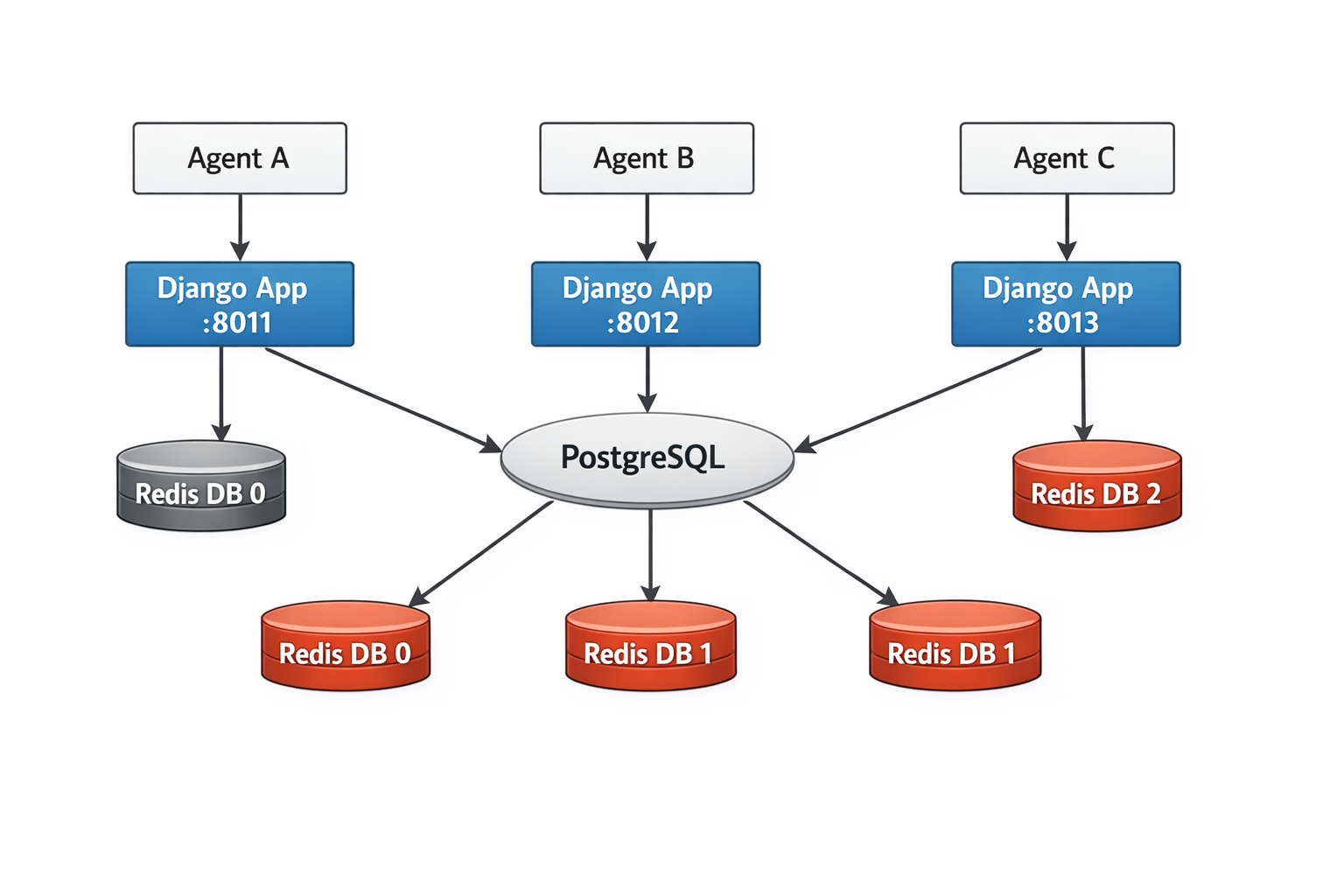
Each application runs independently while sharing infrastructure through logical isolation.
Shared Infrastructure (Run Once)
name: vikas  # Fixed name — one instance per machine

services:
  postgres:
    image: postgres:16
    volumes:
      - local_postgres_data:/var/lib/postgresql/data
    env_file:
      - .env
    ports:
      - "5432:5432"

  redis:
    image: redis:7
    ports:
      - "6379:6379"

networks:
  default:
    name: app_local
Run once:
docker compose -f local-infra.yml up -dTo understand how containers communicate in this setup, it helps to know how Docker networking and container communication works.
Application Layer (Per Worktree)
name: ${GN_PROJECT_NAME:-gn-master}

services:
  django:
    build: .
    environment:
      - DATABASE_URL=postgres://user:pass@postgres:5432/${POSTGRES_DB:-app_db}
      - REDIS_URL=redis://redis:6379/${REDIS_DB:-0}
    ports:
      - "${DJANGO_PORT:-8011}:8000"

  celeryworker:
    build: .
    environment:
      - DATABASE_URL=postgres://user:pass@postgres:5432/${POSTGRES_DB:-app_db}
      - REDIS_URL=redis://redis:6379/${REDIS_DB:-0}

networks:
  default:
    name: app_local
    external: true
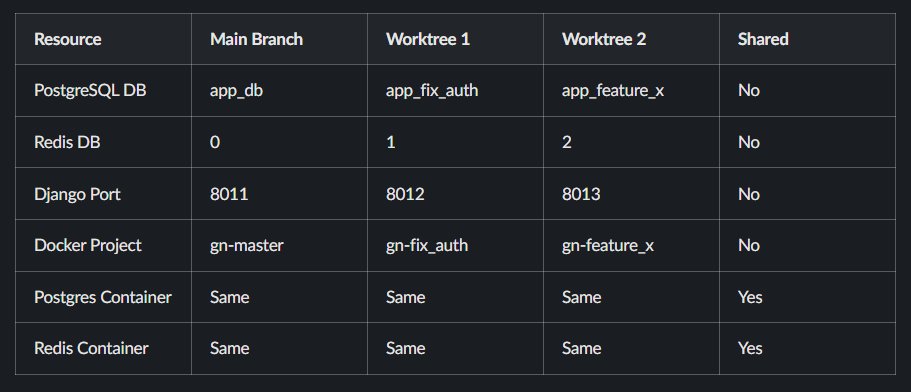
Each worktree creates its own isolated application environment while reusing shared infrastructure.
Isolation Matrix
Cooperative Scanning Algorithm
Redis DB Allocation
USED_DBS=()
for env_file in ../*/.env.worktree; do
    if [ -f "$env_file" ]; then
        db=$(grep "^REDIS_DB=" "$env_file" | cut -d= -f2)
        [ -n "$db" ] && USED_DBS+=("$db")
    fi
done

for candidate in $(seq 1 15); do
    if [[ ! " ${USED_DBS[@]} " =~ " ${candidate} " ]]; then
        REDIS_DB=$candidate
        break
    fi
done
This ensures each environment gets a unique Redis database.
Port Allocation
USED_PORTS=("8011")

for env_file in ../*/.env.worktree; do
    if [ -f "$env_file" ]; then
        port=$(grep "^DJANGO_PORT=" "$env_file" | cut -d= -f2)
        [ -n "$port" ] && USED_PORTS+=("$port")
    fi
done

for candidate in $(seq 8012 8030); do
    if [[ ! " ${USED_PORTS[@]} " =~ " ${candidate} " ]]; then
        DJANGO_PORT=$candidate
        break
    fi
done
This avoids port conflicts automatically.
Predictable Port Mapping
VITE_PORT=$((5173 + (DJANGO_PORT - 8011)))Ports follow a predictable pattern, making debugging easier.
Database Creation on Shared Postgres
WORKTREE_NAME=$(basename "$PWD" | tr '-' '_')
POSTGRES_DB="app_${WORKTREE_NAME}"

docker exec vikas-postgres-1 psql -U postgres -tc \
    "SELECT 1 FROM pg_database WHERE datname='${POSTGRES_DB}'" \
    | grep -q 1 \
    || docker exec vikas-postgres-1 createdb -U postgres "${POSTGRES_DB}"
Each worktree gets its own isolated database.
What You Actually Get
After setting this up:
- Multiple development environments running in parallel
- No port conflicts
- Separate databases per branch
- Clean Redis isolation
- Predictable and repeatable setup
When This Approach May Not Work
- If you need production-grade isolation
- If you're already using Kubernetes
In such cases, Kubernetes environment isolation provides a more scalable and production-ready solution.
FAQ
Why not run a full Docker stack per branch?
Because it duplicates infrastructure and increases memory usage significantly.
How are port conflicts avoided?
Ports are assigned dynamically by scanning existing worktrees.
Can Redis handle multiple environments?
Yes. Redis supports multiple numbered databases for isolation.
Read More on KubeBlogs
If you're exploring DevOps, Kubernetes, and cloud infrastructure, these guides will help you go deeper:
- How Kubernetes Routes Pod Traffic with a Single Egress IP
https://www.kubeblogs.com/how-civo-kubernetes-routes-pod-traffic-single-egress-ip-explained/ - GP3 vs GP2 EBS Volumes: Performance and Cost Comparison
https://www.kubeblogs.com/gp3-vs-gp2-ebs-volume-aws/ - How to Set Up a Self-Hosted GitHub Actions Runner
https://www.kubeblogs.com/self-hosted-github-actions-runner/
These articles cover Kubernetes networking, AWS storage optimization, and CI/CD infrastructure — useful when scaling beyond local development environments.
Conclusion
This setup allows you to run multiple dev environments locally on a single machine without conflicts and without unnecessary resource usage.
If you're working with Docker, Django, or AI-assisted development workflows, this approach provides a clean and scalable solution.
It balances performance, simplicity, and isolation — making it ideal for modern DevOps setups.