Table of Contents
Introduction
On Civo’s managed Kubernetes (built on K3s), worker nodes don’t get public IPs. Only the control plane does.
That means no matter which node your pod lands on, its outbound traffic leaves the cluster through a single public-facing IP. This is intentional. It simplifies networking, but it also changes how you think about egress, IP whitelisting, and external integrations.
Once you understand how Civo routes pod traffic internally, most “which IP do we whitelist?” confusion disappears.
In this post, we’ll cover:
- How Civo uses one IP for all pod egress
- What to whitelist when third parties require static IPs
- Edge cases to watch for in production
How Does Civo Route Pod Traffic to the Internet?
Architecture: One Public IP Per Cluster
A standard Civo K3s cluster looks like this:
- Only the control plane node has a public IP
- Worker nodes only have private IPs (e.g.
192.168.1.x) - All outbound pod traffic is routed through the control plane
So every outbound connection from any pod appears to come from the same public IP.
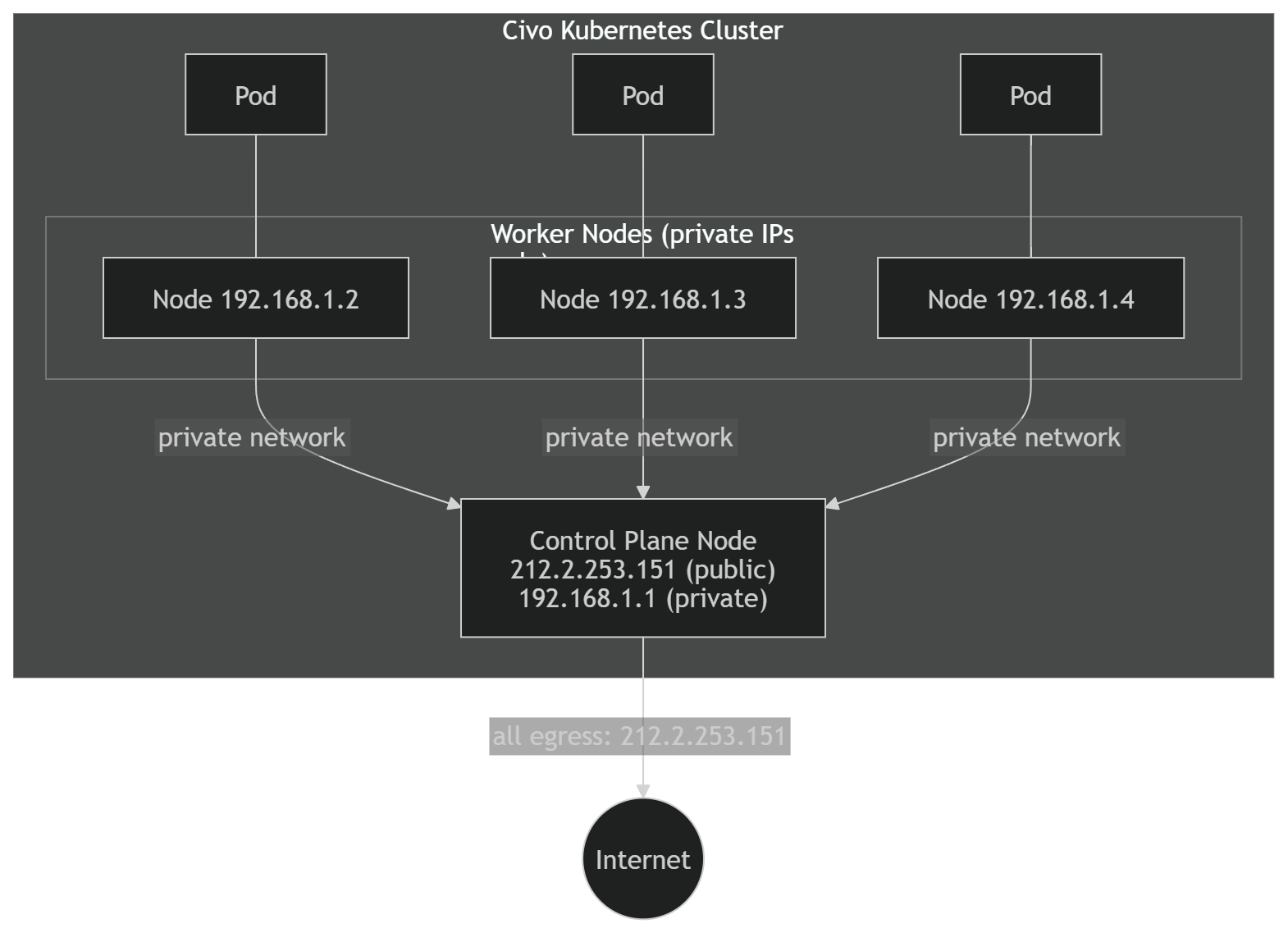
From the internet’s perspective, the cluster has one identity.
What We Observed in Testing
To verify this, we deployed a DaemonSet running:
curl -s ifconfig.meon every node.
Results:
| Node | Node Public IP | Pod Outbound IP |
|---|---|---|
| 1111l | 212.2.253.151 | 212.2.253.151 |
| 31uzb | (none) | 212.2.253.151 |
| tjvv7 | (none) | 212.2.253.151 |
| yogx1 | (none) | 212.2.253.151 |
Even pods running on nodes without public IPs reported the same outbound IP — the control plane’s.
That confirms:
- Worker nodes do not perform direct internet egress.
- All outbound traffic ultimately exits via the control plane.
How It Works Under the Hood
There are two NAT steps involved.
1. Pod Networking
10.42.x.xThese IPs are internal to the cluster.
Node-Level Masquerading
When a pod makes an outbound request:
- Kubernetes performs SNAT.
- The pod’s IP (
10.42.x.x) is translated to the worker node’s private IP (192.168.1.x).
This is standard Kubernetes behavior.
Control Plane Egress
Because worker nodes do not have public IPs:
- Traffic is routed over Civo’s internal network.
- The control plane receives it.
- The control plane performs another SNAT.
- The source IP becomes the control plane’s public IP.
- The packet exits to the internet.
Here’s the flow:
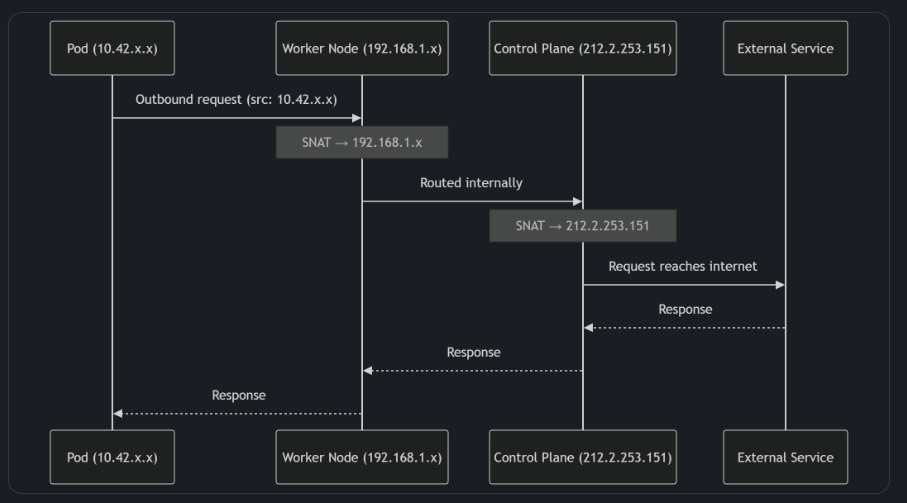
The net result is simple:
One predictable egress IP for the entire cluster.
IP Whitelisting Scenarios
This is where most production questions show up.
What to Whitelist (Outbound)
If an external system restricts access by source IP — for example:
- APIs
- Databases
- Webhook endpoints
- SaaS services
You should whitelist:
The control plane’s public IP.
Retrieve it with:
civo kubernetes show <cluster-name>Or:
kubectl config view --minify -o jsonpath='{.clusters[0].cluster.server}'Extract the IP or hostname from there.
That’s your cluster’s egress identity.
What Not to Whitelist
Do not whitelist:
- Pod IPs
- Worker private IPs
- LoadBalancer IPs (for outbound cases)
- Reserved IPs
Those are not used for default pod egress.
Inbound vs Outbound Clarification
If a third-party asks:
- “Which IP will you use to call us?” → Control plane public IP
- “Which IP should we use to call your service?” → LoadBalancer or Ingress IP
Keeping this distinction clear avoids most integration mistakes.
Edge Cases to Be Aware Of
Control Plane Replacement
If the control plane node is upgraded, recreated, or fails, the public IP may change.
Impact:
- Existing whitelists may break.
- Outbound requests may be rejected.
After cluster changes, verify the egress IP:
kubectl run ip-check --rm -it \
  --image=curlimages/curl \
  --restart=Never -- curl -s ifconfig.me
It’s a quick sanity check that saves time later.
Multiple Clusters
Each cluster has its own control plane and therefore its own egress IP.
If you run:
- Dev
- Staging
- Production
Each environment requires separate whitelist entries.
This is easy to overlook during rollout.
LoadBalancer vs Cluster Egress
LoadBalancer services get their own public IPs.
Those are for inbound traffic only.
They do not affect how pods reach the internet.
Summary
On Civo Kubernetes, all pod traffic to the internet exits through a single public IP — the control plane’s IP.
That’s the IP you whitelist for outbound integrations.
LoadBalancer IPs are for inbound traffic only.
The model is simple and predictable, but you need to remember that the control plane is your cluster’s egress gateway.
Once you understand that, troubleshooting outbound networking becomes straightforward.
Need help with setting up an observability strategy for your business that scales? KubeNine can help. Reach out to us on contact@kubenine.com!