
On this page
AWS T2 vs T3 vs T4g: Performance, Cost and Architecture Comparison Guide (2026)
Compare AWS T2, T3 and T4g EC2 instances. Understand performance, cost, CPU credits and architecture differences to choose the right instance for your workload.

Introduction
Choosing the right EC2 instance type directly affects performance, cost, and reliability. Many teams still rely on T2 instances, assuming they are cost-effective. In reality, T2 instances often lead to CPU throttling and inconsistent performance.
This guide explains the differences between T2, T3, and T4g instances, focusing on real-world DevOps use cases, architecture, and cost efficiency.
What Are Burstable EC2 Instances
Burstable instances provide a baseline level of CPU performance and allow temporary increases using CPU credits.
How CPU Credits Work
- CPU credits accumulate during low usage
- Credits are consumed during high CPU usage
- When credits are exhausted:
- T2 instances throttle performance
- T3 and T4g instances can continue in unlimited mode
Burstable instances are commonly used for web servers, APIs, development environments, and microservices.
T2 vs T3 vs T4g: Key Differences
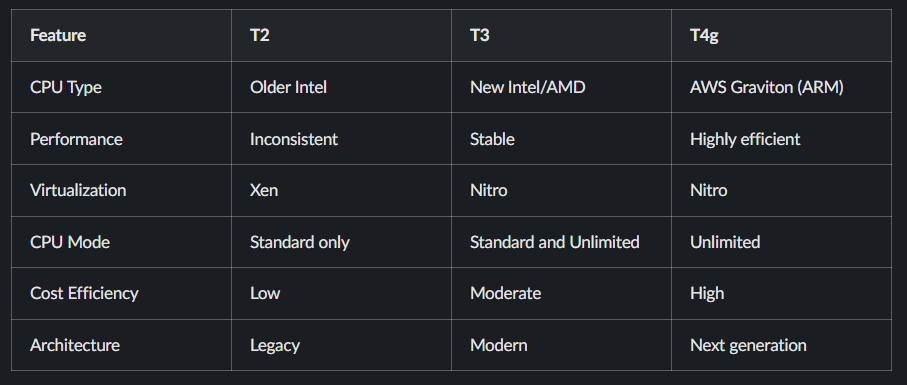
Architecture Comparison


T2 Architecture
- Based on Xen hypervisor
- Higher virtualization overhead
- Less efficient resource utilization
T3 and T4g Architecture
- Powered by AWS Nitro system
- Hardware offloading for networking and storage
- Lower latency and improved performance
Why T3 Is Better Than T2
Consistent Performance
T2 instances throttle aggressively when CPU credits are exhausted. T3 instances provide more stable performance and handle bursts more effectively.
Unlimited Mode
T3 instances support unlimited mode, allowing workloads to continue running even after CPU credits are consumed. This is essential for production systems with variable traffic.
Better Price-to-Performance Ratio
T3 instances deliver more usable compute power per dollar compared to T2, making them more cost-effective in real-world usage.
T3 vs T4g: Which One Should You Choose
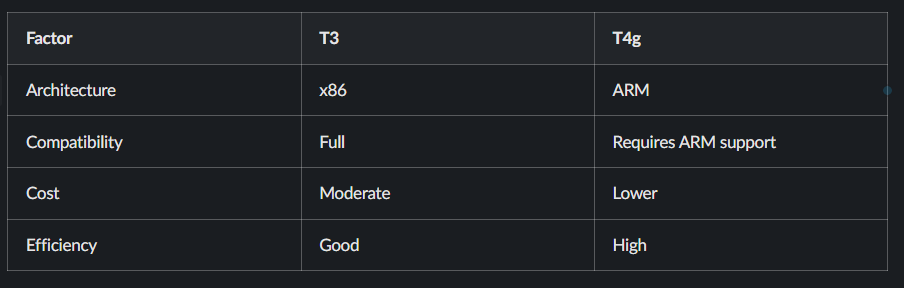
Use T3 When
- You need x86 compatibility
- You are running legacy applications
- Your dependencies do not support ARM
Use T4g When
- You are running containerized workloads
- Your application supports ARM architecture
- You want to reduce infrastructure costs
Real DevOps Use Cases
Suitable Workloads
- Kubernetes worker nodes with moderate load
- CI/CD pipelines such as Jenkins or GitHub Actions
- Backend APIs with variable traffic
- Microservices-based applications
- Development and staging environments
Unsuitable Workloads
- High and constant CPU usage workloads
- Memory-intensive applications
- Large-scale production clusters
In such cases, compute-optimized (C-series) or memory-optimized (R-series) instances are more appropriate.
Cost Comparison
When comparing t2.medium, t3.medium, and t4g.medium:
- T2 may appear cheaper initially but suffers from throttling
- T3 provides balanced performance and cost
- T4g offers the best long-term cost efficiency
Organizations adopting Graviton-based instances often report significant cost savings.
Example: Launching a T3 Instance Using AWS CLI
aws ec2 run-instances \
  --image-id ami-123456 \
  --instance-type t3.micro \
  --credit-specification CpuCredits=unlimited
This configuration ensures consistent performance without CPU throttling.
Decision Framework
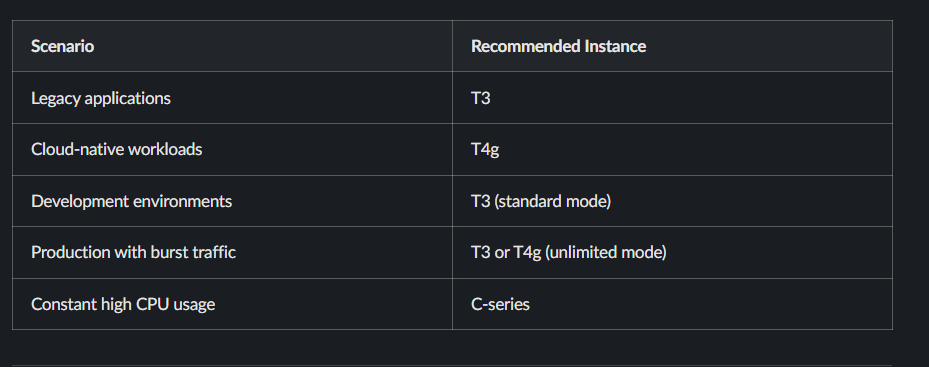
Should You Migrate from T2
You should migrate if:
- Your application experiences CPU throttling
- Your workload includes traffic spikes
- You want better cost efficiency
- You are modernizing your infrastructure
T2 instances are no longer suitable for most modern workloads.
Frequently Asked Questions
What is the difference between T2, T3, and T4g
T3 improves performance and introduces unlimited mode, while T4g uses ARM-based processors for better efficiency and lower cost.
Is T3 better than T2
Yes, T3 provides better performance, flexibility, and cost efficiency.
Should I use T4g instead of T3
If your application supports ARM architecture, T4g is the most cost-effective option.
What happens when CPU credits run out
T2 instances throttle performance, while T3 and T4g continue running in unlimited mode with additional charges.
Read More on KubeBlogs
If you're exploring DevOps, Kubernetes, and cloud infrastructure, these guides will help you go deeper:
- How Kubernetes Routes Pod Traffic with a Single Egress IP
https://www.kubeblogs.com/how-civo-kubernetes-routes-pod-traffic-single-egress-ip-explained/ - GP3 vs GP2 EBS Volumes: Performance and Cost Comparison
https://www.kubeblogs.com/gp3-vs-gp2-ebs-volume-aws/ - How to Set Up a Self-Hosted GitHub Actions Runner
https://www.kubeblogs.com/self-hosted-github-actions-runner/
These articles cover Kubernetes networking, AWS storage optimization, and CI/CD infrastructure — useful when scaling beyond local development environments.
Conclusion
T2 instances are outdated and should not be used for new deployments.
T3 is the safest and most compatible option for most workloads, while T4g provides the best cost efficiency for modern cloud-native applications.
Selecting the correct instance type improves performance, reduces cost, and ensures system reliability.