Table of Contents
Why This Comparison Still Matters
In many AWS accounts we still see T2 instances running production workloads. Most of the time, this isn’t by choice. It’s usually inheritance — old templates, old AMIs, or “this is what we launched years ago”.
The issue here is: you are likely paying more money for worse performance.
How Burstable EC2 Instances Originally Worked
When AWS introduced T2 instances, burstable compute was a solid idea.
You received:
- A low baseline CPU
- CPU credits earned during idle time
- The ability to burst when needed
For small, spiky workloads, this model worked well enough at the time. T2 became the default for running applications on top of ec2 instances.
Where T2 Starts to Fall Apart
Over time, several issues became obvious.
In real environments:
- Baseline CPU performance is low
- CPU credits accumulate slowly
- Unlimited bursting costs extra
- Performance becomes unpredictable under sustained load
In most teams, this shows up as mysterious CPU throttling, even though the instance size “should” be enough.
What Changed With T3
T3 instances are not just a pricing refresh.
They are built on AWS Nitro, which fundamentally improves how compute is delivered.
The result is:
- Higher baseline CPU
- Faster CPU credit earning
- More consistent performance
- Lower cost for equivalent instance sizes
This is why AWS positions T3 as the replacement for T2.
How CPU Credits Differ Internally
CPU Credit Behavior (High Level)
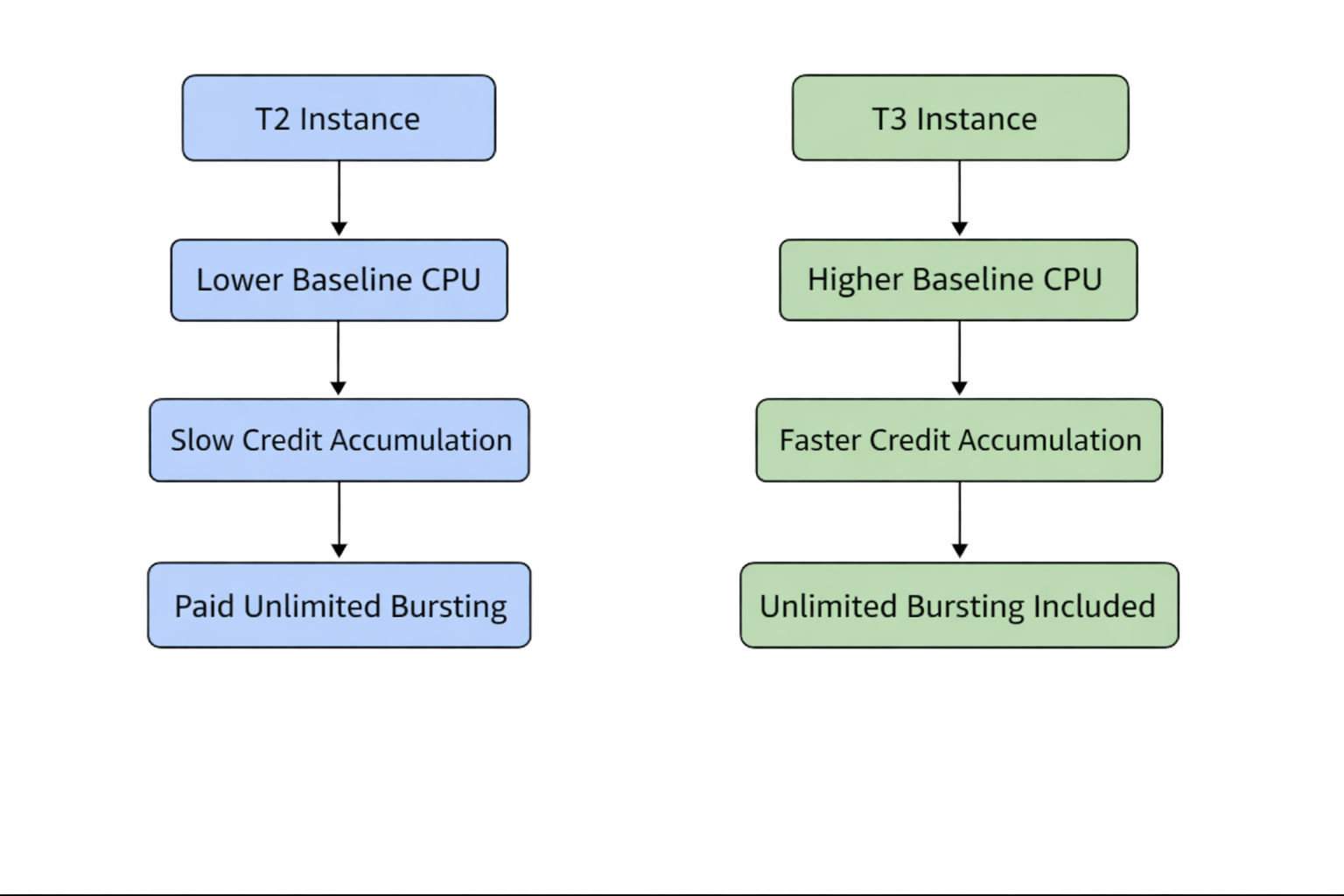
The key difference is not just bursting — it’s how quickly credits are earned and how predictable performance is once credits are spent.
Practical Cost Reality
For the same workload:
- T2 often ends up more expensive
- T3 delivers better throughput
- Unlimited bursting on T2 adds surprise costs
Once sustained CPU usage enters the picture, T2 stops being economical very quickly.
Practical Example
If you are running:
- APIs
- Background workers
- Small application servers
- Internal tooling
T3 will almost always behave better under real traffic patterns.
In practice, many teams switch to T3 and immediately notice fewer CPU-related alerts without changing instance size.
Operational Considerations
There is no special configuration required to use T3.
From an operations perspective:
- IAM remains unchanged
- Monitoring stays the same
- Autoscaling behavior improves due to more stable CPU usage
This makes T3 a low-risk upgrade in most environments.
Migration Guidance
Migrating from T2 to T3 is usually straightforward:
- Ensure your AMI supports Nitro-based instances
- Launch a T3 instance of the same size
- Observe CPU credit behavior and latency
- Roll out gradually if the workload is critical
The biggest blocker is often legacy AMIs, not application behavior.
When to Use T3 vs When Not To
Use T3 When:
- Launching new workloads
- Running general-purpose services
- Cost efficiency matters
- You want predictable burst behavior
Use T2 Only When:
- You are stuck with legacy AMIs
- Nitro is not supported
- Migration is temporarily impossible
Even then, T2 should be treated as a short-term compromise.
Conclusion
T2 instances are effectively legacy at this point.
T3 instances are cheaper, faster, and operationally simpler.
For anything new, T3 should be the default.
T2 should exist only where history forces it to.
That single decision can quietly reduce cost and eliminate an entire class of performance issues.
Recent Posts