
On this page
How We Automated GCP Billing Alerts with Airflow and Slack
A practical guide to automating GCP billing notifications using Apache Airflow, BigQuery, and Slack for daily cloud cost visibility and proactive spend monitoring.

Introduction
Staying on top of your cloud spendings saves you from disasters. For startups and fast-moving teams, not knowing what you're spending until it’s too late can blow up budgets and cause panic. We have been situations where we created services and let them running for days and ended paying thousands of dollars for nothing. We wanted to avoid that from happening ever again. So, we built a simple automation that sends daily billing updates straight to Slack, so everyone stays in the loop, and there are no surprises. Every morning we review the cloud spends so as to double check if we are on the right track.
We have implemented the daily billing alerts for both AWS in GCP. AWS was comparatively easier and straightforward to do. GCP was not so straightforward and so we decided to write a blog to make it easier for all of you.
Automating GCP billing alerts using Apache Airflow, BigQuery, and Slack for proactive cloud cost monitoring.
Understanding the GCP Billing Model
Google Cloud Platform (GCP) offers a powerful ecosystem of services, but unfortunately they don’t offer a direct billing API that provides you a clean breakup of cost incurred so far this month.
GCP structures billing around:
- Projects: Organizational units where services are deployed.
- Services: Products used (e.g., BigQuery, Compute Engine).
- SKUs: Granular billing units, representing specific resource consumption.
Monitoring this daily is crucial for teams. It enables spotting anomalies early, evaluating cost-saving measures, and avoiding billing surprises at the end of the month.
Why We Built This GCP Billing Automation
We faced an incident where we tested out a bunch of services from GCP and forgot to delete them. We ended up getting a huge bill for something we didn’t even use. We had to spend a lot of time to get refunds from Google (Thankfully they were kind enough to do it though).
We had built a similar automation on AWS earlier that was too simple to build because of the Monthly usage API offered by AWS.
So once we burned fingers - we decided that this should never happen again to us or our customers and we started exploring options on GCP. Our vision: Build a system that tracks GCP spend daily, calculates taxes (like GST), and notifies the team through Slack, our primary collaboration tool.
The Role of the Automation
Our solution does three things, reliably and on schedule:
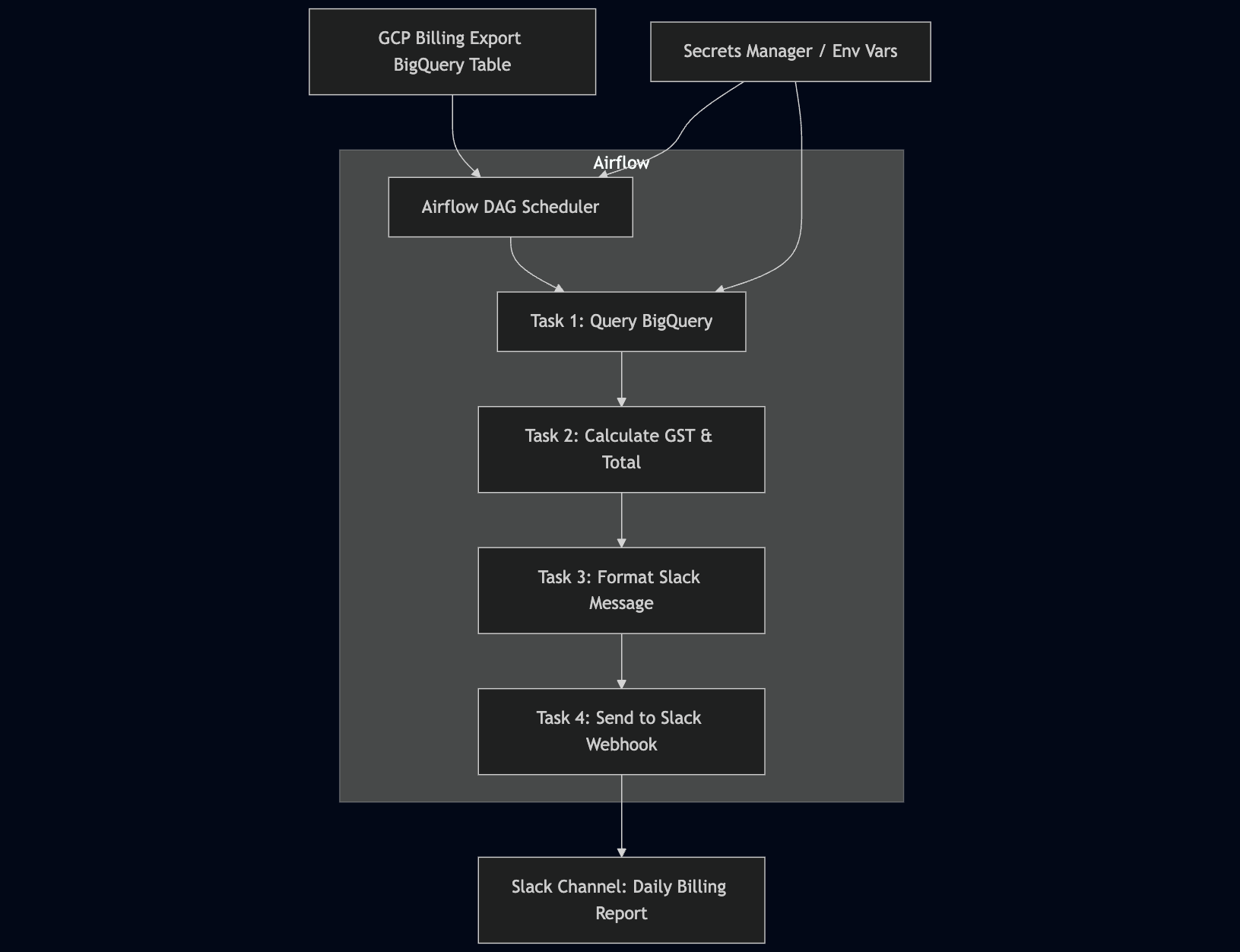
- Extracts daily billing data from GCP’s BigQuery billing export, broken down by service.
- Computes the total cost and applicable GST, creating a daily snapshot of spend.
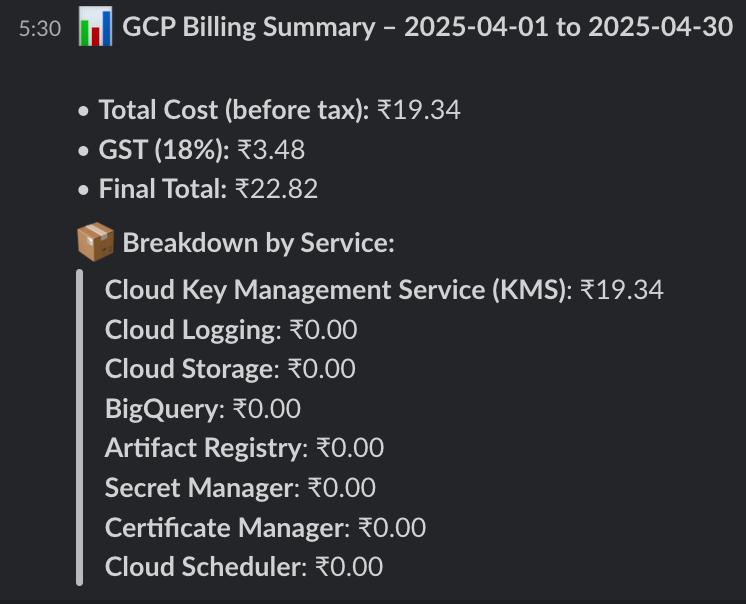
- Formats and sends a report to Slack, so that the DevOps and Finance teams stay informed without needing to log in anywhere.
It runs every morning. Everyone gets a simple, readable update. No guesswork.
BigQuery Isn’t Scary: How We Simplified Billing Queries
Many developers avoid BigQuery due to pricing concerns or perceived complexity. But billing queries are relatively lightweight when written correctly.
Here’s how we make it work:
- Use TIMESTAMP_TRUNC to limit the query to daily slices.
- Filter only required fields like service.description, project.id, and cost.
- Avoid wildcards or unbounded time ranges.
Billing Export Fields Used:
- service.description: Name of the service (e.g., Compute Engine)
- cost: Cost for that row in USD
- usage_start_time: When the usage started
Example Query:
SELECT
            service.description AS service,
            ROUND(SUM(cost), 2) AS cost
        FROM `{PROJECT_ID}.{DATASET}.{TABLE}`
        WHERE usage_start_time >= TIMESTAMP_TRUNC(CURRENT_TIMESTAMP(), MONTH)
        GROUP BY service
        ORDER BY cost DESC
Building the App: Our Stack
We used:
- Apache Airflow: Orchestrates the daily workflow
- Python: Executes the BigQuery query and formats results
- BigQuery: Data source for billing info
- Slack Webhooks: Sends formatted messages
Secrets Management
Service account credentials are securely stored in Airflow connections or environment variables. Slack Webhook URLs are encrypted and kept outside the codebase.
Airflow Workflow
- Task 1: Query BigQuery and fetch billing data
- Task 2: Calculate total and apply GST
- Task 3: Format message using blocks and send to Slack
XComs are used to pass the intermediate data between tasks.
Slack Message Example
Results and Benefits
Since implementing this automation:
- Manual checks dropped to zero. The bot keeps everyone informed, we never had to manually check the bills again.
- Improved accountability. Teams see their impact.
- Early Anomaly Detections: Teams can quickly detect anomalies based on billing.
FAQ
Why automate GCP billing notifications?
Automating GCP billing notifications helps teams detect unexpected cloud spending early, improve visibility, and avoid costly billing surprises before the end of the month.
Why use Apache Airflow for billing automation?
Apache Airflow makes it easier to schedule billing workflows, query BigQuery data, process cloud costs, and send automated Slack notifications reliably.
How does GCP billing data get collected?
GCP billing data is exported to BigQuery, where billing records can be queried and aggregated by services, projects, and usage timelines.
Why send billing alerts to Slack?
Slack notifications provide daily visibility into cloud spend for engineering and finance teams without requiring manual checks inside the Google Cloud Console.
Is BigQuery expensive for billing analysis?
Billing queries are usually lightweight when optimized correctly using filters, limited time ranges, and selective fields, making BigQuery cost-effective for billing automation workflows.
Conclusion
Even small teams can gain real-time observability without investing in expensive tools. Our lightweight automation gives daily clarity, early warnings, and peace of mind, all using native GCP services and open-source tools.
Want to try it out or customize it for your stack? We’re happy to share more, reach out KubeNine if you'd like to collaborate or get a template.
Read More
- How We Use Airflow to Optimize Our DevOps Workflow
https://www.kubeblogs.com/how-we-use-airflow-to-optimize-our-devops-workflow/ - Why Your CloudWatch Bill Is So High (And How to Fix It)
https://www.kubeblogs.com/why-your-cloudwatch-bill-is-so-high-and-how-to-fix-it/ - A Simple Framework to Help You Rightsize Your Cloud Resources
https://www.kubeblogs.com/a-simple-framework-to-help-you-rightsize-your-cloud-resources/